Checkbox Receipts Import
This service pulls fiscal receipts from Checkbox and turns them into accounting documents. Until it runs, the sales exist in the fiscal service but not in the system — no revenue, no stock written off.
Where to find it: Modules → Checkbox → Maintenances → Checkbox Receipts Import
A worked example
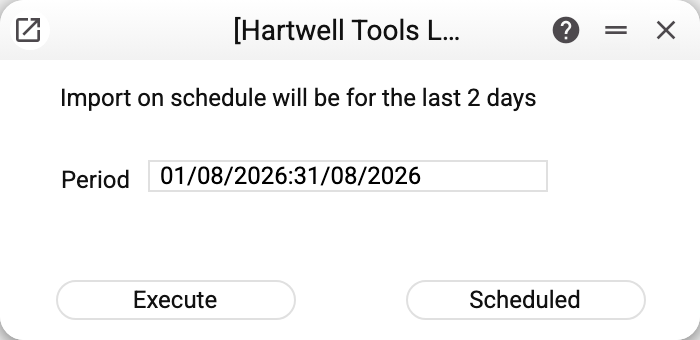
A short window: a period, "Execute" for a one-off import over that period, and "Scheduled" to put it on automatic.
The line at the top — "Import on schedule will be for the last 2 days" — is how it works: every scheduled run takes the receipts of the day before yesterday, yesterday and today, and ignores the period in the window. The period is for manual runs, when something older has to be picked up.
What the import does
For every receipt not yet loaded the system creates two records:
- a fiscal receipt — with its fiscal details and the receipt total; its rows hold the item, quantity, price and the amount before discount (the discount is on the invoice);
- an invoice — the accounting document. When every item of the receipt is in the item register, the invoice is created posted: stock is written off and the ledger entries appear at once — the same as the "Vchasno.Kasa Receipts Import" service does. When an item is missing from the register, posting is refused, or an approval rule holds the posting, the invoice stays a draft, and the service summary names its number and the reason. The import records a return receipt as a negative invoice — quantities, amounts and payment are negative, the same way the Vchasno.Kasa receipts import does it — and posts it by the same rule as a sale: the goods go back to stock and the revenue goes down. Only two cases stay drafts to be sorted out by hand: a receipt where the return flag of at least one item does not match the receipt type, and a return with a discount; the service summary names the draft's number and the reason.
The till is recognised by the fiscal number held on the Checkbox account, and the same row supplies the POS payment mode, which decides the accounts cash and card takings land on. The till is looked up by its number only the first time: what is found is written into the row's "Cashbox id" column, and from then on the import takes the till by that id and does not read the number.
Two receipt types are picked up: sale and return — only with the DONE status and only those whose first payment is cash or cashless (card). The service skips other receipts silently: the summary has no line about them.
Period bounds of a manual run
The period covers whole days in the base's time zone: from midnight of the first day to midnight after the last, so night receipts of the first day are picked up too. Receipts already loaded are not created again.
Running it again breaks nothing
Before creating anything the service checks the fiscal ids of receipts already loaded and skips them. Overlapping ranges are therefore safe: running a whole week after the daily import has already worked is harmless.
Typical situations
No receipts appeared. Read the service summary first: it says how many receipts were imported and names the skipped tills and accounts — "no cashier could log in", "no open cashier with a login and password — receipts are not imported", "no open cash register with a fiscal number — receipts are not imported", "payment mode … not found — the cash register is skipped", "user … of the sale point is not found — the cash register is skipped" (the "Sale point" field of the till's POS payment mode holds a user who no longer exists), "Checkbox has no cash register with this fiscal number — the cash register is skipped" (a new till whose "Cashbox id" is still empty, and the number has a typo or belongs to another Checkbox account: fix the number or mark the till row "Closed"). If there is no open Checkbox account at all, the summary says so: "There is no open Checkbox account — receipts are not imported". If there are no such lines but there are fewer receipts than in Checkbox: the till row on the account is marked "Closed" or has no fiscal number; the receipt does not have the DONE status or was paid neither in cash nor by card; it is a night receipt of the first day of a manual period (see above).
The service stopped with an error and nothing was loaded. The whole run is one operation: an unexpected error cancels the receipts of every account and till in that run, and the scheduled run keeps failing every time until the cause is removed. Most often the cause is Checkbox not answering: a request that gets no answer for 60 seconds (or takes over 5 minutes) is cut off, and the run is cancelled too; try again later.
The till's fiscal number was changed, but receipts still come from the old one. "Cashbox id" is not reset when the number changes, and it cannot be cleared in the row: the import keeps pulling the old till's receipts and books the payments by this row's payment mode. Add a new till as a separate row and mark the old row "Closed".
"Invoice 501 is left as a draft: the receipt items are not in the item register: 4820001234567" — in the service summary. The sale is loaded, but the item code from Checkbox was not found among the items: add the item (or fix the code at the till), correct the invoice row and post it. Instead of codes there may be the text of a posting refusal: remove its cause and post the invoice. The reason "an approval rule holds the posting" means the invoice falls under an approval rule: the approval request has been sent or rejected.
"Receipt … is not imported: …" — in the service summary. The invoice and the fiscal receipt are created together, and for this receipt not even a draft of the invoice could be saved — for example, the user in the "Sale point" field of the POS payment mode has no "Client by default" (without it the invoice has no customer) or it names a client that is no longer among the contacts ("Customer '…' is not found"); the text after the colon gives the exact reason. Only this receipt is skipped; the other receipts of the run are imported. Fix the card or the reference data and run the service again: the skipped receipt is picked up, and receipts imported earlier are not created a second time.
An older period is needed. Enter it by hand and press "Execute" — the schedule only looks two days back.
Where to look next
- Checkbox accounts — tills, cashiers and the connection.
- Fiscal receipts — what actually loaded.
- Vchasno.Kasa receipts import — the same for the other service.