Returns From Customer
The customer brought the goods back. A return from customer puts them on the location and opens the way to refunding the money.
Where to find it: Modules → Stock → Registers → Returns From Customer
Like a return to vendor, it does not deal with money itself. Its business is the goods: how many units came back, to which location and at what cost. The customer's debt is reduced by the credit note raised on the basis of the return.
The cost comes back exactly as it left. That matters for profit: if a return put the goods on stock at the selling price, every such operation would hand the company a margin that never existed.
The document lives in the Stock module. It is created from the shipment card — that is how both the lines and the links to the order come across.
What approval does
- increases the balance on the location from the header;
- puts the goods on the location as a new batch — at the cost they left with in the shipment; if the shipment line took the goods from several batches at different prices, at the average price of that line. An item with the «Set» box ticked on its card comes onto the location as its components, not as one item;
- posts a transaction between the stock account and the cost-of-sales account (the customer's debt is not touched — see below);
- corrects the sales order — reduces the delivered quantity, and with the matching choice in the switch, the ordered quantity as well;
- recounts «Return. Qty» on the shipment lines — the next return from that shipment offers only what has not come back yet.
A worked example
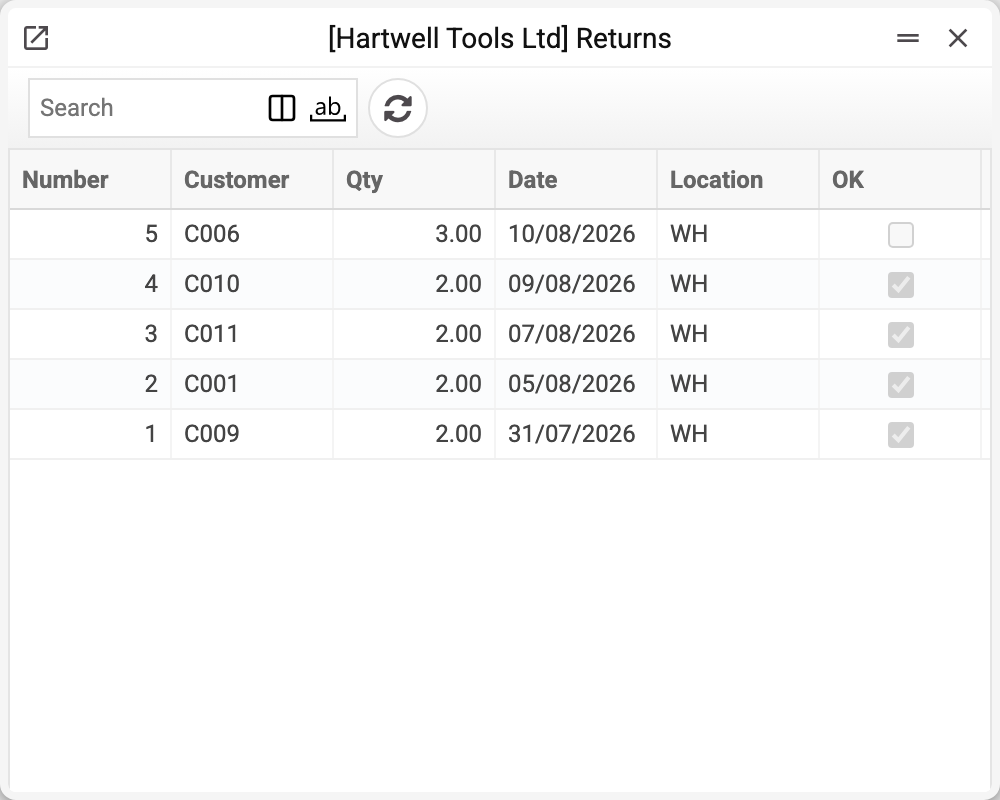
The journal shows the number, customer, quantity, date, location and approval. No. 5 is not approved yet — it will change the stock only when posted. We will take No. 2 of 05/08/2026.
The customer returned two power supply units from a shipment.
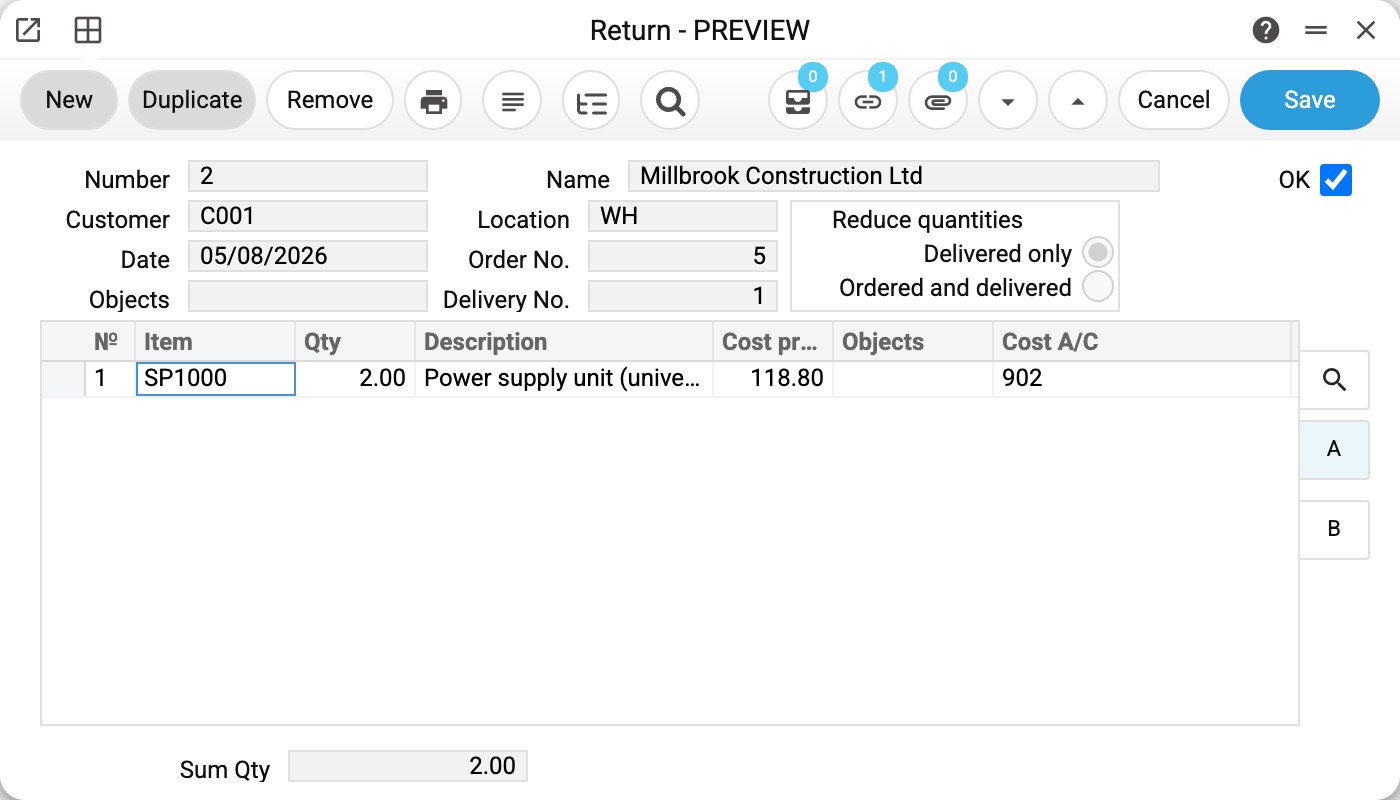
In the header:
- «Customer» and «Name» — who returned the goods;
- «Location» WH — where they are put. Not necessarily the location they were shipped from: a return can be taken onto a separate storage place if the goods need checking;
- «Delivery No.» and «Order No.» — where the goods went out from and against which order. The order itself is corrected not through these fields but through the link of each line to its shipment line, which the line gets when the return is created from the shipment;
- «Date» 05/08/2026 — the day the goods count on the location again.
The «Reduce quantities» switch
- «Delivered only» — only the delivered quantity goes down. The order keeps its original quantity, which means the customer has not given the goods up and is waiting for a replacement;
- «Ordered and delivered» — the ordered quantity goes down too. The deal shrinks and there will be no second shipment.
The choice here answers the question «do we still owe the customer these goods?». Whether the order counts as fulfilled depends on it.
Lines
- «Item», «Qty», «Description» — what came back and how much;
- «Cost price» — the cost of the whole line: two units at 59.40 make 118.80. It is the same value the goods left with in the shipment. The column is visible only to users whose role has the «Show cost price» task;
- «Cost A/C» — the cost account the value comes back from onto the location: the transaction credits it.
At the bottom — «Sum Qty».
What the document posts
A return is the mirror of a shipment. The shipment moved the cost of the goods into expenses; the return brings it back onto the location: the stock account is debited, the cost account is credited.
| Dr | Cr | Amount | For what |
|---|---|---|---|
| 201 | 902 | 118.80 | two power supply units |
Note what the transaction does not contain: the customer's debt. The return deals with the goods only, and once it is approved the customer still owes money on paper for what they have already brought back. That debt is removed by the credit note raised on the basis of the return.
There are as many rows as there are batches returned; positions with zero cost produce no transaction rows.
The return posts only if the «Returns From Customer» box is ticked on the «Logistics» tab of the «Records from Subsystems» setting; without it the document is approved with no transaction and no warning. Unapproving always removes the transaction, even if the box has been cleared since.
Where the accounts come from
Neither account is stored in the return in advance — both are resolved at the moment of approval, and each follows its own chain.
The stock account (201 «Raw materials and supplies» here) is looked up as: item card → item group → location card → general settings. So the goods come back onto the same account they left from, provided the settings have not been changed since and the return is taken onto the same location. A return taken onto another location goes to that location's account, unless the item or its group has an account of its own.
The cost account (902 «Cost of goods sold» here) is found differently: first the «Cost A/C» column in the document line, which is filled in when the return is created from a shipment; if that is empty, the item card is asked, then its group, and only then the general cost-of-sales account from the settings.
The last step of both chains lives in the «Account Usage» setting: the stock account on the «Stock» tab, field «Cost Items Acc.»; the cost account on the «Sales» tab, field «Cost Account».
Because of this, two positions in one return can go to different cost accounts. The account in the line cannot be changed by hand: it comes from the shipment line and is set again on approval. So the same item comes back onto different cost accounts only if they differed in its shipments.
How to work with it
1. Create it from the shipment
The shipment card → «Create a customer return» in the menu. The shipment must be approved, otherwise "You need to confirm document!".
The return is saved straight away as a draft dated today. The lines come across from the shipment — with the quantity not yet returned by approved returns; if there is nothing left to return, you get "There are no items that can be returned". The position of the «Reduce quantities» switch comes from the «Return Items Setting».
2. Keep only what came back
Set the quantity to what the customer actually brought; delete the lines for goods that did not come back. An item that was not in the shipment cannot be saved: "This returned item does not match any shipped items!". Each item goes on one line, and the quantity must be above zero. A row filled from another shipment does not pass approval: "The row was filled from another shipment: enter the items again from shipment …".
3. Choose the reduction condition
Is the customer waiting for a replacement or giving the goods up — see above.
4. Approve
If you changed the lines, save the document first, then OK and save again; ticking OK in the same save as the line changes gives "Save the document before approval!". The goods are on the location, the transaction is posted, the order is corrected.
Together with other approved returns from the same shipment you cannot return more than was shipped: "You cannot return more than shipped!".
5. Refund the money
«Create credit note» in the return card's menu raises a credit note to the customer on the basis of the return — as a draft. Only from an approved return: from a draft you get "Return from customer is not approved! Approve the return from customer, then create the credit note from it" (until 29.10.2026 the credit note was built from a draft too). The credit note is built from the approved invoice for this shipment; if there is none — "The invoice is not attached to the shipment, create a credit report from the invoice!". One return — one credit note: repeating the command gives "Credit invoice already created!".
The customer's debt goes down once the credit note is approved (OK); until then you have the goods, and on paper the customer owes the same amount as before. If "Create Credit Note when OKing Returned Items" is ticked in the Sales Orders Setting, the draft credit note appears by itself when the return is approved — provided the shipment already has an approved invoice.
How to be sure the document is right
- The shipment in the header is the one the goods went out on. Without it the return can only be written once as a draft: the next save and the approval ask for "Delivery No.", and the approval also needs the shipment to be approved ("Shipment not approved!").
- The quantity equals what was actually brought back.
- The location is where the goods were really put. If the return goes to quarantine or for checking, name that storage place, otherwise it goes back on sale as ordinary stock.
- The switch answers the replacement question.
- The credit note has been created and approved — otherwise the customer still owes money for goods already returned.
Unapproving and deleting
In an approved return only «Comment» can be changed. To fix anything else, OK is removed — the role needs two tasks for that: «Can remove OK» and «Can unconfirm Return From Customer» (or the general «Can unconfirm stock documents»), see How to reopen a document for editing. Unapproving takes the goods off the location, removes the transaction and gives the order back its previous quantities.
OK cannot be removed if:
- an approved credit note was created from the return — "There are approved credit notes created from this return!"; unapprove the credit note first;
- the returned goods have already moved on — "Items on the return list have already been shipped, moved, or written off!".
Only a draft can be deleted: "Can't delete confirmed return!".
Print variables
Values available in this document's printed form templates. How to write a variable in a template — see Print Forms.
Header fields:
| Variable | What it holds |
|---|---|
| RetC_Ok | OK |
| RetC_No | Number |
| Contact_Code | Customer (code) |
| Contact_Name | Customer (name) |
| Loc_Code | Location (code) |
| Loc_Name | Location (name) |
| RetC_Cust_Name | Name |
| RetC_Date | Date |
| RetC_Order_Nr | Order No. |
| RetC_Objects | Objects |
| RetC_Devider_No | Delivery No. |
| RetC_Sum_Qty | Sum Qty |
| RetC_Upd_Stock | Update stock (no such field on the form; «No» in new documents) |
| RetC_Type | Reduce quantities |
Row fields:
| Variable | What it holds |
|---|---|
| No | Row position number |
| Item_Code | Item |
| Qty | Qty |
| Spec | Description |
| Serial_No | Serial No. |
| CostPrice | Cost price |
| Objects | Objects |
| CostAcc | Cost A/C |
The records the document refers to through its form fields (location, customer, currency…) also expose the rest of their variables — code and name are already listed in the tables above, the rest is described in the register's article:
- Customer — Contacts
- Location — Locations (
Loc_*) - Company details — name, addresses, bank accounts, officers, the printing user: Main Company
Common situations
The customer returned goods they never bought from you. Check the shipment: they may have gone out on a different document. A return is created only from a shipment: a new document cannot be created in the register on its own, and the return will not take an item that was not in the shipment. Find the shipment the goods went out on and create the return from it.
The goods came back damaged. Taking them onto the location and then writing them off are two separate operations, and both are needed: first the goods return to the books, then they go to expenses. Otherwise there is no telling where the loss came from. If the write-off took the returned batch itself, the return can no longer be unapproved.
Part of the return is accepted, part is not. Only the accepted quantity goes into the document. The rest is settled with the customer separately.
A return of serial-tracked goods. The serial number fills itself into the line from the shipment line and cannot be changed by hand, so the numbers that went out are the ones that come back. If the same item sits on several lines of the shipment (say, several units with individual numbers), a return from that shipment will not be created — contact support.
Field reference
Header
| Field | Description |
|---|---|
| Number | Document number, assigned automatically |
| Customer, Name | The counterparty and its name |
| Date | The day the goods return to the location |
| Location | The storage place the return is taken onto |
| Order No. | The sales order the sale ran on |
| Delivery No. | The shipment the goods came back from |
| Reduce quantities | What to reduce on the order: delivered only, or ordered and delivered |
| Objects | Analytical objects of the document |
| OK | Approval: puts the goods on the balance and posts the transaction |
| Comment | A note; in an approved document the only field that can be changed |
Item lines
| Field | Description |
|---|---|
| Item, Description | The position and its name |
| Qty | How many units came back |
| Cost price | Cost of the whole line; visible with the «Show cost price» task |
| Cost A/C | The cost account the transaction credits |
| Serial No. | Serial number of a unit or a batch; comes from the shipment line |
| Objects | Analytics of the line |
Document totals
| Field | Description |
|---|---|
| Sum Qty | How many units came back in total |