Contacts Setting
One small setting with large consequences: whether every new contact gets its own analytical object. An object is the dimension profit is later broken down by — customers, business lines, branches.
Where to find it: Modules → Sales Orders → Settings → Contacts Setting
Example walkthrough
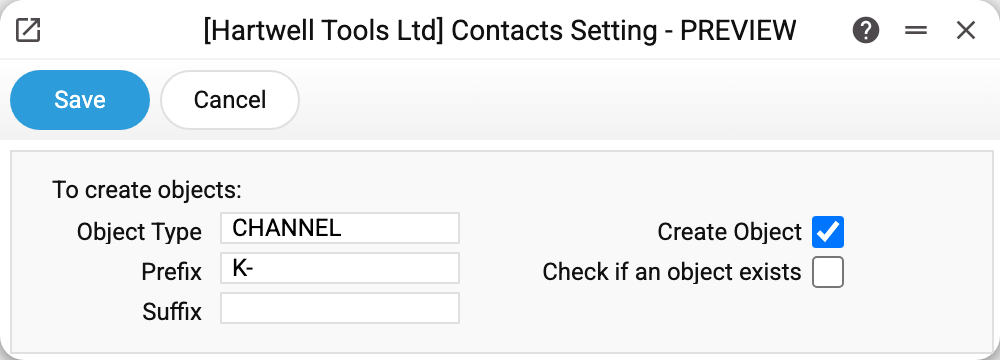
The object type (CHANNEL) and the prefix «K-» are set, and «Create object» is on. From now on, saving a new contact makes the system create an object coded «K-» plus the contact code and put it on the card: contact K0002 got the object K-K0002.
| Field | What it does |
|---|---|
| Object Type | Which object type the record is created in |
| Prefix / Suffix | How the object code is assembled: prefix + contact code + suffix |
| Create object | Create the object automatically together with the contact |
| Check if an object exists | Require the contact to have an object of the given type |
| Allow contact code as object | The contact code is accepted as an object in a transaction and in the «Object» filter of financial reports, although the objects register has no such record. A transaction will not accept a closed contact |
| Contact code as object in invoice transactions | An invoice (except cash register receipts) and a vendor invoice add their contact code to the objects of every row of their transaction; payments and cash documents do not. Without the first tick the setting will not save: «To use the contact code as an object in invoice transactions, allow the contact code as an object!» |
The last two ticks are the second way to have contacts in analytics: without a separate object per customer.
How the two ticks combine
«Create object» only — the object is created silently with the contact, if the card's «Objects» field is empty. This is the sensible way to start.
«Check if an object exists» only — the system creates nothing but refuses to save a contact without an object of the required type: «Object with type is missing CHANNEL!». A strict mode for those who maintain analytics by hand.
Both — a missing object is created on the fly, including when an existing contact is saved.
Neither — the object on the card is filled in manually only (the default on most installations).
Typical situations
No objects are created. «Create object» alone works only on a new contact and only with an empty «Objects» field; existing contacts are left alone. An empty «Object Type» does not stop creation — the object appears without a type — but «Check if an object exists» does nothing without a type.
A contact will not save because of an object. The existence check is on. Either pick an object on the «Conditions» tab, or add the «Create object» tick, or switch the check off.
Too many objects appeared. That is what happens when an object is created per contact. Analytics by customer makes sense with dozens of customers; with thousands, break profit down with the sales report and keep objects for business lines.
Existing contacts need objects too. Turn on both ticks and fill in «Object Type»: then the object is created when an existing contact is saved as well — open a contact and save it. With «Create object» alone an old contact gets no object.