List of Fixed Assets
The question this report answers: which fixed assets the company holds — with purchase cost, date and the person responsible. Not depreciation and not book value (that is the Information on depreciation of fixed assets report), but the list of the assets themselves.
Where to find it: Modules → Fixed Assets → Reports → List of Fixed Assets
A worked example
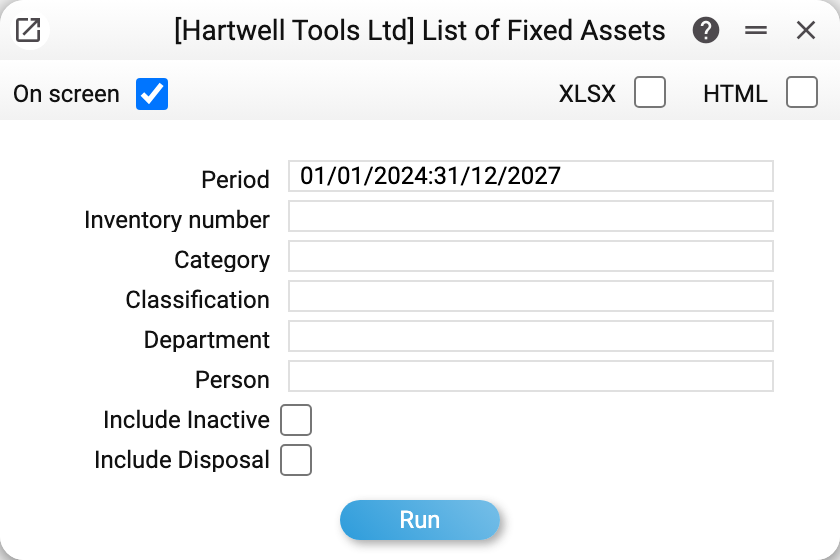
«Period» does two things here. It selects fixed assets by purchase date: only those bought between the start and the end of the period make the list. And its end is the date the report uses to judge disposals (see below). So to see everything on the books, start the period at the date of the oldest asset — 01/01/2024 in the example.
The window opens with the first record of the «Reporting Period» setting (with no periods set up — with the current month). A cleared field is filled in by the report with today's date, and then the list shows only what was bought today — so to see everything, do not clear the period, start it earlier.
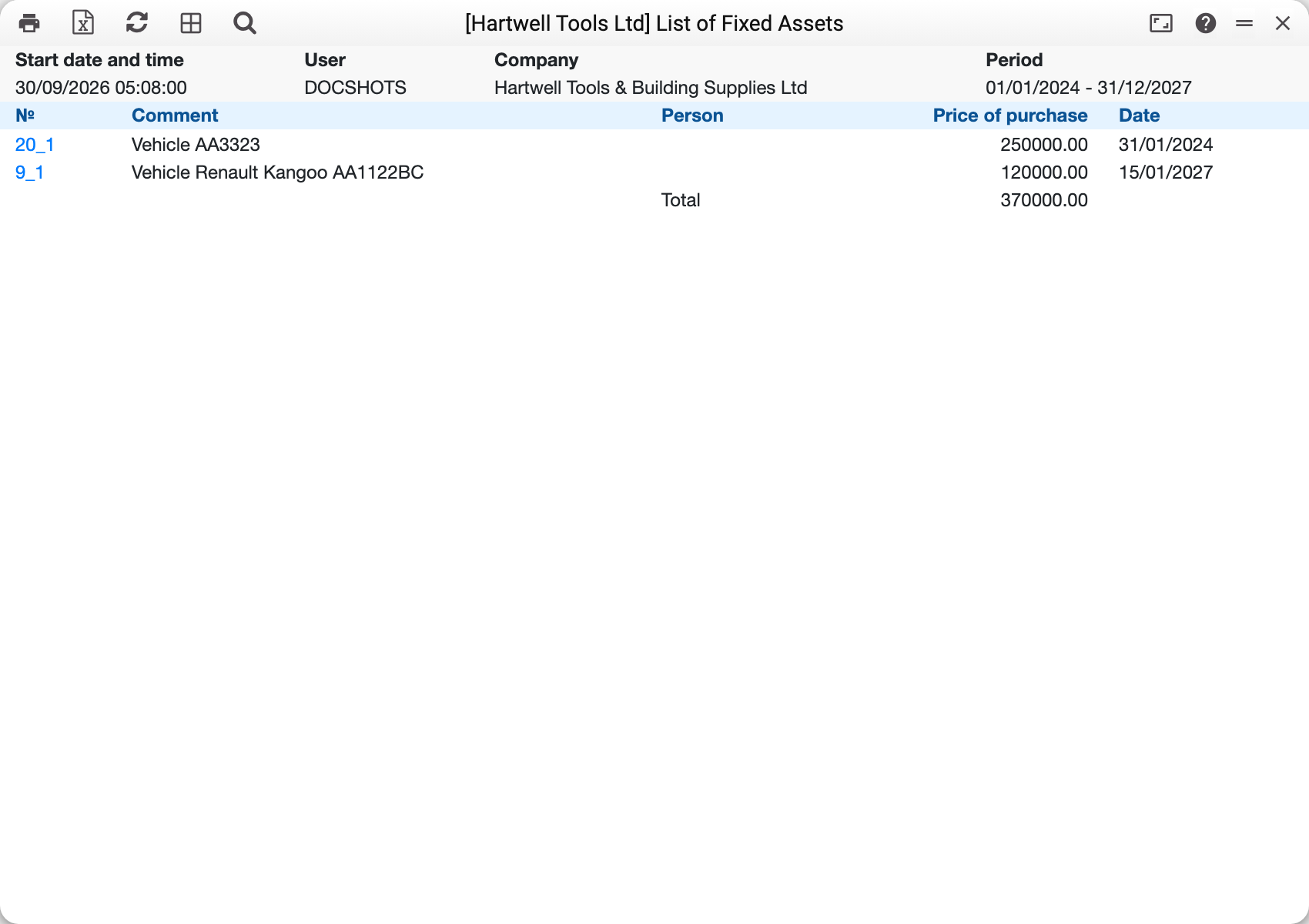
The demo company has two assets: 20_1 «Vehicle AA3323», bought on 31/01/2024 for 250,000, and 9_1 «Vehicle Renault Kangoo AA1122BC» — 15/01/2027, 120,000. «Total» 370,000. The inventory number is a link that opens the fixed asset card. The «Person» column is empty: the demo cards do not have it filled in.
The Renault already has disposal act No. 1 — a write-off after an accident — but the act is not posted, so the vehicle stays on the list.
What counts as disposed
A fixed asset drops off the list once posted disposal acts dated no later than the end of the period have taken all of its quantity — sales and write-offs together.
- An act that is not posted changes nothing: the asset stays on the list.
- A partly disposed asset (three of ten units at 100 sold) stays on the list — at the value of what remains: 7 × 100 = 700. An act dated after the end of the period does not affect such an asset either: at the period end that quantity was still on the books.
When a posted act takes the whole quantity, the fixed asset card gets the «Closed» mark by itself (unposting the act removes it). And without the «Include Inactive» box the report shows only cards that are not closed — before it even looks at disposals. Two things follow:
- to see fully disposed assets you need both boxes — «Include Disposal» and «Include Inactive»; «Include Disposal» alone will not bring them back;
- a list for a past date does not show a fully disposed asset even when the act is dated after the period end — tick «Include Inactive». The list will then also include cards closed by hand.
Columns
- «№» — inventory number;
- «Comment» — the asset name from the card;
- «Person» — the user login from the card's «Employee» field (not a name);
- «Purchase cost» — the value of the remaining quantity at the period end: the card's «Qty» minus what posted disposal acts dated no later than the period end took (sales and write-offs together), multiplied by the card's «Purchase cost (unit)». When nothing remains — a fully disposed asset or a card with no quantity — one unit is counted. The report does not show the quantity itself;
- «Date» — the card's «Purchase Date».
«Total» is the sum of the «Purchase cost» column. It is the original cost of what is on the books: the report does not take depreciation into account. One caveat: with the «Include Disposal» box, the cost of one unit of every fully disposed asset is added to the sum as well.
The result header shows the period and the filters that were filled in, but not the boxes: a printout does not tell whether disposed and closed assets were included.
How the filters work
Inventory number, category, classification, department and person must match the card field exactly. «Person» is a login: its picker lists «Users». The inventory number picker lists only assets that are not closed.
The result can go to the screen, XLSX or HTML — use the boxes at the top of the window. In XLSX the date follows the user's date format (on screen it is always DD/MM/YYYY).
Typical situations
The report is empty or older assets are missing. The period selects by purchase date: assets bought before its start are left out. Start the period earlier. Clearing the field does not help — the report reads an empty period as today.
An asset was sold but is still on the list. The disposal act is not posted or did not take the whole quantity.
A fully disposed asset is missing even with «Include Disposal». Its card was closed automatically — tick «Include Inactive» as well.
«Total» does not match the book value. It is the original cost of what remains: accumulated depreciation is not in it. For the value on a date, see Information on depreciation of fixed assets.
Where to look next
- Fixed Assets — the asset card.
- Disposal of fixed assets — the sale or write-off act.
- Journal Disposal Fixed Assets — all disposal acts for a period.
- Fixed assets report — one asset in full.