Client Aging Report Settings
A single table: the overdue bands the customer aging report uses to spread debt across its columns. This is where the company decides what counts as a "fresh" debt and what counts as an old one.
Where to find it: Modules → Sales Ledger → Settings → Client Aging Report Settings
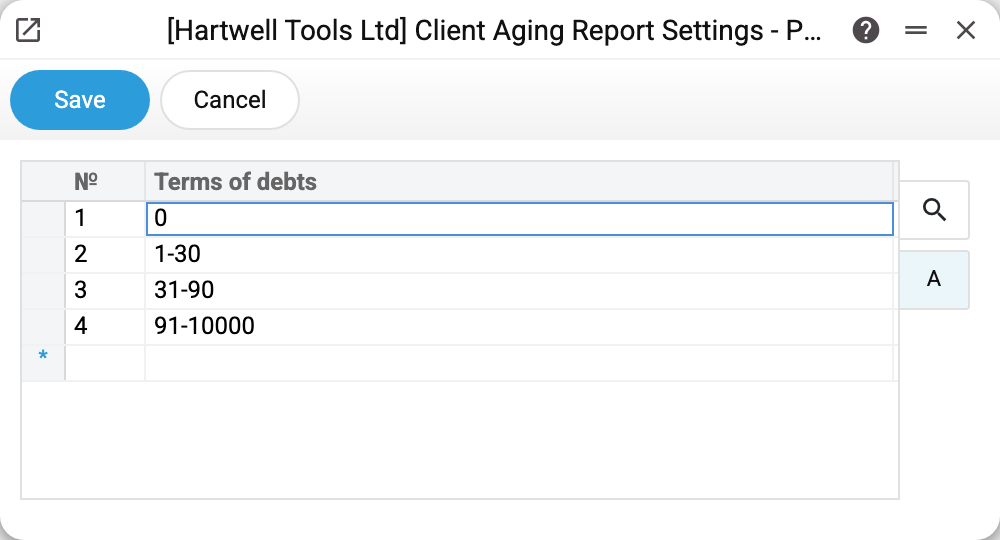
A worked example
The demo company holds four rows: 0, 1-30, 31-90, 91-10000. These become the report's columns, left to right, in row order. The row's text becomes the column heading.
They read as:
- 0 — not due yet or due today: in the report these are invoices with a zero or negative overdue count;
- 1-30 — between 1 and 30 days overdue;
- 31-90 — from a month to a quarter;
- 91-10000 — everything older. The upper bound is deliberately huge: it is how you say "and all the rest".
Adjust the bands to your own practice — for example the rows 0, 1-14, 15-45, 46-10000 if you work on two-week terms. Separate the bounds of a range with a hyphen: the report does not recognise any other sign — it reads the row 0:30 as the single number 0.
What to keep in mind
Bands must not overlap. An invoice's amount goes into EVERY band it fits: with 1-30 and 20-60, a debt 25 days old stands in both columns. The columns then add up to more than "Total", where the invoice is counted once.
The last band must be open-ended. If the oldest band stops at 90, a debt 200 days old lands in no column at all: it is there in the invoice row and in the totals, but not in the breakdown by age. Hence the habit of writing 91-10000.
An empty table — the report does not run. If the table is empty and the report's "Terms of debts" parameter is empty too, the report refuses: «Fill in the customer aging report settings». Fill in the table before the report's first run.
The setting belongs to the company. Fill it in separately for every company in the database.
Common situations
The report refuses with «Fill in the customer aging report settings». The table is empty — fill it in, or type the bands, comma-separated, straight into the report's "Terms of debts" parameter, which overrides the setting.
The columns are in the wrong order. Column order equals row order in the table, with one exception: single-number bands (0, 91) always come first, in ascending order. The rows 1-30, 31-90, 91, 0 give the columns 0, 91, 1-30, 31-90. Write a range (91-10000 instead of 91) and put 0 in the first row.
The bands changed and old reports look different. That is expected: the report stores nothing, it recalculates from the current bands every time it runs.