Projects
A project card is the folder everything about one job hangs off: hours spent, materials bought, invoices raised. It calculates nothing by itself; its value is that every document knows its project, so profitability is one report away.
Where to find it: Modules → Project Management (also in modules: Service Orders) → Registers → Projects
A worked example
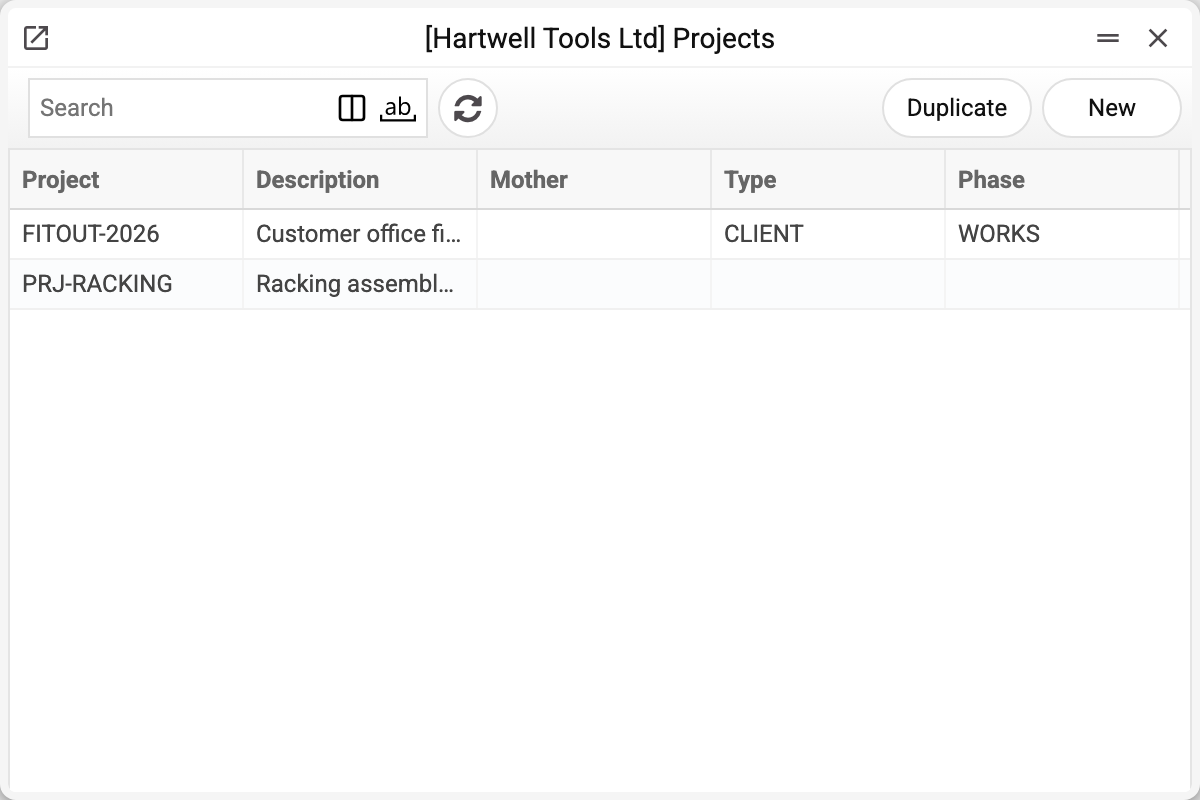
The journal shows the project code, description, «Mother» (the project this one belongs to), type and phase. We will take FITOUT-2026.
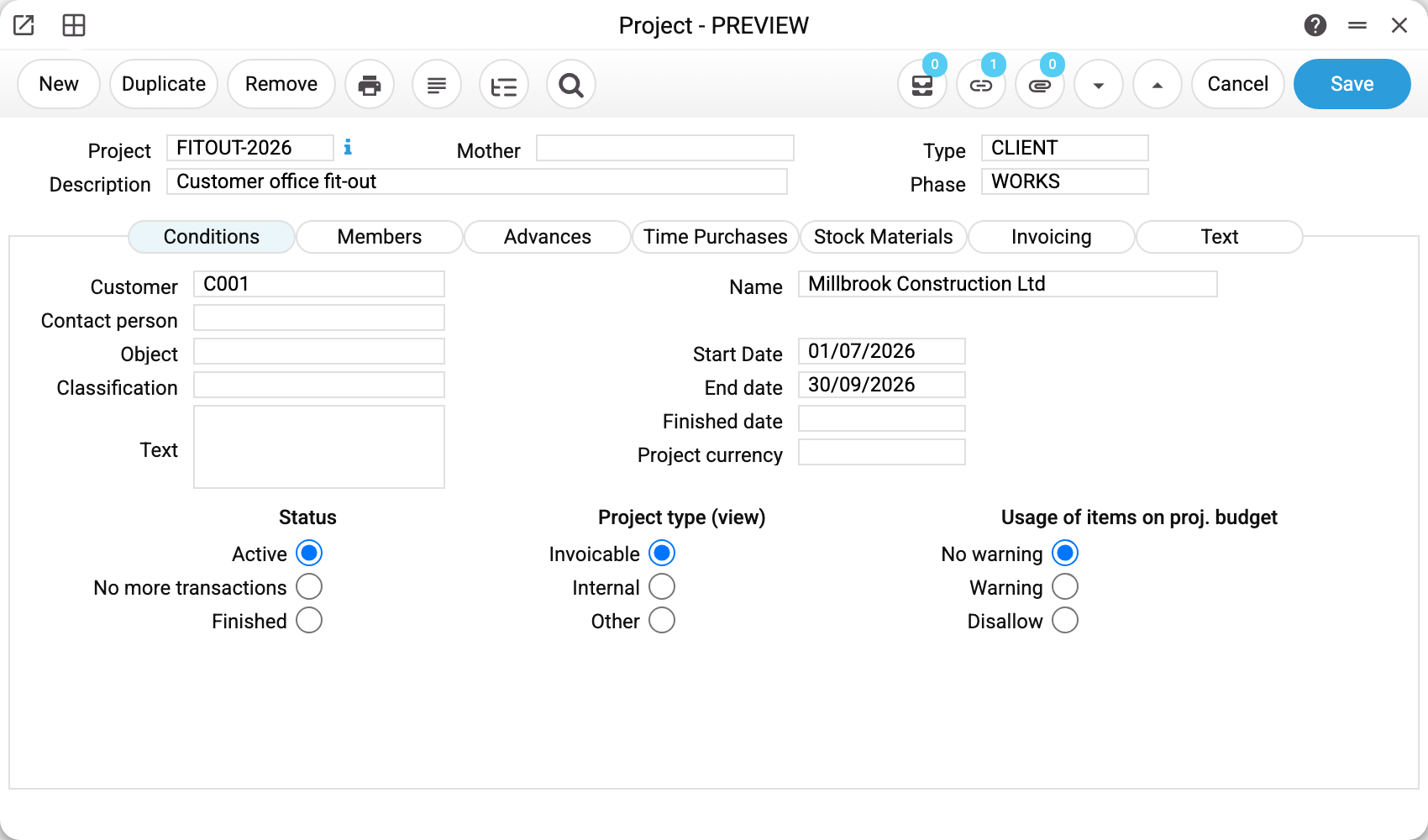
Project FITOUT-2026 "Customer office fit-out", type CLIENT, stage WORKS, customer C001, running 01/07–30/09/2026.
The three switches at the bottom carry the main decisions:
- Status: "Active" / "No more transactions" / "Finished" — a mark for people and for the project report: no document is checked against it;
- Project type: invoiceable, internal, other;
- Use of items against the budget: don't warn / warn / don't allow — for now only stored on the card: no document is checked against it (see below).
The tabs are the project's sections: Conditions, Members, Advances, Time Purchases, Stock Materials, Invoicing, Text.
Type, stage, classification
Three registers describe a project from different angles and do not replace each other:
- type (class) — what kind of project it is: client work or internal;
- stage — where it stands: preparation, works, handover;
- classification — a free label: urgent, under warranty.
Type, stage and classification are one code apiece. The card does not accept several classifications separated by commas: the code is looked up in the register as a whole, and URG,WAR is refused with «Classification 'URG,WAR' is not found!».
Typical situations
The project is done. Set the status to finished and fill in the completion date — that shows the work is closed, and the whole history stays. But it is only a mark: the project is still offered for selection, and time sheets, worksheets and invoices are still accepted for it. Keep an eye on new documents for a finished project yourself.
Work is under way but invoicing should wait. The "Date of first inv." field is only stored on the card and printed: it neither delays nor forbids invoices — when to issue the first one is up to you.
Overspend has to be blocked. This cannot be set up at the moment: the item-use switch ("Warning" / "Disallow") is saved on the card, but no document is checked against it — the system lets issues beyond the budget through.
There is more than one project leader. The card holds up to five: the main one and four more.
The project was created by mistake. A project can be deleted only while it is set nowhere: purchase orders, quotations, sales orders, invoices, contracts, service orders, worksheets and time sheets, project budgets — and only while it has no daughter projects. Otherwise the system refuses and names where it is used: "A record of «Projects» is used in: Purchase Orders!". A finished project is not deleted — set its status to finished.
Where to look next
- Project budget — the plan of work, materials and money.
- Classes, phases, classifications — the registers the card is filled from.
- Project information report — the summary for a project.
Print variables
Values available in this document's printed form templates. How to write a variable in a template — see Print Forms.
Header fields:
Main
| Variable | What it holds |
|---|---|
| Project | Project |
| Mother | Mother |
| Description1 | Description |
| ContactPersonName | Name of the contact person — by the code in the «Contact person» field |
| Type | Type |
| Phase | Phase |
| Status | Project state: active, finished or closed for transactions |
| ProjectKind | Project kind: internal, invoiceable or other |
| ItemsUsage | Project item control: warning or ban |
| Members | First and last names of the members, comma-separated (field «Members») |
| InvoiceTime | Invoice Times |
| InvoicePurchase | Invoice Purchases |
| InvoiceStockedItems | Invoice stocked items |
| InvoiceMaterials | Invoice Materials |
Conditions
| Variable | What it holds |
|---|---|
| Customer | Customer |
| CustomerName | Name |
| Classification | Classification |
| Description2 | Text on the «Conditions» tab |
| StartDate | Start Date |
| EndDate | End date |
| FinishedDate | Finished date |
| Currency | Project currency |
Members
| Variable | What it holds |
|---|---|
| Salesmen | First and last name of the salesperson (field «Salesmen») |
| SalesGroup | Sales Team |
Invoicing
| Variable | What it holds |
|---|---|
| AccNoCustomer | Acc. No. for the cust. |
| DateOfFirstInvoice | Date of first inv. |
| Language | Language |
| MaxRetention | Max retention |
| NotInvoicing | "Do not invoice" mark |
| UseWIP | "Work in progress" mark |
| TimeSheets | "Time sheets as a separate row" mark |
| PurchaseInvs | "Purchase invoices as a separate row" mark |
| ProjectCode | "Project code on invoice" mark |
| ProjectDescription | "Project description on invoice" mark |
| ProjectText | "Project text on invoice" mark |
| ProjectLeader | "Project leader on invoice" mark |
| ContactPerson | Mark from the «Put on Invoice» block: the words «Contact person» when that box is ticked, empty otherwise. The contact person's name is the ContactPersonName tag |
| PeriodOfInvoiced | "Period of invoiced transactions" mark |
| AveragePriceTime | "Average time price on invoice" mark |
| QuantityTime | "Include quantity on time" mark |
| AveragePricePurchase | "Average purchase price on invoice" mark |
| QuantityPurchase | "Include quantity on purchase" mark |
| ItemsPerDay | "Items per day" mark |
Text
| Variable | What it holds |
|---|---|
| Text | Text from the «Text» tab |
Other variables
| Variable | What it holds |
|---|---|
| Object | Name of the analytical object |
| PaymentTerms | Comment of the payment terms from the register — by the code in the «Payment Terms» field |
| Leaders | Logins of project managers 1–5, comma-separated (not names) |
Row fields:
| Variable | What it holds |
|---|---|
| MNo | Row position number |
| MType | Type |
| MPhase | Phase |
| MPlanDate | Date |
| MInvoiceNumber | Invoice No. |
| MSum | Sum |
| MEmployee | Employee |
| MComment | Comment |
| MInvoiced | Invoiced |
| MRetention | Retention percentage — the window has no such column, so it cannot be filled in the window |