Prepayments Histories
Where money received in advance went: each row is a movement on a particular customer prepayment.
Where to find it: Modules → Database Maintenance → Registers → Prepayments Histories
A worked example
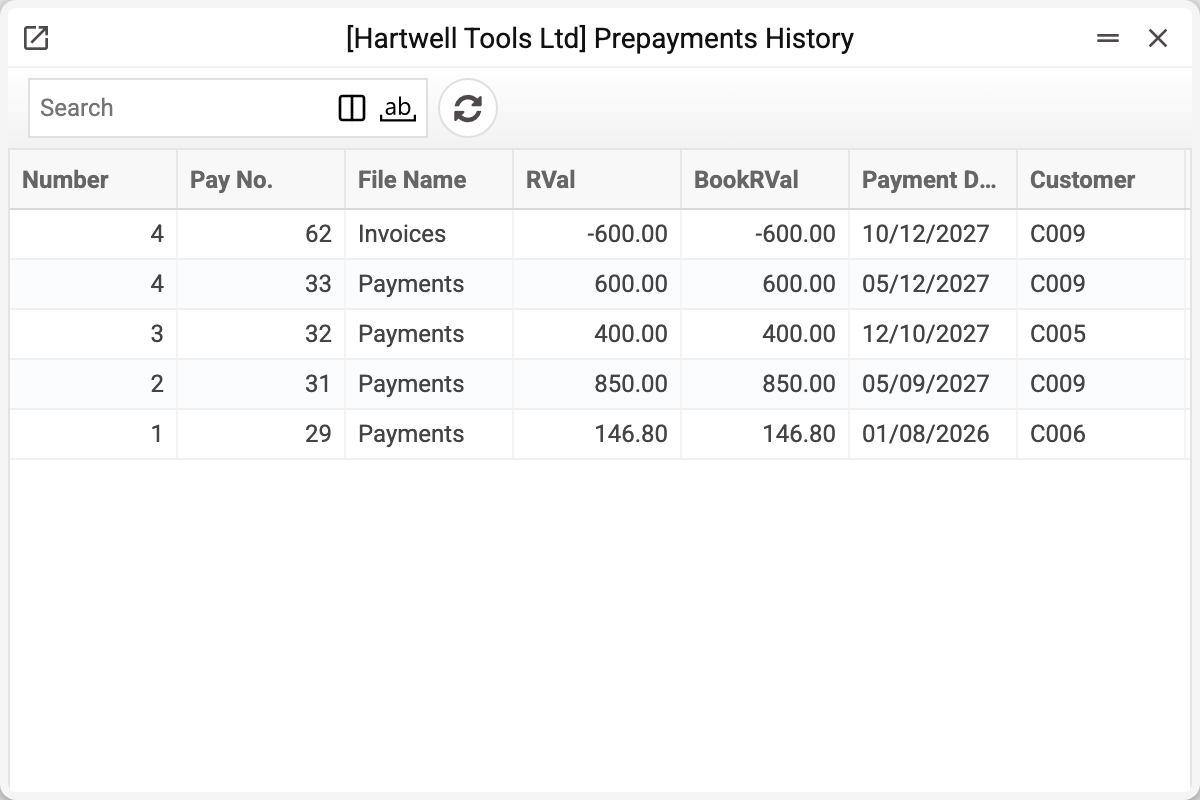
A row carries the prepayment "Number", "Pay No.", "Document", the amount of the movement ("Sum in currency" and "Sum in base currency"), the date and the customer. The key detail: the amount can be negative — a plus is money coming in, a minus is money being used (applied to an invoice) or refunded.
The "Document" column tells where the row came from:
- "Payments" — a customer payment; "Pay No." holds that payment's number;
- "Invoices" — an application in an invoice; "Pay No." then holds the invoice number, not a payment number.
So the history of one prepayment reads like a bank statement: what came in, what was spent, what remains.
Why it is needed
The open prepayments register shows only the balance — a single number. When a customer argues ("I paid 5,000, where did it go?"), a number is not enough; the movement is: it arrived, it was applied to invoice 122, this is what is left.
It also helps at reconciliation: the sum of movements on a prepayment must equal its balance (except a prepayment brought in past a payment — see below).
Typical situations
The balance is lower than the customer expects. Find the negative rows: "Invoices" — applications to invoices, "Payments" — a refund or the prepayment used by a payment.
The prepayment was refunded. A refund is a movement too: a negative row with no invoice — "Document" shows "Payments".
No receipt row, yet a prepayment exists. A prepayment that came by a payment always has a receipt row — even an unused one: the posted payment writes it straight away. No such row means the prepayment appeared outside a payment (opening balance, import): the history then holds only the applications to invoices, and the sum of movements will not match the balance.
Where to look next
- Open prepayments — the current balances.
- Vendor prepayment history — the same from the other side.