Items Receipts Currency Rate
Imported goods are ordered in one month and arrive in another, and the exchange rate moves in between. The cost price of an import depends on which rate is taken: the order's rate, the rate of the arrival day — or the rate at which the money actually left for the supplier as a prepayment.
Where to find it: Modules → Stock → Settings → Items Receipts Currency Rate
This setting answers that question once for the whole company.
A worked example
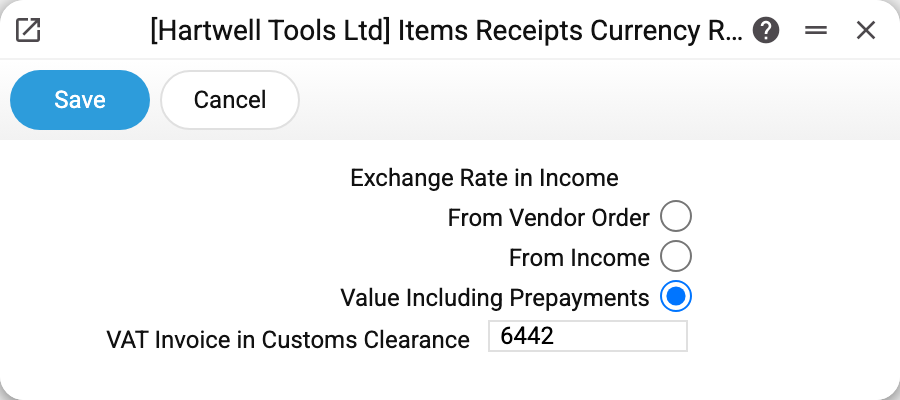
The demo company uses Value Including Prepayments, and VAT Invoice in Customs Clearance is set to 6442.
Three ways to take the rate
From Vendor Order. The rate is not recalculated: a goods receipt created from a purchase order inherits the order's rate. The cost price stays as it was planned at ordering time.
From Income. The system takes the rate from the exchange rates register as of the receipt date and recalculates the cost price of the lines. The classic option: goods are booked at the rate of the day they physically arrived.
Value Including Prepayments. The same as above, but corrected for advances. If the supplier has already been paid a prepayment against this order, the system uses the rate of that prepayment — so the cost price carries the amount actually paid. The part not covered by the advance is converted at the current rate. This is the same logic as in non-monetary accounts: an advance fixes the rate.
The setting applies equally to a receipt from an order, to customs clearance, and to a receipt created from customs clearance.
VAT Invoice in Customs Clearance
A separate field, unrelated to the rate. In customs clearance the import VAT arrives as a line of a vendor invoice on a particular account. When a received VAT invoice is created from such an invoice, the system looks for the line with exactly this account and takes its amount as VAT. Lines on account 6442 are always taken — with an empty field and also alongside the field's account when a different one is set.
Typical situations
The import cost price is not what was expected. Check which option is selected: with "From Vendor Order" the arrival-day rate is never applied.
We paid an advance, yet the cost price used the arrival rate. Then the wrong option is selected — only the third one honours the advance rate. Check as well that the prepayment is linked to the order: the system looks it up by order number.
We changed the setting and old documents did not change. They will not: the rate is frozen in the document when it is created. To change the rate in an approved document, unapprove it and save it again.
Where to look next
- Goods receipts — where the rate and the cost price are visible.
- Additional costs — customs clearance, delivery, insurance.
- Cost price difference — the report that catches divergence from the supplier's invoice.