Open Invoices
The receivables window: customer invoices that have not been paid yet. The system maintains it — rows are written by posting invoices, credit notes and payments. You cannot create a row in the window, and only a role with the action "Can change open invoices, prepayments and payment histories" can change or delete an existing one.
Where to find it: Modules → Database Maintenance → Registers → Open Invoices
A worked example
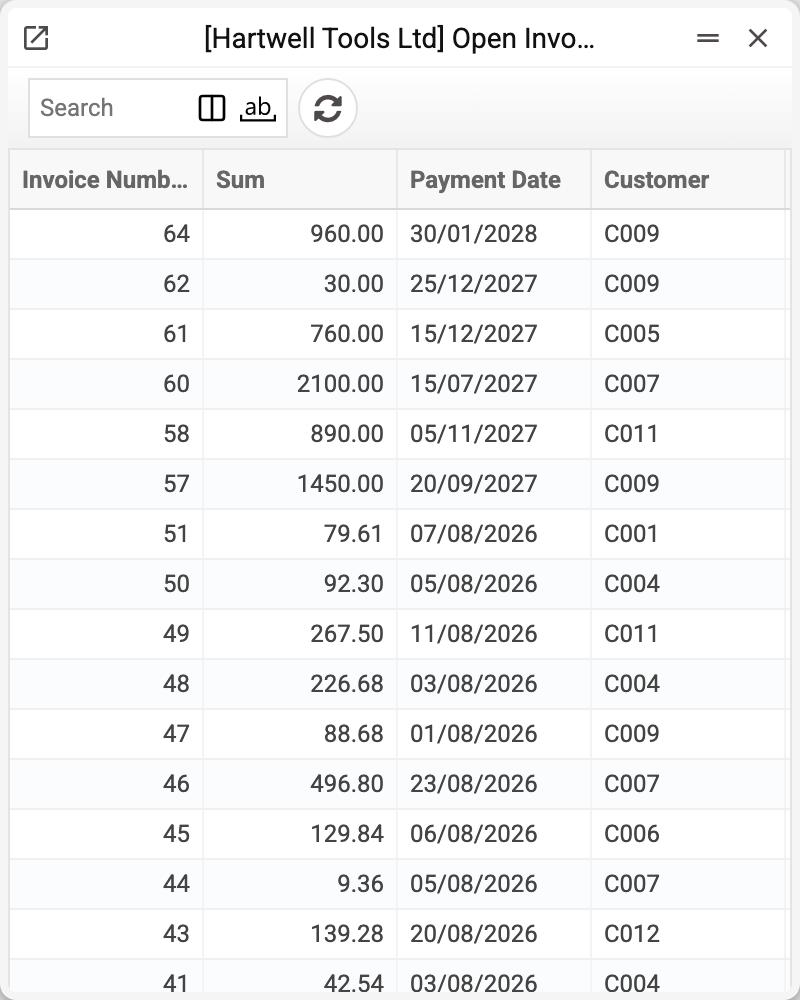
Each row is an invoice and what is left on it: number, customer, outstanding amount and due date. It is not a copy of the invoice but its debt balance: the figure shrinks with every payment.
How a row appears and disappears
- The invoice is posted — a row appears for the amount still to be received: the invoice total minus what was paid at the till at the time of sale and minus the prepayments offset in the invoice itself. If a row for this number already exists, the amount is added to it.
- The customer pays part of it — the system reduces the balance and records the event in the payment history.
- They pay the rest — the row leaves the register. The row is deleted when the balance in the invoice currency becomes exactly zero.
- The payment is reversed — the row comes back with its amount restored.
A credit note against the invoice also reduces the balance: it shrinks the row or closes it altogether, and if the row is already gone (the invoice is paid or on cash terms) it creates a row with a minus. Unposting the credit note returns its amount to the invoice's row. Unposting the invoice itself deletes the row.
There is no row at all when nothing is owed on the invoice: the payment terms are of the "Cash" type, the invoice total is zero, or the invoice was paid in full at the time of sale or by a prepayment.
So a non-empty register is the answer to "how much are we owed": no need to walk the invoices and subtract payments.
Why a separate register when invoices exist
Because the questions differ. The invoice register answers "what did we issue"; this one answers "what of it is still open". On a large database the difference is dramatic: debts run to dozens of rows, invoices to tens of thousands.
Speed is the other reason. This window is read by the "Unpaid invoices" report (without "On Date"; with a date the report recalculates the debt on that date from invoices and payments) and the "Payment calendar" report, the "Overdue on my invoices" and "Overdue receivables" tiles, the invoice list (it uses it to colour unpaid invoices), and the payment: it takes the invoice balance from here into its row and reduces it here on posting.
The "Customer Debt Report" and "Client Aging Report" do not read this window: they recompute the debt from invoices and payments. The system sends no payment reminders.
Typical situations
The invoice is paid but the row remains. Check the payment is posted: an unposted document reduces nothing.
The invoice is posted but there is no row. Check the invoice payment terms: terms of the "Cash" type create no debt. There is also no row when the invoice was paid at the till at the time of sale or fully covered by a prepayment.
The balance is larger than expected. Look at the payment history — every payment against the invoice is there.
The balance is negative. The customer paid more than they owed, or a credit note was posted against an already paid invoice: the row does not disappear but stays with a minus — now you owe the customer. A payment against an invoice that is no longer in the register will not save: the system replies that the invoice is closed or not found. To stop overpayments from posting, tick "Prohibit invoice overpayment" in "Account Usage", "Debtors" tab: a payment or credit note for more than the balance will then not post.
The list and the card show different amounts. The "Sum" column in the list is the balance in the invoice currency. In the card the "Sum" field is the same balance in the base currency, and the balance in the invoice currency is in the "Amount in Currency" field. For an invoice in the base currency the figures match.
The row vanished but no money arrived. The invoice was probably closed not by a payment but by a credit note. The row also vanishes when the invoice is unposted or when a role with the action "Can change open invoices, prepayments and payment histories" deleted it. A prepayment does not remove the row by itself: it is offset in the invoice before posting, so the row is created smaller or not at all (look in prepayments).
The customer warned they will pay later. Do not change the due date in the invoice — the invoice window menu → "Expected payment date…" and the date you expect the money. The payment calendar puts the invoice on it, while overdue days are still counted from the agreed due date (Expected payment dates).
Where to look next
- Payment history — how the balance came about.
- Open prepayments — money already received.
- Open vendor invoices — the same from the other side.