POS settings
This is the main control panel of the till: here the system learns which payment methods the till accepts, which financial accounts that money lands on, where it goes when the cash is collected, and what the cashier is allowed to change in a receipt.
Where to find it: Modules → POS → Settings → POS settings
There is one such setting per company. If you run several shops and each one settles differently, give that shop its own card — POS payment modes. A till with such a card takes its receipt payment methods from the card as a whole; only the cash in/out, fiscal device and collection account fields left empty on the card fall back to this setting.
Menu: Modules → POS → Settings → POS settings.
Worked example
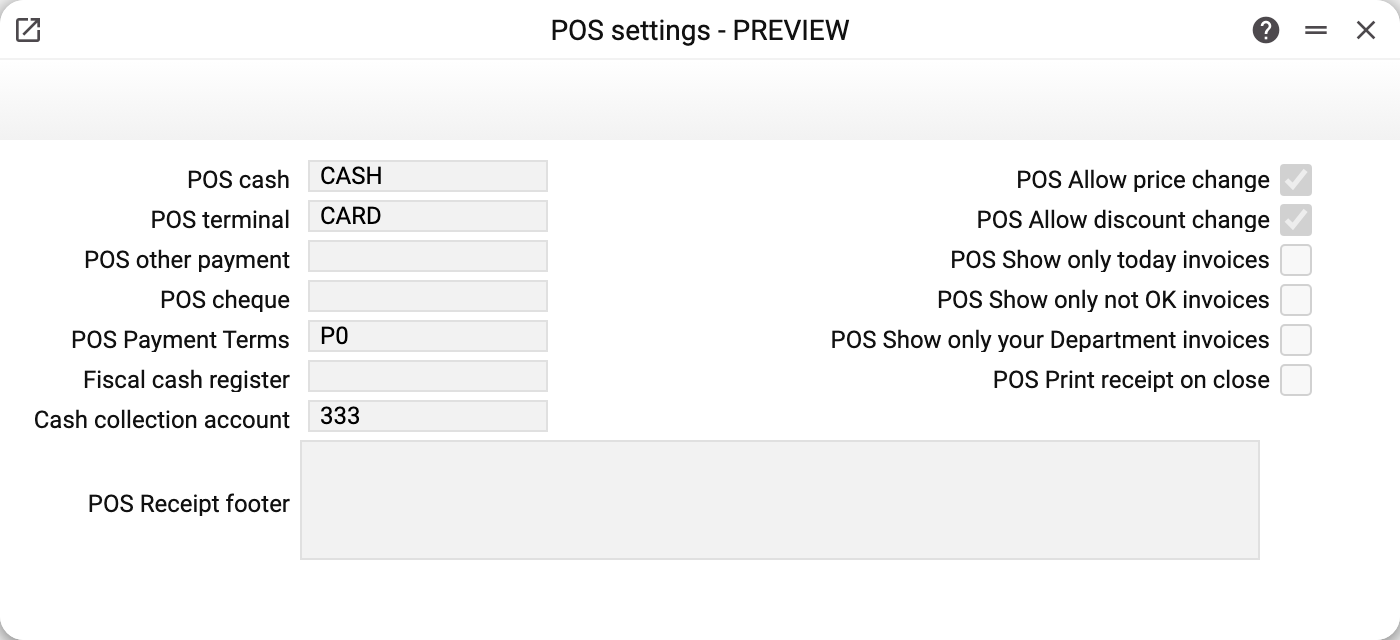
The left column is about money, the right one about what the cashier may do.
POS cash (CASH) and POS terminal (CARD) are not the words "cash" and "card" — they are payment method codes from the Payment Methods table. Each code carries a financial account with it: CASH → "Cash (GBP)" → account 301, CARD → "Card terminal" → account 311. That is why a cash sale and a card sale end up in different places of the balance sheet even though the cashier presses two neighbouring buttons.
POS other payment and POS cheque are the codes of two more non-cash methods: a third one (mobile money, for example) and payment by cheque. They are empty on the demo stand, so the till's buttons for these methods refuse: "The other payment method is not set for this till", "The cheque payment method is not set for this till". Cash and terminal refuse the same way when their field is empty.
POS Payment Terms (P0 — "Cash / card on collection") are copied into every receipt: the invoice counts as paid on the day of sale, with no deferral. Terms of the "Cash" type mean that a receipt closes only when it is paid in full. A receipt of a till whose card has empty "POS Payment Terms", and whose customer has no terms either, gets these terms together with the due date when it is closed.
Fiscal cash register is empty — the demo stand has no fiscal device connected. If you put a Vchasno.Kasa account code here, every sale made at the till is fiscalised automatically; the step-by-step guide is Vchasno.Kasa.
Cash collection account (333 — "Cash in transit in national currency") is where the banknotes go once they are handed over for collection. In the cash-collection posting this account is on the debit side and the POS cash account (301) on the credit side: the money has left the till but has not reached the bank yet.
On the right — the cashier's permissions, filters of the receipt list, and printing:
- Allow price change and Allow discount change — whether anyone at the till may edit the price and the discount in a receipt line. Switched off, only users whose role has the action "Can change price in POS" or "Can change discount in POS" may do it; for everyone else the fields are read-only at the till, and the server does not accept prices or discounts from the till. A manager with that action can still open them for one line on the spot — see "Manager approval at the till" below.
- Show only today invoices — the till's invoice list shows today's receipts only.
- Show only not OK invoices — unposted (that is, still open) receipts only.
- Show only your Department invoices — the cashier sees the receipts of their own department, not of the whole company.
- Print receipt on close — the till prints the receipt as soon as it is closed.
At the bottom, across the whole window, is the Receipt footer: the lines the printed receipt ends with (a thank-you, return terms and so on).
Manager approval at the till
When prices or discounts are closed for the cashier, a manager can approve one change right at the till, without the cashier logging out:
- The cashier opens the receipt line (F7, the "Edit item" window) and presses Manager approval — the price and discount fields open.
- The cashier types the new price or discount, the manager types their login and till PIN, and the cashier presses Edit.
- The change applies to that one line only. The line remembers which manager approved it; if the price is later changed again without approval, the mark is removed.
The till PIN is not the login password. It is set in the manager's user card — the fields "Till PIN" and "Confirm till PIN", 6 to 12 digits — and the till does not accept the login password at all: a PIN seen over the manager's shoulder opens approvals at the till, not the back office. The manager needs the same role action a cashier would need ("Can change price in POS", "Can change discount in POS") in the company the till works in.
After 5 wrong attempts a till stops accepting approvals for 15 minutes; after 20 wrong attempts for one manager, from any tills, that manager cannot approve anywhere for 15 minutes. Logging into the back office is not affected.
Where the data comes from
| Field | Source list | What the system does with it |
|---|---|---|
| POS cash, POS terminal, POS other payment, POS cheque | Payment Methods matrix (code → account) | puts the payment method into the receipt and takes the account for the posting |
| POS Payment Terms | Payment deals | calculates the due date of the receipt |
| Fiscal cash register | Vchasno.Kasa accounts (open ones only) | fiscalises receipts, shifts and cash operations |
| Cash collection account | Chart of accounts | debit side of the cash-collection posting |
The fallback rule. The system first looks for the till's own card in POS payment modes by the till login. No card — everything comes from here. With a card, receipt payment methods are taken from the card as a whole: an empty field on the card is not filled in from here, and the till's button for that method refuses. Cash in and cash out (and the cash withdrawal when a shift is closed), the fiscal device, the collection account and the payment terms of a receipt being closed are taken field by field: empty on the card means it comes from here. So this setting holds the "chain-wide rules" and the card holds "the exception for one shop".
Several terminals on one till (additional codes of a method) are set only on the till's card — there is no such table here: POS payment modes.
Parameters
| Field | Description |
|---|---|
| POS cash | Payment method code for cash settlements. It determines the cash account and the amount subject to collection. |
| POS terminal | Payment method code for card settlements. That money is considered to be in the bank already, so it is never collected. |
| POS other payment | Code of the third non-cash method (mobile money, for example). Never collected. |
| POS cheque | Code of the method for payment by cheque. Never collected. |
| POS Payment Terms | Payment terms code copied into the receipt. |
| Fiscal cash register | Vchasno.Kasa account that fiscalises this company's sales. |
| Cash collection account | Account the cash is moved to on collection. If it is empty both here and in the till card, the posting is created "into itself" (debit = credit) and moves nothing. |
| POS Allow price change | Lets anyone at the till edit the price in a receipt line. Switched off — only roles with the action "Can change price in POS", or one line with a manager's approval. |
| POS Allow discount change | Lets anyone at the till edit the discount (percent and fixed) in a receipt line. Switched off — only roles with the action "Can change discount in POS", or one line with a manager's approval. |
| POS Show only today invoices | Limits the till's receipt list to the current day. |
| POS Show only not OK invoices | Shows unposted receipts only. |
| POS Show only your Department invoices | Limits the receipt list to the cashier's department. |
| POS Print receipt on close | The till prints the receipt right after closing it. |
| POS Receipt footer | Lines at the end of the printed receipt. |
Common situations
The till refuses to take cash. An empty "POS cash" (here, or on the till's card if it has one) makes the cash button refuse at once: "The cash payment method is not set for this till". If the payment method has no account, the system does not know where to put the money and stops with "Specify the account of the payment method". The same goes for terminal, other payment and cheque.
Cash collection moves nothing. If the collection account is empty both here and in the till card, the collection document is still created but the posting reads "301 to 301" — the amount goes nowhere. Fill in the collection account.
Two shops bank with different banks. Give each till its own card in POS payment modes — it holds its own payment method codes and its own collection account.
The cashier keeps editing prices. Clear "Allow price change" and "Allow discount change": a new receipt line then gets the price-list price, a line already saved in the receipt keeps its own, and the cashier cannot override it. Give the action "Can change price in POS" to the roles that may change prices at the till (an accountant or a manager, for example) — it is the role of whoever the till works as: the cashier who logged in, or the till login.
The manager types the right PIN, but the till says "Wrong login or PIN". Check that a till PIN is set in the manager's user card: the login password does not work at the till. If the till says "Too many wrong attempts", wait 15 minutes.
See also
- POS payment modes — the same fields, but for one till
- POS Buttons — what the cashier sees on screen
- POS Cash Collection — the document that uses the collection account
- Vchasno.Kasa — fiscalising receipts