Additional Costs
Goods rarely cost exactly what the supplier's invoice says. Delivery, customs duty, insurance, broker's fees, unloading — all of it has to end up in the cost of the stock, or the margin on the sale will look better than it is.
Where to find it: Modules → Purchase Orders → Settings → Additional Costs
A purchase order and a goods receipt each have five separate columns for such costs. This setting answers one question and one only: what those columns are called. While it is empty, the documents show the featureless "Additional costs 1" … "Additional costs 5", and whoever books the receipt has no idea what goes where.
A worked example
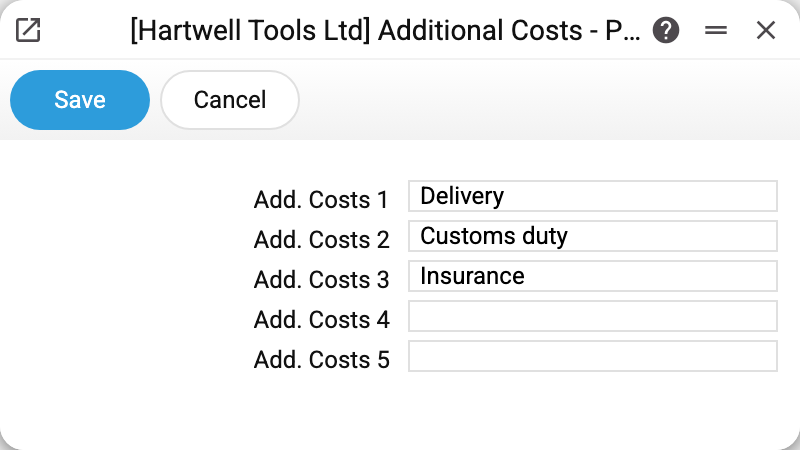
The demo company fills in three columns out of five:
| Field | Name |
|---|---|
| Add. Costs 1 | Delivery |
| Add. Costs 2 | Customs duty |
| Add. Costs 3 | Insurance |
Once saved, those words become the field labels in the documents: in the order and receipt headers, in the matrix rows, and in the account usage setting on the purchase-cost tab — where, next to "Delivery", you name the account on which delivery accrues.
The two empty columns do not disappear; they simply keep their default labels. Filling in all five is not required.
What happens to these amounts
The name is only a label, but each column drives real accounting. On a receipt line, an additional cost is entered per unit, and when the document is approved — provided the "Goods Receipts" mark is set on the "Logistics" tab of the Records from Subsystems setting; without it there is no ledger entry at all — the system:
- debits the stock account with the full line amount — delivery and duty included;
- credits the cost amount to the account assigned to that column in "Account Usage" (freight — to the "Freight" account there);
- credits the remainder — the price of the goods themselves, together with the shares of columns that have no account assigned and the freight when there is no "Freight" account — to the line's "Credit Acc." account (by default the "Purch. Control Account" from "Account Usage"). The receipt does not credit the supplier: the debt to the supplier is created by the vendor invoice.
In other words, costs accrued earlier by a separate document (the carrier's invoice, the broker's payment) are moved off the expense account and into the cost of this particular batch of stock.
Typical situations
The order of the columns matters more than the name. The accounts in "Account Usage" are tied to the column number, not to the word. Swap "Delivery" and "Customs duty" and old documents keep their figures while new ones start posting to the wrong accounts — names may only be rearranged together with the accounts.
Renaming does not touch existing data. Change "Delivery" to "Freight" and the amounts in past receipts stay exactly where they were; only the on-screen label changes.
Five columns are not enough. Merge related costs into one: "Customs clearance" instead of separate "Duty", "Levy" and "Broker's fee". Small, unrelated expenses are better booked as a separate document than stretched across five fields.
The names are company-wide. This is a single-record setting, not a register: each company has its own set of five names, and within a company that set is the same for every document.
Where to look next
- Purchase orders — where these columns are first filled in;
- Goods receipts — where the costs reach the stock value;
- Account Usage — which accounts these amounts close.