Inventory worksheet builder
A stocktake starts on paper: the storekeeper needs a list of what should be on the shelves, with an empty "actual" column. Typing that list by hand is slow and pointless — the system already knows what it thinks is there.
Where to find it: Modules → Stock → Maintenances → Inventory worksheet builder
This service builds a stocktake document from a filter: it takes the book balances on a given date and creates a draft with the lines already in place. The storekeeper then goes and counts, filling in the actual quantities.
A worked example
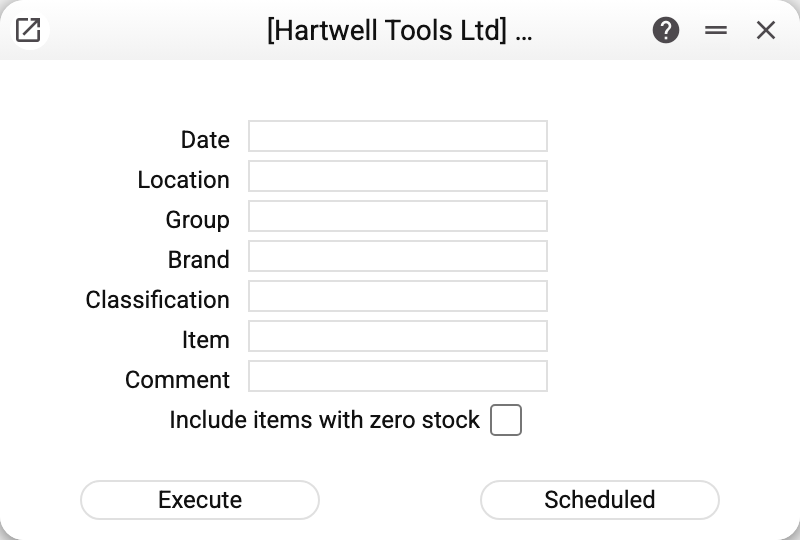
The fields of the window are the filter for the worksheet to come:
- Date — which day's book balance to take;
- Location — required: the sheet is built for one location, not the whole database (without it — "Location required", without the date — "Date required");
- Group, Brand, Classification, Item — a spot check over part of the range; "Classification" takes several codes separated by commas — an item with at least one of them qualifies;
- Comment — the text that goes into the header of the created document;
- Include items with zero stock — add positions that moved through this location but the books say are gone there by the date. Useful when checking whether something already written off is still on the shelf. Items that were never at the location are not added either way. Items with a negative book balance also get into the sheet only with this tick — set it when you want the stocktake to correct the minuses.
Only stock items go into the sheet (services and non-stock items do not); serial-tracked items get a separate line per serial number. If no line is found — "No items found matching the specified criteria".
Execute creates the stocktake document — unapproved, with the book quantities filled in; the counted quantity on every line is 0, the storekeeper enters it. Scheduled puts the build into the queue of recurring jobs; the "Date" is then taken as the day of each run, not the day it was scheduled.
The service approves nothing and changes no balances: what comes out is a draft for a person to work with. After the run the window names the created document and its row count — "Stock take No. … created, rows: …"; look the draft up by that number among the stocktakes.
Typical situations
A planned stocktake. Date, location, everything else empty — and the worksheet is ready.
A spot check. A group or a brand narrows the list to a few dozen lines: that is how weekly checks of expensive goods are done without stopping the warehouse.
Two worksheets for one location. Nothing stops you building several documents — split by group, say, so different people count different parts.
Where to look next
- Stocktake — the document the service builds;
- Stocktaking comparison — where the differences show;
- Location report — the same balance, just to look at.