Contact Links
A housekeeping register holding the links between contacts themselves: who is tied to whom — a contact person to a company, a branch to the head office, a private person to their business.
Where to find it: Modules → Database Maintenance → Registers → Contact Links
A worked example
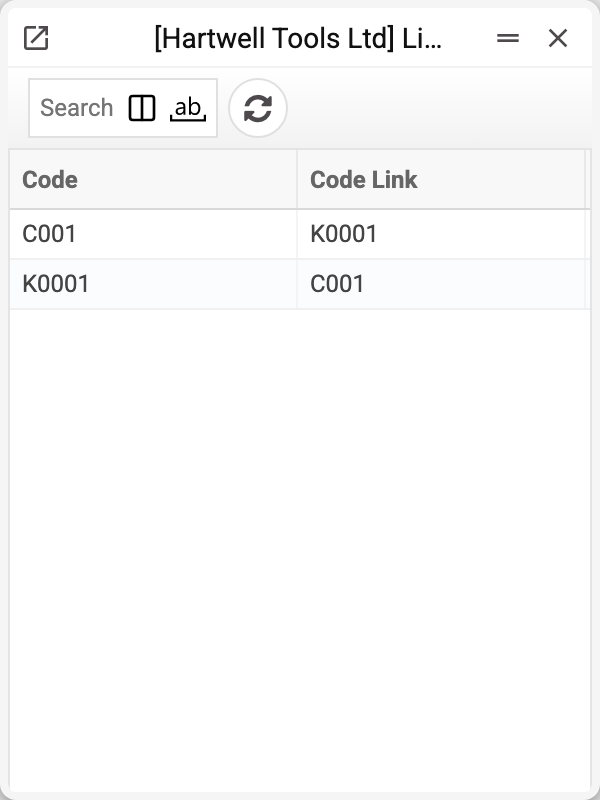
Two columns, both contact codes: whose link it is and with whom. The screenshot shows one link written as two rows: C001 → K0001 and K0001 → C001. That is deliberate — the link reads from either side, from either contact's card.
The system maintains it; nobody edits it by hand.
Why it is needed
Contacts rarely stand alone: a company has people behind it, a person has their business. When those records are kept separately, the link between them has to live somewhere — otherwise the company's card has no representative, and the representative's card has no company.
This register is that storage. It is written from the "Linked Contacts" tab of the contact card: as soon as a row names another contact's code, the link is recorded in both directions; deleting the row removes both records.
Where links work. In a sales order the "Customer contact" picker offers only the customer's linked contacts, and when there are no links — all contacts that are not closed. The Customer Information Report and the Vendor Information Report show the linked contacts and add the linked contacts' documents to the contact's own.
Typical situations
The company's card shows no contact person. There is no link — it is created on the "Linked Contacts" tab of the contact card, not here.
Deleting a duplicate contact. Together with the contact the system silently deletes all its links — on both sides. Before deleting, check here whom it was linked to and add those contacts to the main card.
There are twice as many rows as links. That is expected: every link is written from both sides.
A code on the tab is not linked — "Permissions denied!". The link is written at once, so the right to edit contacts and the right to create (to unlink — delete) linked contacts are needed. An administrator changes the role's rights.
Where to look next
- Contacts — the customer and supplier cards themselves.