Rental agreements
The agreement is the heart of the rental module. An order only records a request and the acts only move equipment around, while the agreement holds the whole arrangement: which units, for how long, at what rate, how often to invoice and what maintenance is due.
Where to find it: Modules → Rental → Registers → Rental agreements
It also answers the hire desk's main question: what is this machine busy with, and until when.
Video walkthrough: Equipment hire in ERPJS step by step — request, agreement, hand-over, invoices, return.
A worked example
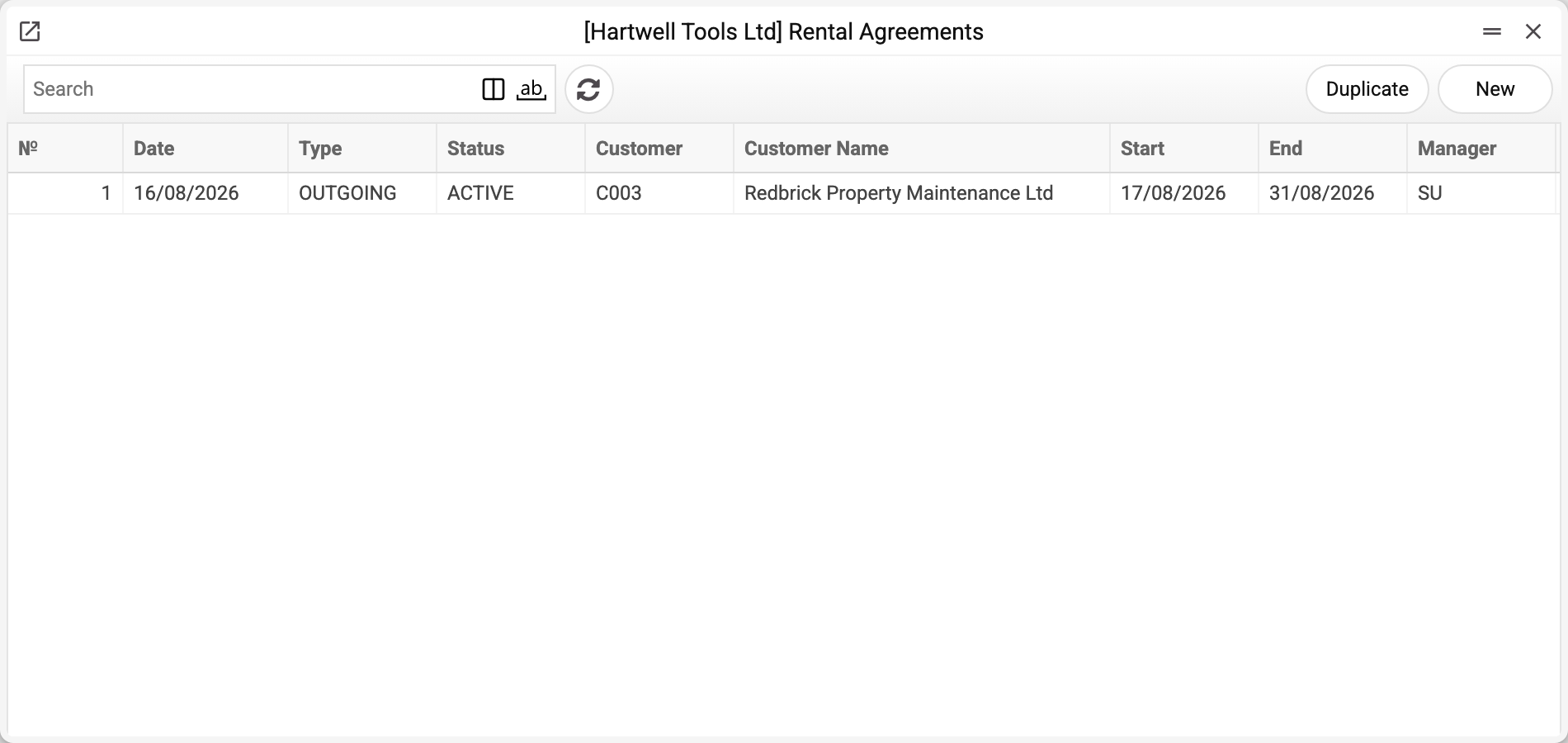
The journal shows the number, date, type, status, customer, hire period and manager. There is one agreement here — No. 1, ACTIVE, and that is the one we take.
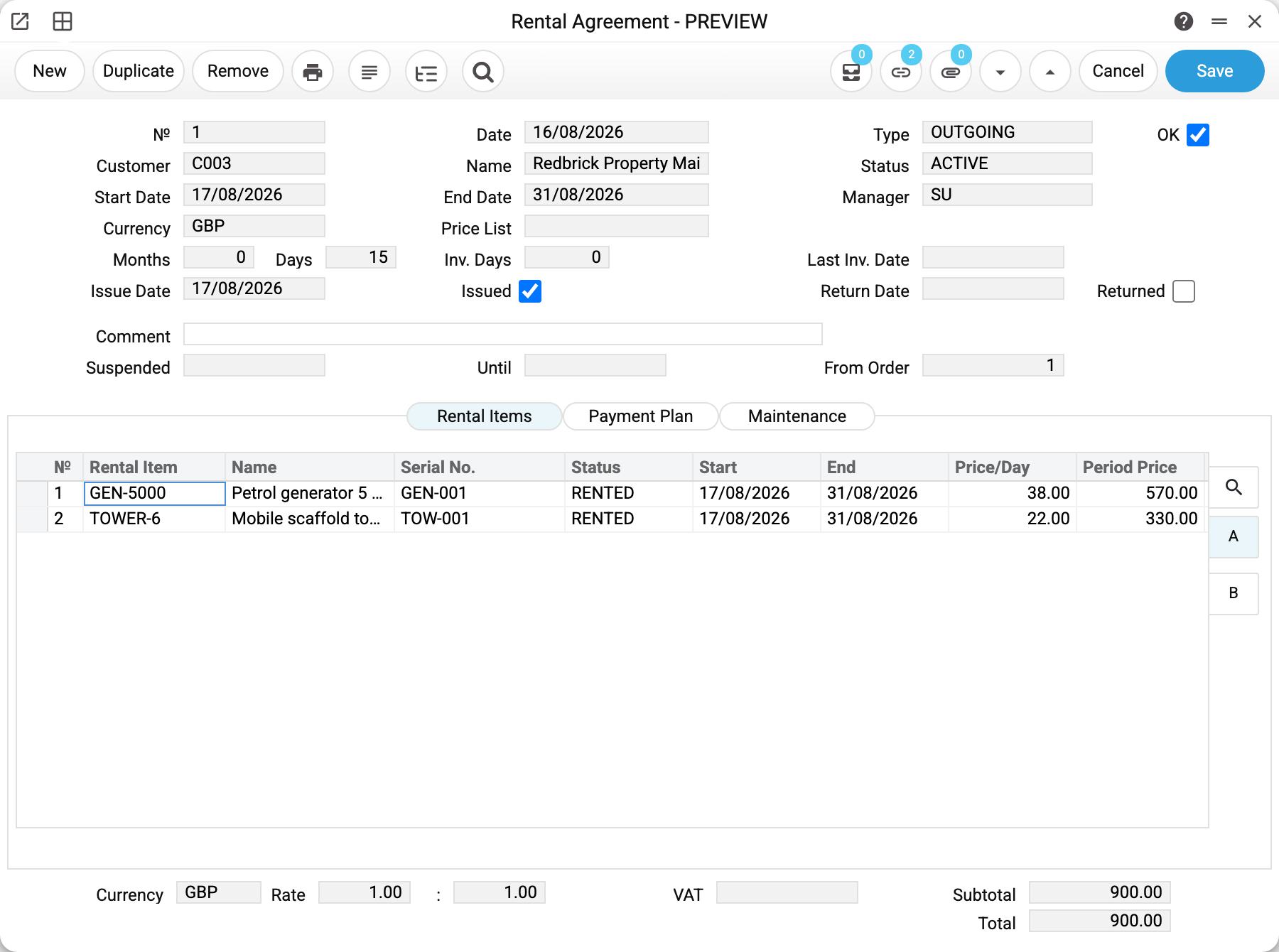
Agreement No. 1 of 16/08/2026, created from order No. 1 (the "From order" field).
- Type
OUTGOING— we are the ones hiring out.INCOMINGcan be set too, but it is only a mark: the system has no separate logic for hiring in, the agreement works the same way; - Status
ACTIVE— the agreement is live; - the period runs from 17/08 to 31/08, and the system worked out its length itself: Months 0, Days 15;
- the Issue date of 17/08 and the Issued tick appeared once the issue act was posted; the return date is still empty.
The lines hold the same units as the order, now with a line status: both RENTED.
| Item | Serial No. | Status | Start | End | Price/Day | Period Price |
|---|---|---|---|---|---|---|
| GEN-5000 | GEN-001 | RENTED | 17/08/2026 | 31/08/2026 | 38.00 | 570.00 |
| TOWER-6 | TOW-001 | RENTED | 17/08/2026 | 31/08/2026 | 22.00 | 330.00 |
Total 900.00.
Three tabs
Rental items — what went out, for how long and at what rate. Every line has its own dates and its own status, so part of the fleet can come back early. Whether the price includes VAT is decided by the agreement's price list, and without one by the Invoice Setting, just as in the Invoice: with VAT-inclusive prices the VAT is taken out of the price, otherwise it is added on top.
Payment plan — the invoicing schedule. The system splits the agreement period into slices of Inv. Days days and sets the invoice date to the start of each slice. While that field is empty the plan cannot be calculated, and the system says so. The amounts in a plan row are the invoice that will be raised for the slice: each object for its own rental days within it, VAT and rounding by the company rule, Subtotal without VAT. Once invoiced, the row shows the number and the amounts of the created invoice.
Maintenance — the service plan for the hire period: when to inspect the machine, change the oil, check it over.
What happens on activation
When the agreement is posted (OK is set — by a separate save or right at creation), it turns ACTIVE and:
- the units in the lines move to RESERVED — booked, but still with you;
- bookings appear in the resource calendar for each unit, using the line's dates. They show on the same board as engineer workload, so the next salesperson will not promise the same tower to another customer;
- after the issue act both the booking and the line status become RENTED, and after the return act — RETURNED.
An agreement can be suspended (the customer paused the works, say) through the "Suspended … Until" fields and a dedicated action. Suspension works on the whole agreement or on a single line.
Typical situations
The customer extends the hire. On an approved agreement the dates and lines are locked in the window. To change the end date, clear OK, change the date and tick OK again — the bookings are created for the new dates. But once the agreement has an issue act, a return act, an invoice or a service document, OK cannot be cleared: "Cannot remove OK: related documents exist". Despite such documents, OK can be cleared only by a role with the "Can unconfirm Rental Agreements" action. But while an issued object has not been returned, nobody can clear OK, not even with that permission: "Issued objects of this agreement have not been returned: make a return act first" — post a return act first.
Part of the fleet came back early. That is a line-level matter: each line has its own end date and status, and the agreement stays ACTIVE while at least one issued object has not been returned. When a return act brings back the last issued object, the agreement closes, and the bookings of lines that were never issued are released.
An invoice is due. The invoice is raised from the agreement by a dedicated action, and its frequency comes from the payment plan.
The agreement has run its course. CLOSED once everything issued is back. CANCELLED is different: an agreement voided before anything went out.
Where to look next
- Rental orders — where the agreement comes from.
- Issue acts and return acts — equipment moving under the agreement.
- Rental items — the units of the hire fleet themselves.
Print variables
Values available in this document's printed form templates. How to write a variable in a template — see Print Forms.
Header fields:
| Variable | What it holds |
|---|---|
| RA_No | № |
| RA_Date | Date |
| RA_Type | Type |
| RA_Cust_Code | Customer |
| RA_Cust_Name | Name |
| RA_Status | Status |
| RA_Start_Date | Start Date |
| RA_End_Date | End Date |
| RA_Manager | Manager |
| RA_Currency | Currency |
| RA_Price_List | Price List |
| RA_Location | Location |
| RA_Period_Length | Months |
| RA_Period_Days | Days |
| RA_Issue_Date | Issue Date |
| RA_Issued | Issued |
| RA_Return_Date | Return Date |
| RA_Returned | Returned |
| RA_Comment | Comment |
| RA_Pay_Terms | Pay Terms |
| RA_Order_No | From Order |
| RA_Rate | Rate |
| RA_VAT | VAT |
| RA_Subtotal | Subtotal |
| RA_Total | Total |
| RA_Cust_Address | Address |
| RA_Cust_VAT | Tax No. |
| RA_Cust_Contact | Contact |
| RA_Phone | Phone |
| RA_Email | |
| RA_Our_Ref | Our Ref. |
| RA_Department | Department |
| RA_Period_Type | Period Type |
| RA_VAT_Code | VAT Code |
| RA_Incl_VAT | Incl. VAT: Yes / No — prices include VAT per the agreement's price list, otherwise per the Invoice Setting (the same rule as in the Invoice) |
Row fields:
| Variable | What it holds |
|---|---|
| RA_Obj_No | Row position number |
| RA_Obj_Code | Rental Item |
| RA_Obj_Name | Name |
| RA_Obj_Serial | Serial No. |
| RA_Obj_Item | Item |
| RA_Obj_Status | Status |
| RA_Obj_Start | Start |
| RA_Obj_End | End |
| RA_Obj_Price_Day | Price/Day |
| RA_Obj_Price_Period | Period Price |
| RA_Obj_VAT_Code | VAT Code |
| RA_Obj_VAT | VAT |
| RA_Obj_Account | A/C |
| RA_Obj_Comment | Comment |
| RA_Obj_Objects | Tag/Object |
Row fields of the additional payplan table ({#payplan}…{/payplan} in the template):
| Variable | What it holds |
|---|---|
| RA_PP_Date | Invoice Date |
| RA_PP_From | Period From |
| RA_PP_To | Period To |
| RA_PP_Subtotal | Subtotal |
| RA_PP_VAT | VAT |
| RA_PP_Total | Total |
| RA_PP_Status | Status |
| RA_PP_Inv_No | Invoice No. |
Row fields of the additional maintenance table ({#maintenance}…{/maintenance} in the template):
| Variable | What it holds |
|---|---|
| RA_MT_Status | Status |
| RA_MT_Type | Service Type |
| RA_MT_Desc | Description |
| RA_MT_Interval_Days | Days |
| RA_MT_Interval_Meter | Meter |
| RA_MT_Plan_Date | Plan Date |
| RA_MT_Last_Date | Last Date |
| RA_MT_Paid_By | Paid By |
| RA_MT_Notes | Notes |
The records the document refers to through its form fields (location, customer, currency…) also expose the rest of their variables — code and name are already listed in the tables above, the rest is described in the register's article:
- Company details — name, addresses, bank accounts, officers, the printing user: Main Company