Discount matrix
The discount matrix answers the question «how many percent to concede to THIS customer on THIS item». The price list sets the price; the discount matrix sets a personal percentage off it: a base one for everything and finer ones for item groups, brands or individual items.
Where to find it: Modules → Prices → Registers → Discount matrix
The register lives in the Prices module.
A worked example
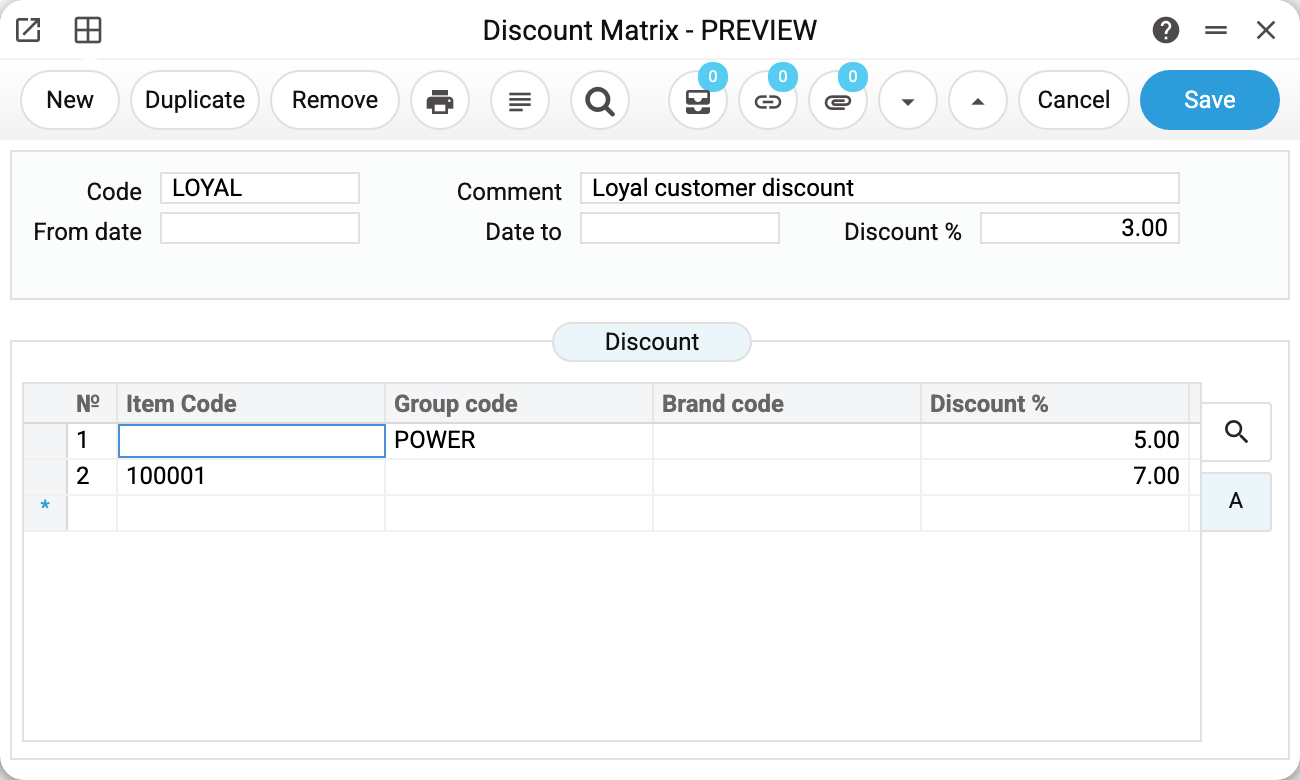
The LOYAL discount («Loyal customer discount») from the demo database reads top to bottom:
- «Discount %» in the header — the base percentage for the whole range: 3 %.
- The matrix rows refine it: power tools (the POWER group) get 5 %, and the hammer drill 100001 gets 7 % by its own row.
The hammer drill matches both the POWER group and the per-item row — the upper of the matching rows wins. In this record the POWER group row comes first, so the drill gets its 5 %, and its own 7 % row does not apply. That is why specific rules are kept above the general ones: move the drill's row to the top and it gets its 7 %.
A row targets either an item («Item code») or a group and a brand («Group code», «Brand code») — plus the percentage. An item cannot share a row with a group or a brand. A group and a brand can, but such a row acts as «group or brand»: it applies to every item of that group and to every item of that brand, not only where both match.
How the discount reaches a document
The discount code goes onto the customer card — the «Discount Matrix» field on the «Finance» tab (or straight into the customer category, and the whole category gets it). From there everything happens by itself:
- In an order, once the customer is picked, the code lands on the «Price List» tab, the «Discount Matrix» field.
- When an item is typed into a row, the system finds its percentage — the per-item row, the group, the brand or the base one — and puts it into the row's «%» column. The row total is computed with the discount at once.
The demo shows it on Millbrook Construction Ltd: the hammer drill and the cordless drill (both POWER) get the group's 5 % — its row stands above the drill's row in the matrix — and the engineers hammer, absent from the matrix, gets the base 3 %. Move the drill's row above the group row and the order shows three different percentages: 7, 5 and 3.
The discount works the same way in invoices. In the «Contracts» register the code is taken from the customer card only — a contract does not pick up the category's matrix. In the «Worksheets» register changing the customer in the window does not fill the «Discount sheet» field: type the code in by hand, and the rows get their percentages by the same rule. A worksheet created from a service order takes the code by itself — from the customer card, or from the category if the card has none.
A discount for a period
«From date» and «Date to» limit a record's validity. Several records can live under one code: an open-ended one (dates empty) — the everyday discount, and a dated one — a promo. For the document's date the system first looks for a record whose period covers that date, and only then for the open-ended one. The promo ends — the everyday percentages return by themselves.
How to work with it
1. Create the table
Code, comment, the base percentage in the header. If needed — matrix rows for groups, brands, items; specific rows above the general ones.
2. Assign it to customers
The «Discount Matrix» field on the customer card («Finance» tab) or on the customer category.
3. Check with a document
Make a test order for such a customer and type in a few items: the «%» column should show the expected percentages.
Print variables
Values available in this document's printed form templates. How to write a variable in a template — see Print Forms.
Header fields:
| Variable | What it holds |
|---|---|
| DiscTable_Code | Code |
| DiscTable_Comment | Comment |
| DiscTable_StDate | From date |
| DiscTable_EndDate | Date to |
| DiscTable_Discount | Discount |
Row fields:
| Variable | What it holds |
|---|---|
| DiscTable_MNo | Row position number |
| DiscTable_MatrItemCode | Item Code |
| DiscTable_MatrGroupCode | Group code |
| DiscTable_MatrBrandCode | Brand code |
| DiscTable_MatrDiscount | Discount |
Common situations
A per-item row «did not work». Look at the order: of the matching rows, the UPPER one wins. Specific rules go above the general ones, not under them.
The discount is zero though the table is filled. Two suspects: the record's period does not cover the document date (and there is no open-ended record), or the customer card's «Discount Matrix» field is empty.
Changed the matrix, but an old order still shows the old numbers. Editing the matrix itself does not touch documents already created. The percentage is inserted into a row when an item is typed in, and also when the header's «Discount Matrix» changes (by hand or together with a change of customer): then all item rows are recalculated, and percentages adjusted by hand are overwritten. To apply the new percentages to an unapproved document, clear the code in the header's «Discount Matrix» field and type it in again.
Need a discount «on everything». That is the header's «Discount %» — the matrix may stay empty. And in any particular document row the percentage can always be adjusted by hand.
I want to exclude an item from the discount. Add a row for that item with 0 % and place it above its group's and brand's rows: a matching row with 0 % gives zero, and the header's base percentage does not reach the item.
The matrix will not delete: «A record of «Discount Matrix» is used in: …». A customer category, a contact card, a contract or a document refers to its code — and a category or card holding the code of a matrix that no longer exists cannot be saved. Remove the code from the place the refusal names. If it names documents, the matrix has to stay; to stop it from applying, end it with «Date to». A record that is not the last one under its code (say, a promo next to the open-ended one) deletes freely: the code lives while at least one of its records remains.
Field reference
| Field | Description |
|---|---|
| Code, Comment | The discount's name; the code goes into customer and category cards |
| From date, Date to | The record's validity period; empty — open-ended |
| Discount % (header) | The base percentage for the whole range |
| Item code / Group code / Brand code | Whom the matrix row targets: an item, or a group and a brand; a group and a brand in one row act as «or» |
| Discount % (row) | The percentage for that item/group/brand; of the matching rows the upper one wins; 0 % — the item gets no discount |