Stocktakes
You have counted the goods on a location and want to put on record what you found. A stocktake writes the result of the count next to what the system believes about the stock.
Where to find it: Modules → Stock → Registers → Stocktakes
And here is the thing people usually expect from it in vain: a stocktake does not change the balance. Approve the document and the quantity on the location stays exactly as it was. It answers «how much is actually there», not «let it now be this much». The difference is closed by separate documents, and a separate procedure — «Stocktaking comparison» — is what creates them. The split is deliberate: counting and correcting the books are two different decisions, often taken by different people on different days.
So the document exists to:
- record the fact — what was found, where and how much, with a date and a location;
- show the discrepancy — right in the line, next to the book quantity;
- leave a trace — the count stays in the «Item movement history» journal as a record marked as not affecting the balance, and you can come back to it when somebody asks where the shortage came from. It will not appear in the «Item history» report: the report shows movement, and a stocktake does not move the balance — what you see there are the documents that closed the discrepancy.
The document lives in the Stock module; it is created by the «Inventory worksheet builder» procedure (see below) or by hand.
What approval does
- writes the count into the item movement journal — one line per position;
- leaves the balance alone: those history records are marked as not affecting stock;
- posts no transaction — a count has no monetary meaning; that appears only in the document you use to close the difference.
A worked example
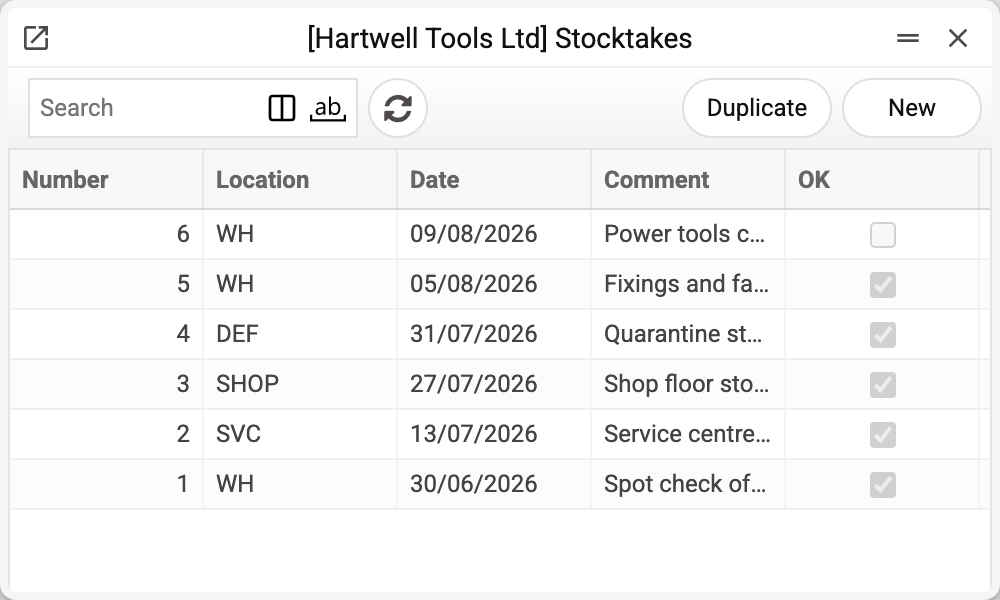
The journal shows the number, location, date, comment and approval. No. 6 is not approved yet — its count is not in the item history yet (posting will not change the balances either). We will take No. 1 of 30/06/2026.
A spot check of cutting discs on the main warehouse.
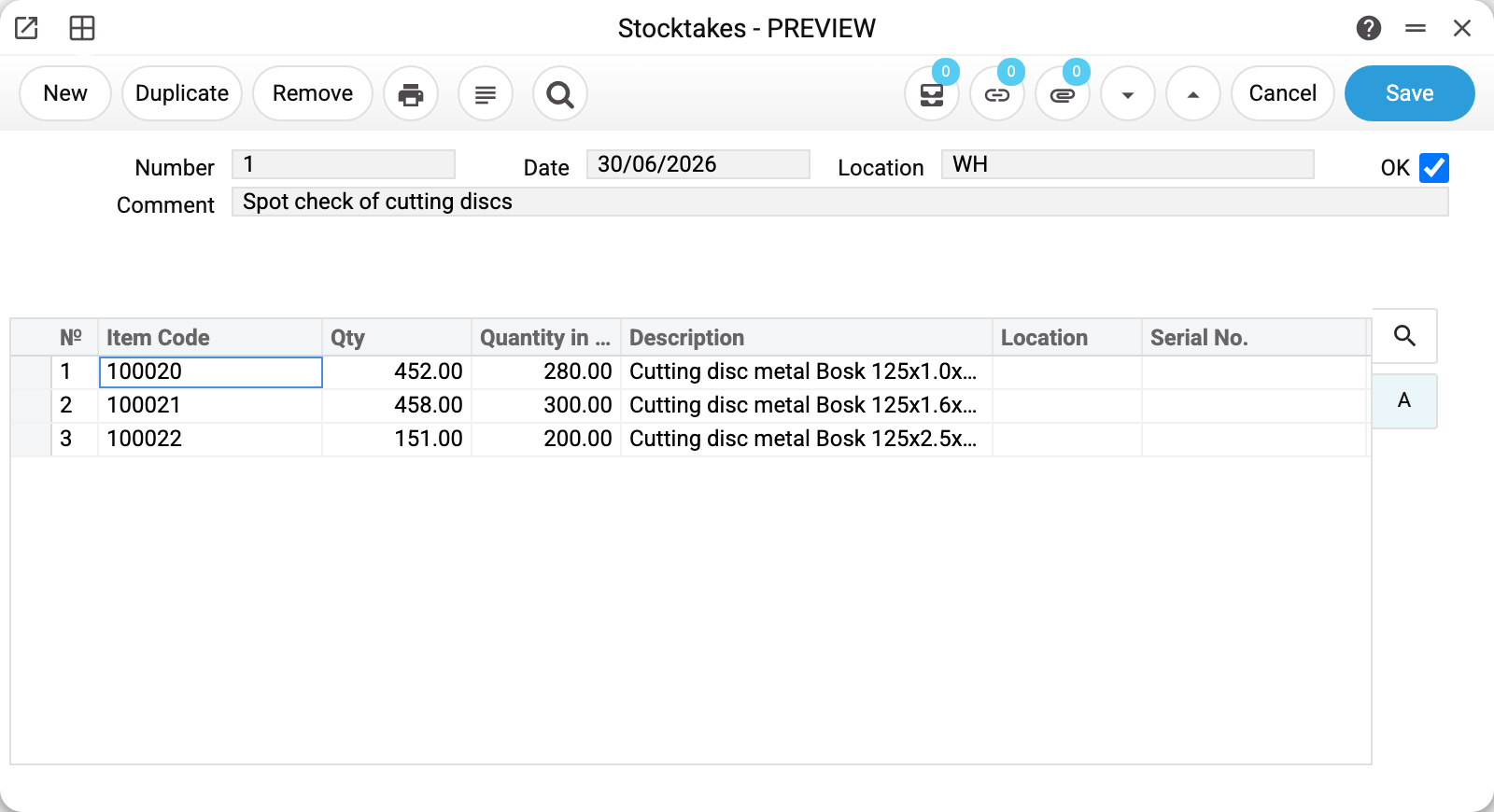
The header is short — «Date», «Location» and «Comment». The location matters: a stocktake is always about one storage place, never about the company as a whole. The comment answers why exactly these positions were counted.
The whole point sits in two columns of the line:
- «Qty» — how many were counted by hand;
- «Quantity in stock» — how many the books show on the document date.
Three lines in the example show both outcomes:
- 1.0 mm discs: 452 against 280 and 1.6 mm: 458 against 300 — a surplus. There is more on the shelf than the system counts: most likely a receipt was never entered;
- 2.5 mm discs: 151 against 200 — a shortage. The goods left physically but not in the books: breakage, an unrecorded issue, a mistake in a shipment.
After approval all three lines went into the item history and the balances stayed as they were. The books still disagree with the shelf — and that is the normal state of this document. The difference is closed next.
How to close the difference
You do not create those documents by hand. The «Stocktaking comparison» procedure does it: it takes the approved sheets of exactly the date you enter (not a period) and creates what is needed — a goods receipt for the surpluses and a stock depreciation for the shortages. The documents are linked to the stocktake both ways, so the sheet always shows what closed it and the depreciation shows on what grounds it appeared.
A stocktake posts nothing
This follows directly from everything above: the document changes neither the balances nor the value of the stock, so nothing appears in the Transactions register once it is approved. There is nothing to look for there — and a missing transaction does not mean the document was approved wrongly.
The movement on the accounts appears with the documents that close the difference: the depreciation takes the shortage to the «Inventory Deficit Acc.», the receipt puts the surplus onto the location against the «Inventory Surplus Acc.» (both in the «Account Usage» setting). The procedure dates the correcting documents with the date you gave it — the stocktake date, not the day it runs — so a shortage lands in the costs on the date of the count.
How to work with it
A stocktake rarely starts from an empty card: normally the sheet is built by a procedure, then counted, then reconciled.
1. Build the sheet
The «Inventory worksheet builder» procedure creates the document with the positions that lie on the location already filled in. The selection is set by location, date, group, brand, classification or a particular item, and the «Include items with zero stock» checkbox also adds positions that have already moved at this location but have no balance on the document date — otherwise a surplus of them found on the shelf would have nowhere to go. An item that never moved at this location is not added even with the checkbox: such a line is entered into the worksheet by hand.
The card can also be created by hand: Stock module → «Stocktakes» register → «New».
2. Enter the count
One line per position: the quantity you actually counted. The book quantity fills itself into «Quantity in stock».
3. Approve
OK and save. The count is on record, the balances are untouched.
4. Close the difference
Run the «Stocktaking comparison» procedure for the location and date. It goes through the sheets and creates the receipt and the depreciation for the discrepancies. The stocktake stays as the justification and is visible through the links.
How to be sure the document is right
- The location in the header is the one you counted.
- The date is the day of the count. The book quantity is taken as of the document date, so yesterday's stocktake shows yesterday's balances, not today's.
- Every counted position is in the document, including the ones that matched: a line where both columns are equal proves the position was counted; a missing line proves nothing.
- A zero quantity is entered where the goods were looked for and not found. A missing line and a line with zero are two different statements.
- The comment explains the scope of the count.
Print variables
Values available in this document's printed form templates. How to write a variable in a template — see Print Forms.
Header fields:
| Variable | What it holds |
|---|---|
| Ok | OK |
| No | Number |
| Comment | Comment |
| Trans_Date | Date |
| Location | Warehouse |
| Loc_Code | Location (code) |
| Loc_Name | Location (name) |
Row fields:
| Variable | What it holds |
|---|---|
| No | Row position number |
| Item_Code | Item Code |
| Description | Description |
| Serial_No | Serial No. |
| S_T_Qty | Qty |
| Item_Location | Location |
| Qty_In_Stock | Quantity in stock |
| Unit_Name | Unit name |
| Units | Unit code |
The records the document refers to through its form fields (location, customer, currency…) also expose the rest of their variables — code and name are already listed in the tables above, the rest is described in the register's article:
- Location — Locations (
Loc_*) - Company details — name, addresses, bank accounts, officers, the printing user: Main Company
Common situations
The stocktake is approved and the balance has not moved. By design, see above. The document records the count; the books are brought to the fact by the «Stocktaking comparison» procedure, which has to be run separately.
The book quantity in the line does not match what the location shows now. Check the document date: the column is calculated as of that date. If there were shipments or movements after the stocktake, today's balance will be different — and that is not an error.
You found goods that are not in the books at all. A line with a book zero is a normal record, and the procedure will create the receipt for the surplus itself. The real question about it is at what cost the goods enter stock, because future profit depends on that. The procedure takes it from the item card — the «Cost in base currency» field — and creates the receipt already approved, so its price can no longer be corrected there. Check the price on the card before running the procedure. The depreciation for a shortage is approved straight away only if the stock covers it; otherwise it stays a draft.
Several locations were counted at once. One document, one location. Each storage place gets its own stocktake, otherwise there is no telling where the shortage is.
Field reference
Header
| Field | Description |
|---|---|
| Number | Document number, assigned automatically |
| Date | The day of the count; the book quantity is calculated as of it |
| Location | The storage place that was counted |
| Comment | Scope and reason for the stocktake |
| OK | Approval: records the count in the item history |
Lines
| Field | Description |
|---|---|
| Item Code, Description | The position and its name |
| Qty | How many were counted |
| Quantity in stock | How many the books show on the document date |
| Location | Storage place of the line, if it differs from the header |
| Serial No. | Serial numbers for individually tracked items |