Rebuild search text without hidden fields
A one-off maintenance operation: removes cost prices and other fields visible only with a right from the search fingerprint of records saved before this rule appeared.
Where to find it: Modules → System → Maintenances → Rebuild search text without hidden fields
A worked example
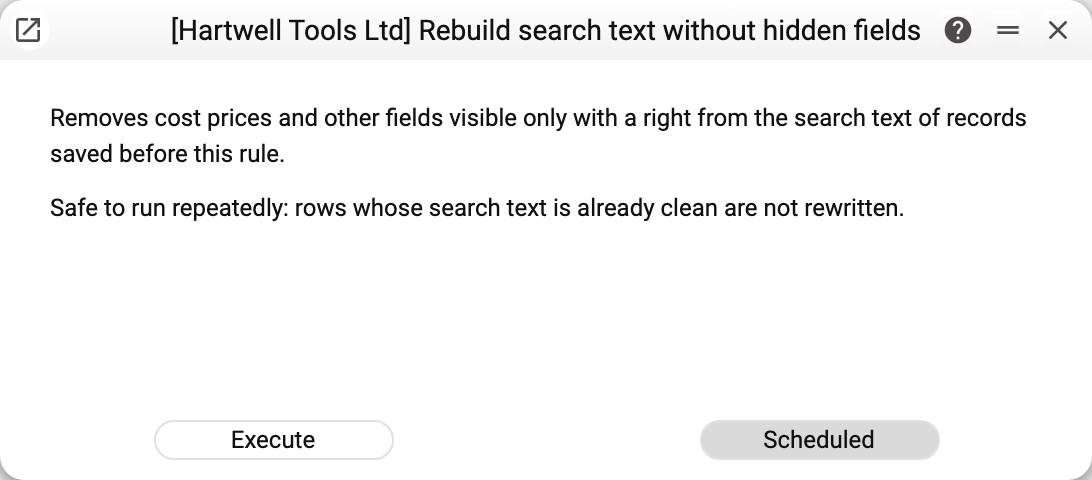
The window is the same as for encrypt integration secrets: two explanations — "Removes cost prices and other fields visible only with a right from the search text of records saved before this rule." and "Safe to run repeatedly: rows whose search text is already clean are not rewritten." — and one working button, «Execute». «Scheduled» is inactive: the operation runs once. There are no parameters.
Example: the database has been updated, and its items and invoices were entered before the update. After «Execute» a summary with a green tick opens: "Tables checked: N; search text rebuilt without hidden fields: M row(s)". N is how many tables with fields visible only with a right were found in the database, M is how many records kept cost prices in their fingerprint. Run the operation again and M will be 0: there is nothing left to rebuild.
Why run it
Every record has a search fingerprint — the text that string search in lists works on. Fields a role sees only with a right (cost price, document profit and margin — the "Show cost price" right) are not put into the fingerprint of new and changed records. A person without that right does not search the fingerprint at all: their string search runs over the visible fields only, so a search for a number does not tell them whether such a record exists even without this operation.
Records saved before the update keep their old fingerprint — cost price included: a person who has the right finds them by it, while new records are not found that way. The operation rebuilds the old fingerprint without the hidden fields, so search behaves the same for old and new records. Run it once after updating the database; scheduling is disabled for it.
What exactly is rebuilt
The operation finds the registers with fields visible only with a right by itself — in the header or in document rows: items, invoices, quotations, orders, shipments, returns, stock movements, item history and others. Records are read in pages of a thousand and across all companies of the database at once. A record whose fingerprint is already clean is not rewritten, so running it again is safe.
Integration secrets (passwords, tokens, keys) are not touched here — encrypt integration secrets removes them from the fingerprint.
How to tell it worked
After the run the operation shows how many tables were checked and in how many records the fingerprint was rebuilt. Every refusal is a separate summary line, and the green check mark is then replaced by a triangle. Search by name, code and other visible fields works as before; by cost price it no longer finds anything. Limits the operation deliberately leaves open: a value cut off at the end of an over-long fingerprint and a cost price written with a thousands space ("1 234.50") are not recognised — such a record keeps its old fingerprint.
Typical situations
- The very first run gives M = 0. The database was created after the update, or the operation has already been run: there are no old fingerprints with cost prices. This is normal, nothing needs to be done.
- A summary with an orange triangle and lines "Table …: …". The line names the table and the reason: the table could not be read, a record could not be saved, or "… row(s) changed during the migration — run the operation again" (the record was changed while the operation ran); the rest were rebuilt. Fix the cause and run the operation again: records that are already clean are not touched.
- The records' modification time is unchanged after the run. The operation rebuilds only the fingerprint and does not change the modification time. So exchanges that pick records by modification time (for example, Prom: update prices) will not treat every item as changed and will not send them all again.
Where to look next
- Encrypt integration secrets — the same kind of operation for secrets.
- System — all maintenance operations of the module.