Customer Debt Report
Who owes the company how much as of a date — per customer, broken down by debt source. The report combines unpaid invoices, unpaid service orders and the customer's prepayments into one balance, so the total shows net receivables, not just invoices.
Where to find it: Modules → Sales Ledger (also in modules: Service Orders) → Reports → Customer Debt Report
The report is in the Reports menu of two modules — Sales Ledger and Service Orders — and in both it counts the whole company's receivables, trade and service alike.
A worked example
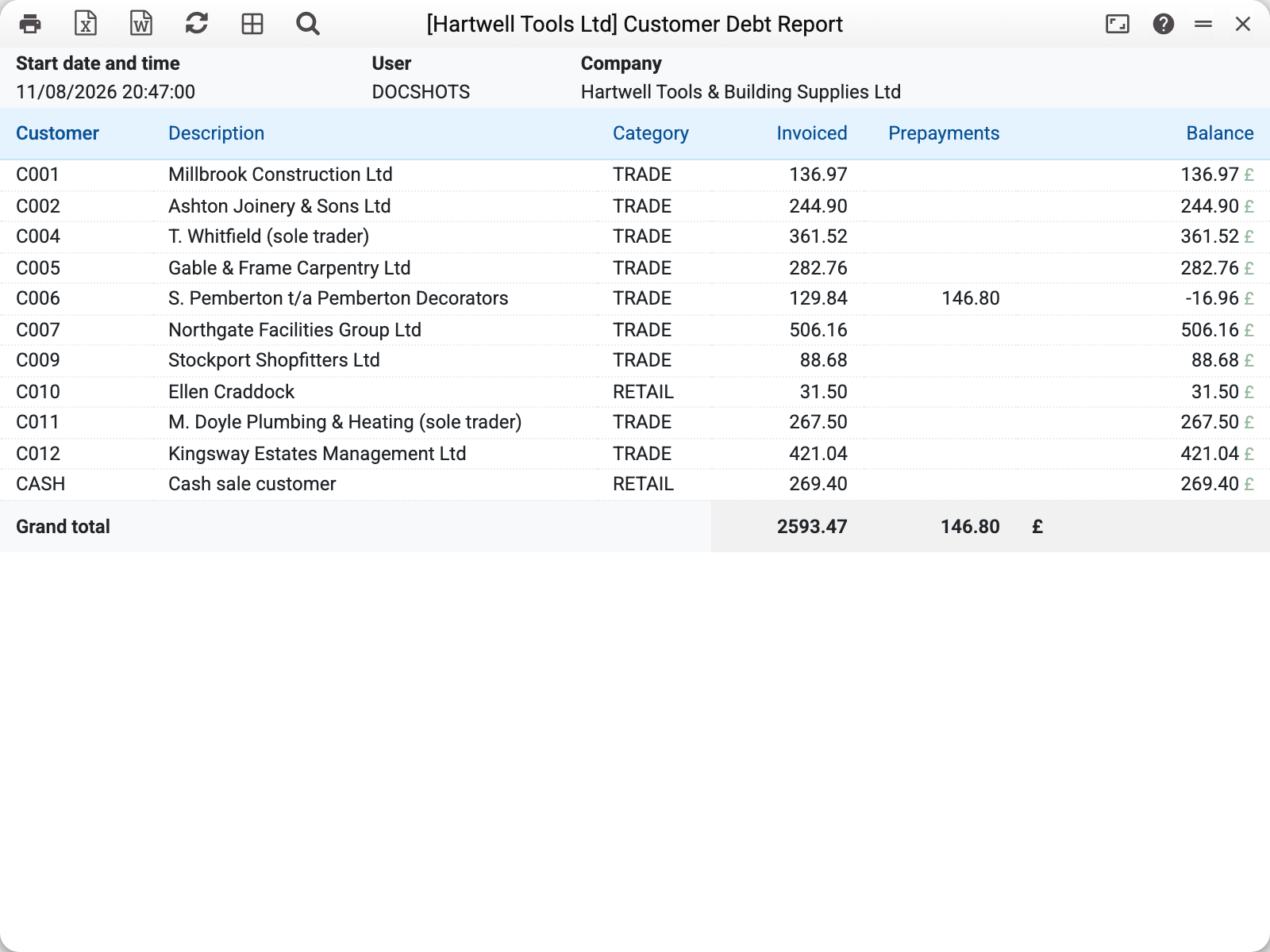
Each line is a customer: debt, prepayments and the balance (debt minus prepayments). Even unusual cases read clearly: a customer with no debt but a prepayment has a negative balance — the company owes them. The bottom line totals the whole company.
The "Detail" checkbox expands each customer down to documents: exactly which invoices and service orders make up the debt, with dates and days overdue. For an invoice the days are counted from its due date (set by the payment terms), so the report separates "has not paid yet" from "is actually late"; for a service order and a prepayment — from the document date. They are counted up to the report date: up to "On Date", or up to today when no date is given.
A customer whose card is closed (the "Closed" checkbox) stays in the report if they have a debt or a prepayment: closing the card does not cancel the debt.
Common situations
The customer says "I paid", but the debt is still there. If the payment was not matched to the invoice (it sits as a prepayment), the debt and the prepayment show separately — the truth is in the Balance column.
Totals differ from the invoice report. Here unpaid service orders are added to invoices and prepayments are subtracted — a wider view than "unpaid invoices".
Parameters
| Parameter | What it does |
|---|---|
| On Date | As of which date to count the debts: documents dated after it are left out (empty — all) |
| Customer / Customer Category | One customer or a category |
| Overdue more than | Only documents whose "Days" exceed N; turns "Detail" on. Empty or 0 — no filter |
| Detail | Expand to documents with days overdue |
| In currency | Show invoice and prepayment amounts in document currencies; service orders and service payments are always in the base currency |