Shipping with Nova Poshta
Step by step: how to turn a sales document into an express waybill, print it and follow the parcel. The instruction assumes the module is already connected — a cabinet card with an API key exists, the reference books are loaded, and "Enable Nova Poshta" is ticked in NP Setting.
Step 1. Open the "Nova Poshta" tab in a shipment
A parcel is arranged in a shipment — the document that already knows the customer, the goods and the amount. With the module enabled, the document gains a Nova Poshta tab.
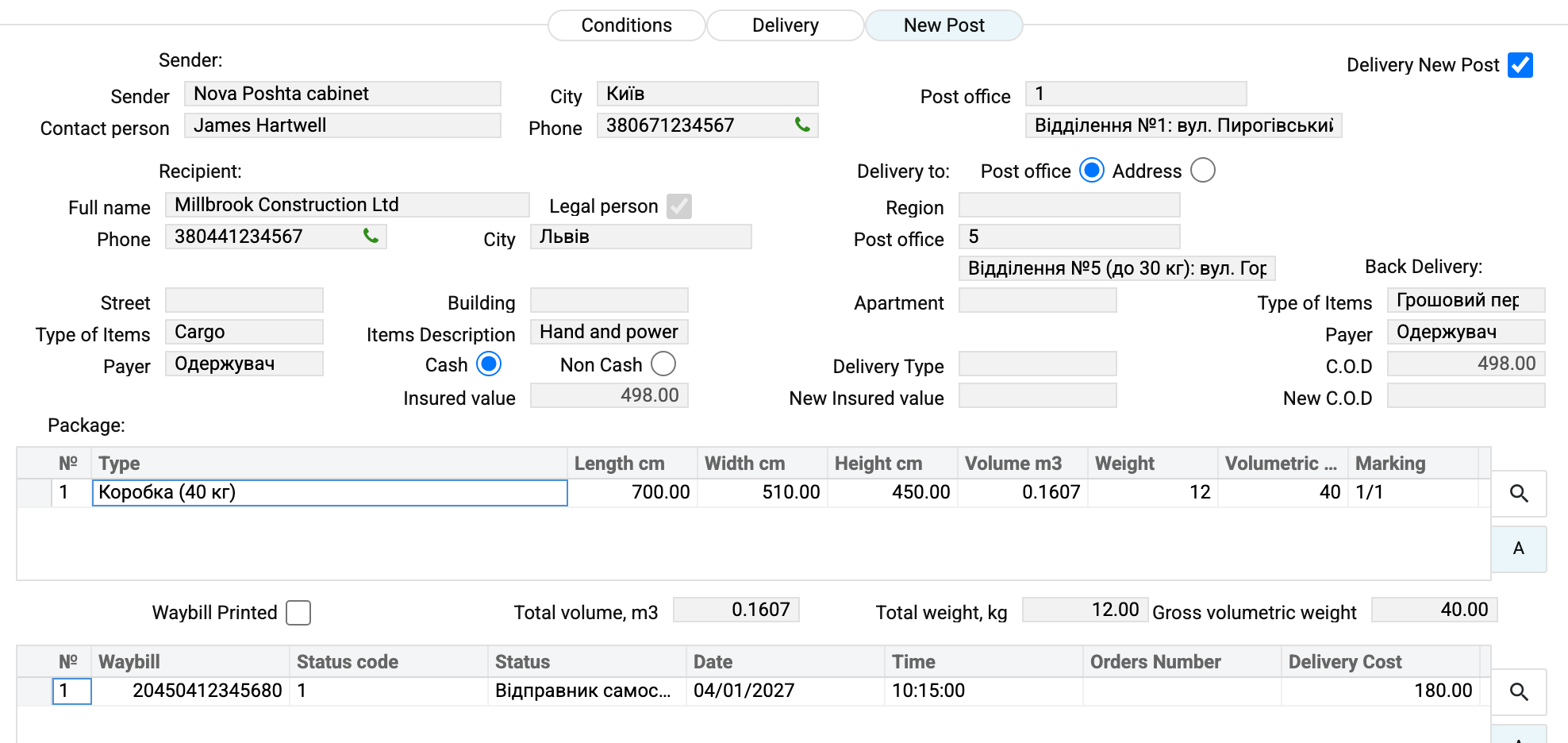
Tick Delivery by Nova Poshta at the top right — that is the flag marking this parcel as travelling with this carrier.
Step 2. Check the sender
The Sender block fills itself when the shipment is created from a customer order (Sales Orders) with Nova Poshta delivery: the sender comes over from the order, and a new order gets the default sender from the NP Setting. The flag alone does not fill the sender — pick it in the Sender field, and the cabinet card supplies name, contact person, phone, city and branch of departure. Check the phone — that is the number Nova Poshta calls — and change the branch if the parcel will be handed in somewhere else.
If you change Contact person, "Phone" takes the number recorded for that contact on this same sender's card. When the sender cannot be told apart (several cabinets with the same name, the contact on both) or the contact person is cleared, "Phone" is cleared — pick the sender in the Sender field from the list again or type the phone by hand.
Step 3. Fill in the recipient
- Full name and Phone come from the customer card but can be edited: the waybill needs whoever actually collects the parcel.
- Legal person — tick for companies, clear for a private individual. The recipient becomes the organisation with the EDRPOU code from the customer card; if the card has no EDRPOU code (or no customer is specified), creating the waybill is refused with «Legal person: the customer card has no EDRPOU code — fill it in or clear the checkbox!».
- Delivery to — the "Post office" / "Address" switch. A post office needs only the city and the number; address delivery needs street, building and apartment.
- City and Post office are chosen from the reference books; the branch description fills itself in.
Step 4. Describe the cargo and the money
Type of Items, Items Description, Payer and the Cash / Non Cash switch are what Nova Poshta prices the shipment by. Insured value and C.O.D are calculated by the system: the sum of the shipped lines including VAT at the order's prices (order line amount ÷ its quantity × shipped quantity), in the Nova Poshta currency from the NP Setting at the rate on the shipment date; recalculated on every save of an unapproved shipment. A shipment without an order leaves these fields alone. A different amount goes into New Insured value and New C.O.D: the waybill takes those first when they are above zero; a zero there does not cancel the calculated amount. A parcel without cash on delivery is sent without the "Грошовий переказ" type in the Back Delivery block. In the screenshot that is 4,320.00.
If the shipped lines are worth 0, the calculated fields become 0 as well — and saving a shipment delivered by Nova Poshta will ask for a New Insured value, and, when the order's payment method is "C.O.D", for a New C.O.D too (or for the order's payment method to be changed to "Prepayment").
The Back Delivery block is about money coming back: the type ("Грошовий переказ" or "Документи") and the payer. Together with the "Afterpayment on goods cost" flag in NP Setting it decides which service carries the cash on delivery.
Step 5. Describe the places
The packaging matrix is what physically travels: the box type from the packaging book, length, width, height, weight. Volume and volumetric weight are calculated by the system, and the totals appear under the matrix.
Without packaging, weight and dimensions the waybill will not be created — that check runs before any data is sent: the packaging matrix may not be empty, and every row needs a weight, actual or volumetric, and its length, width and height (the same goes for every place in a TTN). The carrier's limit applies whatever the payment type: no more than 30 kg per place, counting the larger of the actual and volumetric weight.
Step 6. Create the waybill
From the document menu — Create express waybill (NP). The system sends the data to Nova Poshta and records the answer:
- the waybill number — into the document and into the history matrix;
- the status — the first one, "Відправник самостійно створив ЕН";
- the delivery cost calculated by the carrier (180.00 in the example);
- the number also lands in the linked sales order if that field is still empty.
If the key has expired or a mandatory field is empty, the waybill is not created — the system says what is missing.
If the document already has a waybill, running Create express waybill (NP) again first deletes it at Nova Poshta and then creates a new one, with a new number.
Step 7. Print
Two print actions: the ordinary waybill form and Zebra, for a label printer. After printing the system ticks Waybill Printed itself and switches the document to editing — save the shipment to keep the mark.
Step 8. Follow the parcel
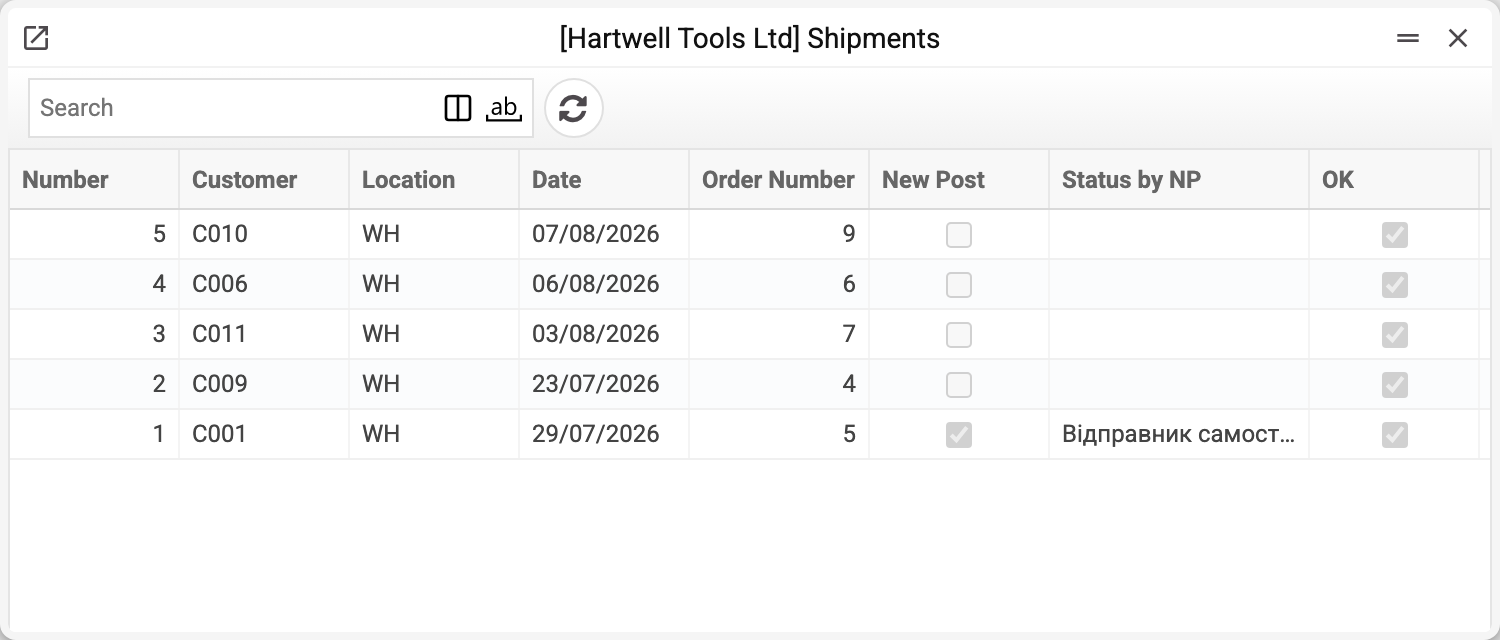
Statuses are refreshed by the service, which is put on a schedule. The result shows right in the shipment list: the Nova Poshta and Status by NP columns.
If the shipment is cancelled
While Nova Poshta has not accepted the parcel, the waybill can be withdrawn: Delete express waybill (NP). The system cancels it at the service and clears the number and status in the document. After acceptance this no longer works — cancellation has to happen in the Nova Poshta Business Cabinet.
When a TTN is needed
An ordinary parcel needs nothing beyond the shipment. A separate TTN is created with the "Create a waybill" item of the shipment menu when the cargo travels in many places, when a marked list is required, or when a road-transport consignment note is needed. The Nova Poshta fields there are the same, and the waybill is created by the same menu items.
Common errors
| What you see | Why |
|---|---|
| "Package weight is required in package matrix" | a row in the packaging matrix has no weight |
| "Package dimensions (width, length, height) are required for all seats" | a packaging row is missing its length, width or height |
| "Maximum weight per seat is 30 kg. Current weight: … kg" | a place heavier than 30 kg by actual or volumetric weight, whatever the payment type |
| "Invalid API key" | the key in the cabinet card has expired or been revoked |
| No "Nova Poshta" tab | the flag in NP Setting is off, or the document was opened before it was changed |
| Empty city and branch lists | the data download service has not run |
Nearby
- Nova Poshta — the cabinet card: key, sender, defaults
- NP Setting — the module switch and the default sender
- TTN — the cargo document with places and marking
- Waybill status update — the tracking service