Cash Out
The document that records money paid out outside of a supplier invoice: wages, payroll taxes, travel advances, running costs, loan interest. Supplier invoice payments do not belong here — they are entered as vendor payments.
Where to find it: Modules → Cash Book → Registers → Cash Out
Despite the name, the document is not only about the till: the payment method may point at a bank account as well. "Cash out" is about paying against an item, not about banknotes.
Until the document is approved it is a draft. The money "leaves" the moment you tick OK.
A worked example
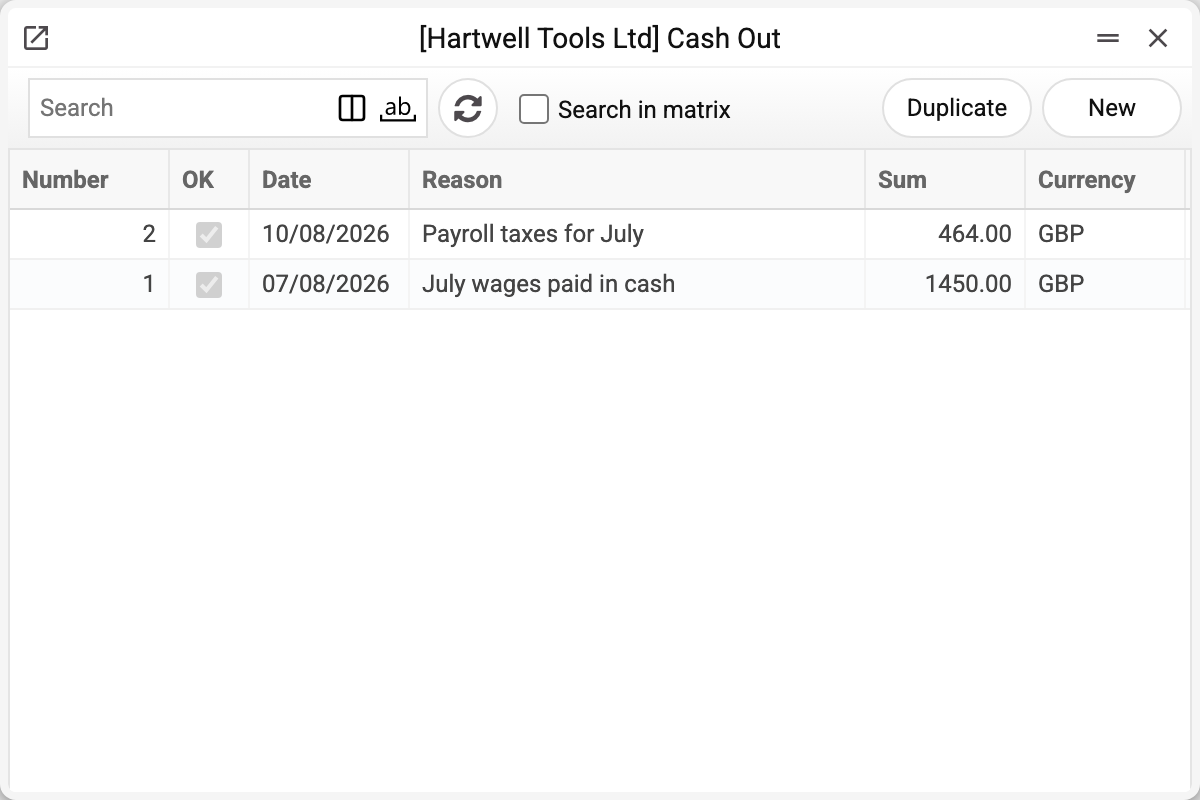
The journal shows the number, approval, date, reason, amount and currency of every payment. The demo company has two: No. 1, the July wages of 1,450.00 GBP, and No. 2, the payroll taxes on them, 464.00 GBP. Let us take the July wages, paid in cash as a single row:
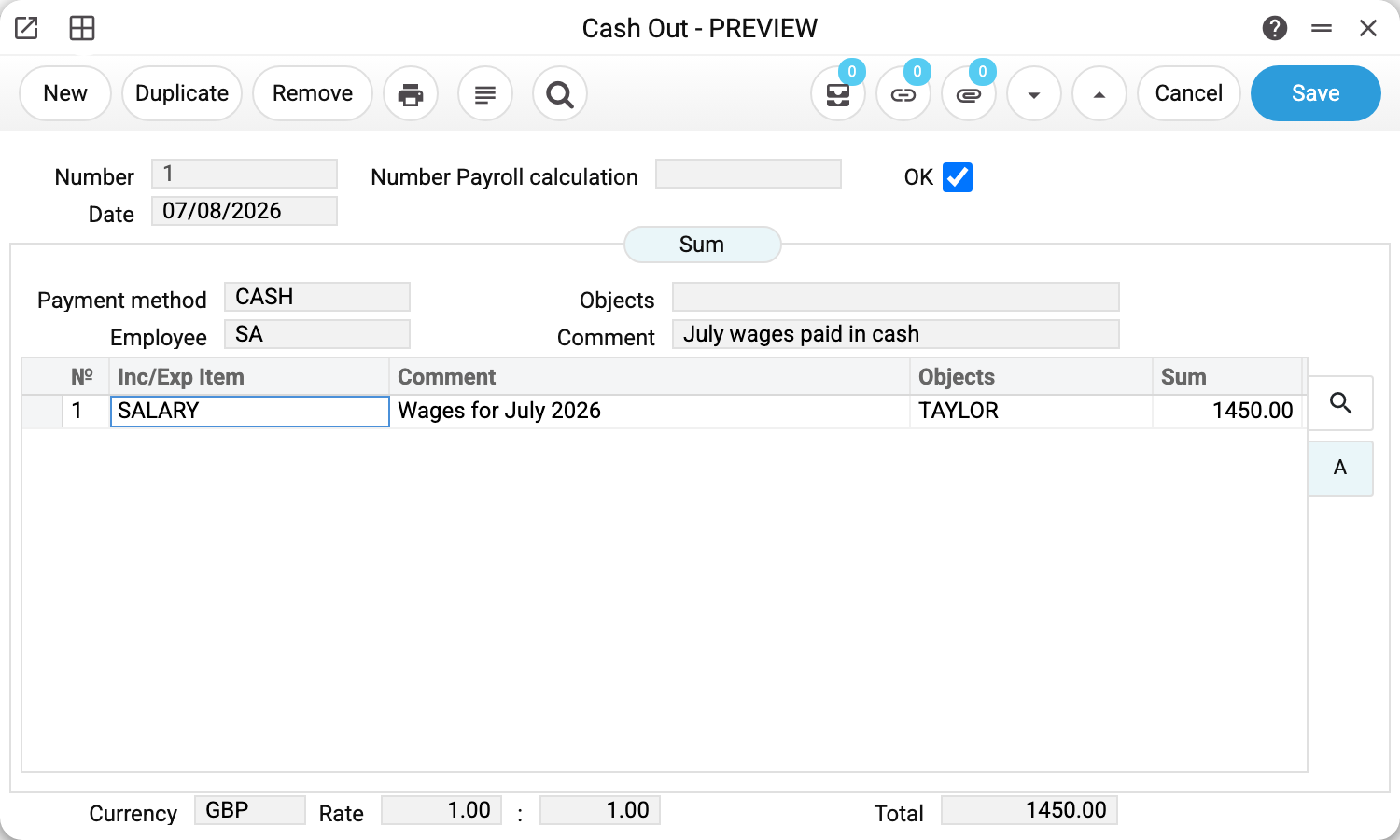
The header is the same as in a cash receipt: payment method (CASH, account 301), employee, objects and comment. Two fields are new. Number payroll calculation is filled in when the document was created from a payroll calculation and ties the payment to a particular run. Under it is Planned payment: the system fills it in when the document was created from a planned payment — in the payment calendar or from the menu of the payment itself; the field cannot be edited by hand. A saved document is linked to the planned payment: the link shows under the chain button in both. A duplicate of the document does not carry the number.
The row holds the item SALARY, a comment, the object TAYLOR and the amount 1450.00. The object is not decoration: object control is configured for account 661, and without a named employee the system will not approve the document.
Several rows in one document
The second document is the payroll taxes for the same wages, paid from the bank:
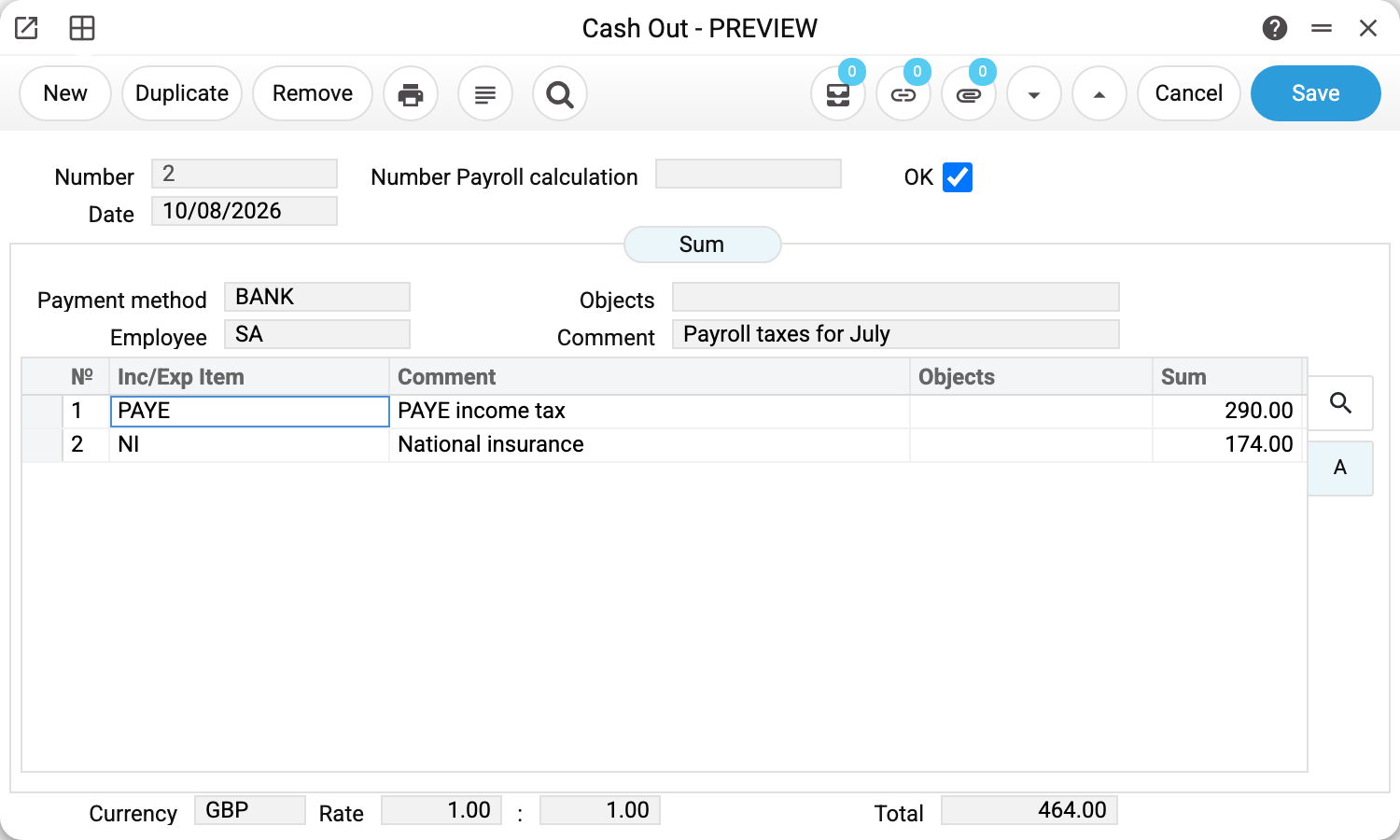
The payment method is BANK (account 311) and there are two rows: PAYE 290.00 and National insurance 174.00. The total, 464.00, is calculated by the system.
This is the convenient way to pay everything that leaves on the same day from the same account but against different items. There is no need to split it into separate documents: in the ledger each row is posted on its own anyway.
What approval does
Ticking OK creates a ledger transaction. For the wage payment:
| Account | Dr | Cr |
|---|---|---|
| 661 Wages and salaries payable | 1450.00 | |
| 301 Cash on hand in national currency | 1450.00 |
The rule mirrors the receipt: debit is the item account, credit is the payment method account. Money left the till and the wage debt went down.
The two-row document produces two pairs of postings:
| Account | Dr | Cr |
|---|---|---|
| 6411 Personal income tax settlements | 290.00 | |
| 311 Current bank accounts in national currency | 290.00 | |
| 651 Settlements for mandatory state social insurance | 174.00 | |
| 311 Current bank accounts in national currency | 174.00 |
The money account repeats in every pair, the item account differs per row. Row objects go into both sides of the posting. A row with a negative sum is a refund into the till: its debit and credit swap places, so the till moves by the sum of the rows with their signs.
Clearing the OK flag reverses the postings completely. In an approved document only the header "Comment" can be changed: edit it and save, no need to clear OK. Anything else: clear OK, fix, tick OK again.
Print variables
Values available in this document's printed form templates. How to write a variable in a template — see Print Forms.
Header fields:
| Variable | What it holds |
|---|---|
| CashOut_OK | OK |
| CashOut_Number | Number |
| CashOut_NumberPayrollCalc | Payroll calculation number |
| CashOut_Date | Date |
| CashOut_PaymentMethod | Payment method |
| CashOut_Objects | Objects |
| CashOut_Comment | Comment |
| CashOut_Employee | Employee |
| CashOut_Total | Total |
| CashOut_CurrencyCode | Currency |
| CashOut_RateFrom | Rate |
| CashOut_RateTo | : |
Row fields:
| Variable | What it holds |
|---|---|
| MNo | Row position number |
| MComment | Comment |
| MCorspCode | Inc/Exp Item |
| MSum | Sum |
| MObjects | Objects |
Common situations
«Enter an object with type …» — the most frequent error when paying wages. Account 661 requires an object of type "employee"; put it on the row rather than in the header if you are paying several people.
"Select the payment mode" — the payment method in the header is empty.
We pay from a bank account, yet the document is called "cash out". That is by design: the payment method decides which account the money leaves. For the bank you pick a non-cash method.
The document is approved but there are no postings. The flag that creates ledger entries for cash payments is set in the transaction control settings, separately from receipts.
The document was created from a payroll calculation. Then the header carries the calculation number, and the row item comes from the Payroll Calculation Setting by the calculation type (advance, salary, vacation). An item with the "Request a payroll number" flag (see income/expense items) does not pass without a calculation number in the header: «Inc./exp. item '…' is used only with accrual of salary». "Paid" in the calculation grows only from the rows made by its "Create payout" menu item. An employee added here by hand with the same item does get the money, but the calculation does not see this payment — so after saving, the window warns about such a row (the save still goes through). The warning works only while the document still has at least one row created from the calculation: if all of them are deleted, a hand-added row goes through without a warning. A row of another item, such as a bank fee, is an ordinary row with no warning.
«Payroll row "…" would be overpaid: already paid …, left to pay …, this cash out pays …» — on approval. A payout against a calculation cannot exceed what is left to pay: usually this is a second cash out made by "Create payout" for the same calculation, or a row sum raised by hand. Taxes are checked the same way: «Tax "…" of payroll calculation … would be overpaid». Reduce the row sum or look at the other cash outs of this calculation.
Where to look next
- Cash In — the mirror document;
- Income/expense items — where the row accounts come from;
- Cash Out Journal — every payment for a period, with its rows;
- Cash Out report — payments broken down by item;
- Cash book — the cash balance and every movement on the account;
- Payroll calculation — the document a cash payment can be created from automatically.