Account Usage
The setting documents take their bookkeeping accounts from when there is nowhere else left to look. Every posting — invoices, payments, receipts, write-offs — resolves accounts down the chain "document row → item card → item group → this window", and the chain ends right here: whatever these tabs hold is the company-wide account default. The inventory cost account is also looked up on the location card, between the group and this window; revenue and the expense account follow chains of their own — see Item Groups.
Where to find it: Modules → Nominal Ledger → Settings → Account Usage
Walkthrough
The "Debtors" tab of the demo database:
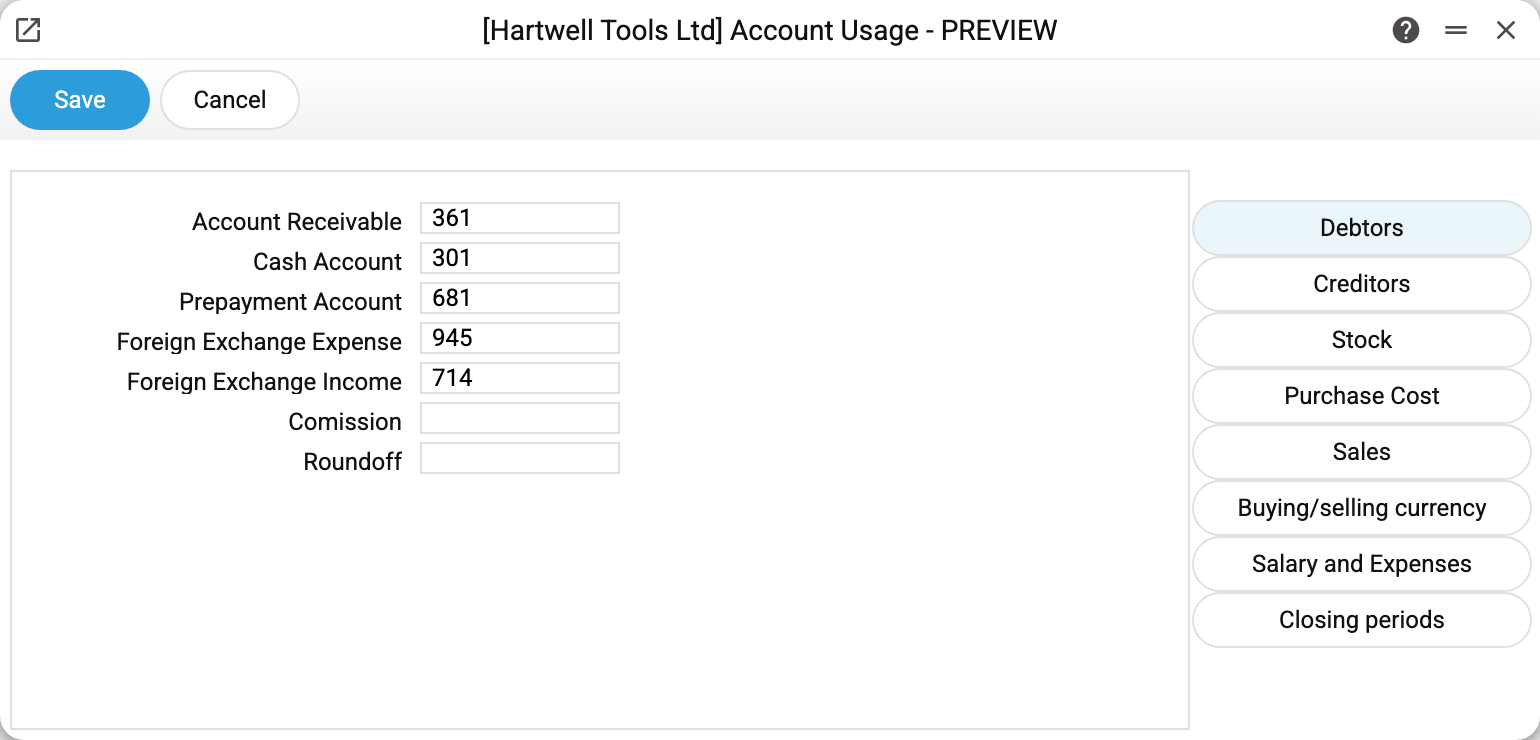
Debtors account 361, prepayments 681, exchange-rate differences 945/714, commission 921. The screenshot still shows "Cash account" — it was removed from the window in August 2026 (see below); the tab now has "Rounding Profit Account" and "Rounding Loss Account" instead (the rounding remainder of goods receipt row sums goes to them) and the "Prohibit invoice overpayment" box. These are the numbers you see in invoice and payment postings in Transactions: an invoice debits 361 against revenue — the "361" came from here.
The "Sales" tab:
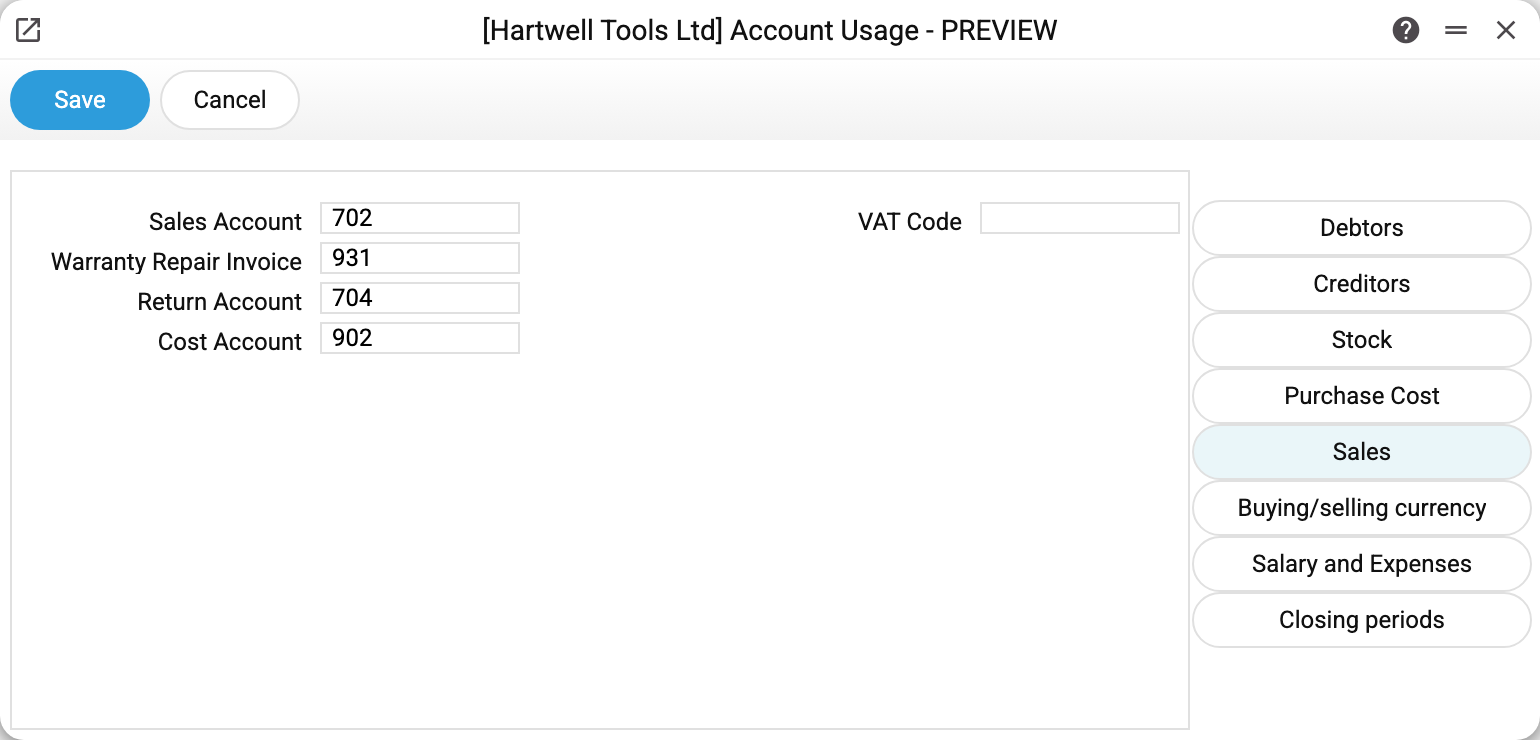
Sales account 702, returns 704, cost of sales 902, warranty repairs 931. "VAT code" is the rate from the VAT setting that documents fall back to when neither the item nor the counterparty defines one.
A credit note reverses where the revenue was posted: it takes the invoice's filled "Sales account", and without one the debit goes to the return account. The "Credit note to the return account, not the sales account of the invoice" checkbox is for those who set their own sales account on invoices but want returns on the return account. It only concerns the account from the invoice: the account of credit payment terms, of a row or of an item group works as it does without it.
The "Stock" tab:
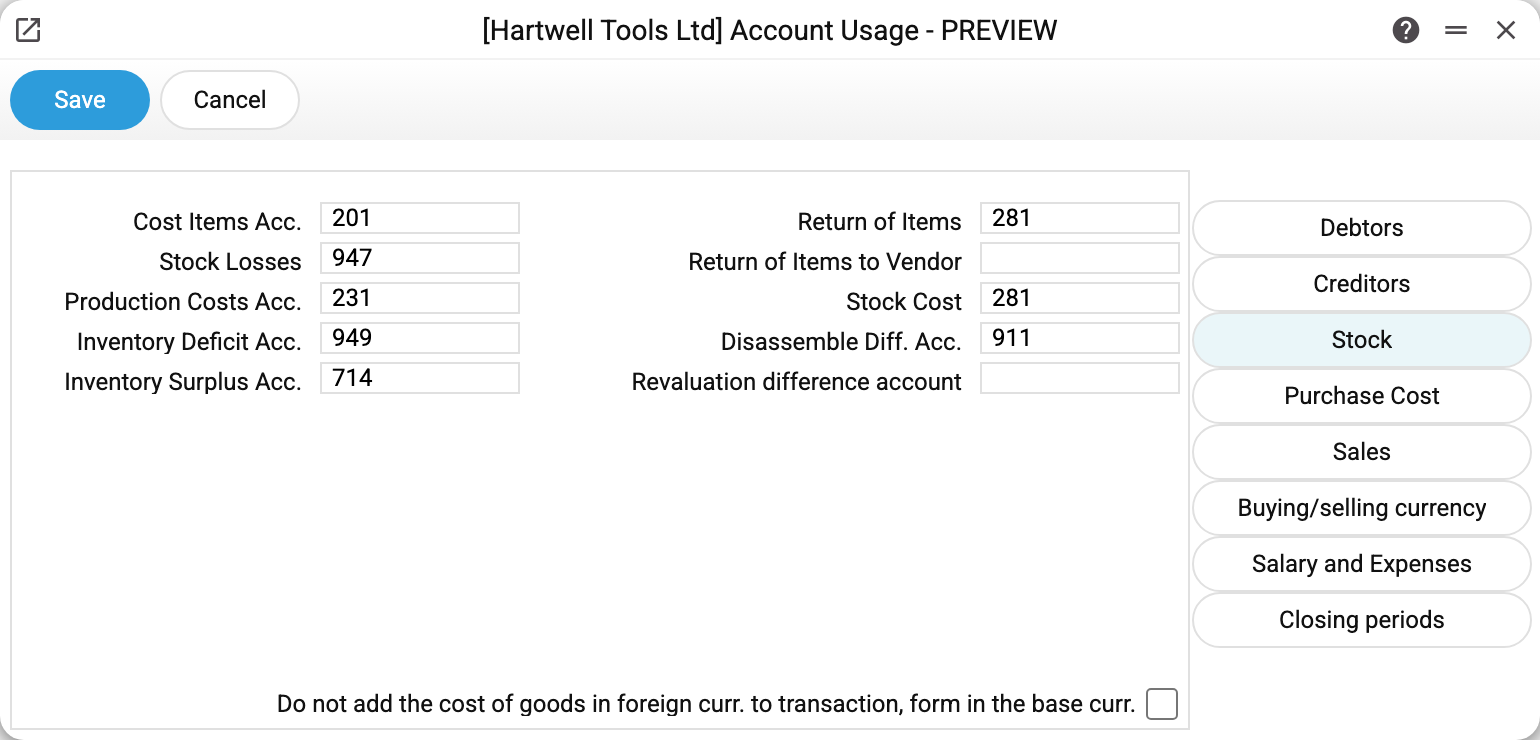
Inventory value 201, warehouse losses 947 — the default account of a new write-off, stocktaking shortages/surpluses 949/714, disassembly differences 911 (disassembly in production). Shortages and surpluses are not posted by the stocktake itself — it does not read this setting — but by the maintenance "Stocktaking comparison": it creates write-offs for shortages and goods receipts for surpluses with exactly these accounts, and refuses without them. "Revaluation difference account" is filled into a new stock revaluation document; "Stock Cost" is required to post a goods receipt — an empty field gives the refusal "Warehouse value account not defined".
The window used to show four more accounts ("Return of Items", "Return of items to supplier", "Cash account", "Earnings applied in the reporting period") — no posting ever read them, and in August 2026 they were removed from the window (#4266). A return from a customer builds its posting as a mirror of the shipment — the stock account from the location and the item, the cost account from the row or from the item card; the till takes its account from the payment mode; profit application is posted manually by the accountant. The exception since September 2026 is a return to supplier in data migrated from SERP: when the setting holds a return-to-supplier variance account, the posting again takes the stored "Return of items to supplier" value (or, by a flag in the migrated data, the row's credit account) and books the price difference to the variance account. The window has no such fields — only migrated data switch this mode on.
The "Closing periods" tab:
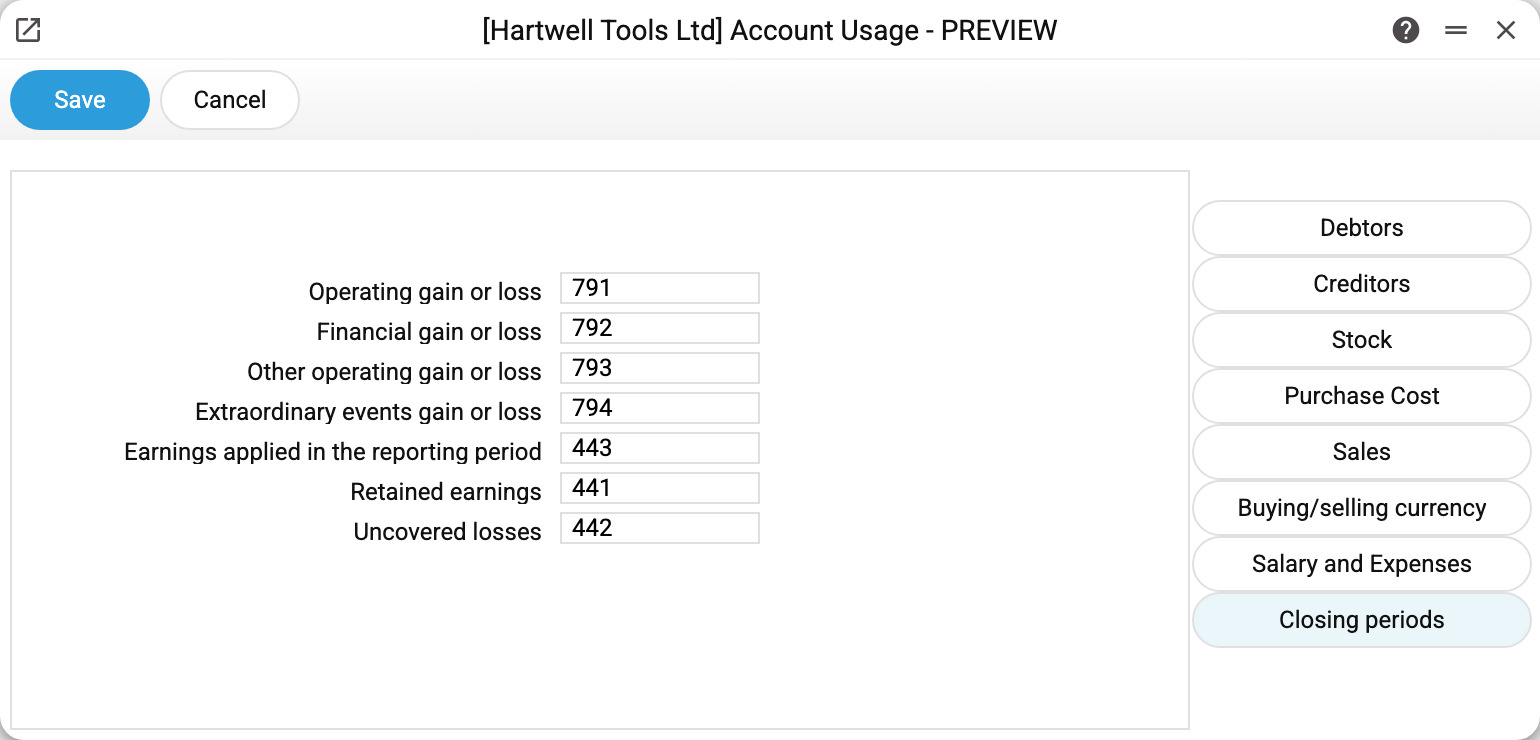
Four financial result accounts 791–794 (operating activities, financial operations, other ordinary, extraordinary events) and the capital accounts 441/442 — these are what closing periods uses to carry out the profit or loss.
The remaining tabs follow the same idea: Creditors (suppliers, prepayments paid to them, bank commission), Purchase Cost (goods receipts and additional costs), Buying/selling currency (the stage accounts of the currency exchange document), Salary and expenses (payroll, advance holders).
How an account reaches a posting
Priority always runs from specific to general:
- an account typed into the document row by hand (on an invoice this sets the row's revenue account);
- the account on the item card: "Cost A/C" for the cost of sales, "Account of the cost of goods" for the stock; revenue has no item level;
- the item group's accounts — "Revenue account" (revenue), "Cost account" (cost of sales), "Inventory cost account" (stock); on an invoice the "Sales account" field in its header sits between the row and the group — when filled, it beats the group's account; for the stock, the warehouse's account comes after the group;
- the account from this setting.
So an edit here only affects documents that had no account anywhere above — and conversely, "why did the invoice pick the wrong account" usually means some higher level defines its own.
Two accounts here — debtors and sales — are mandatory: without them an invoice will not post at all ("Debtor account not defined" / "Sales account not defined").
Prohibiting invoice overpayment
The "Prohibit invoice overpayment" checkbox on the Debtors tab. When it is on, a customer payment and a credit note will not post if they take more off the invoice debt than is owed. Example: the invoice debt is 1,000 UAH.
- A payment of 1,200 will not post: "The amount exceeds the amount of the invoice! 1200 > 1000 UAH" with the hint "Reduce the amount or book the excess 200 as a prepayment". A payment of 1,000 posts and closes the invoice.
- After a payment of 400 (debt 600), a next payment of 700 will not post: the excess is 100.
- A credit note of 1,200 will not post ("The credit note exceeds the open amount of the invoice"); one of 300 posts and the debt becomes 700. The credit note's total from its rows is compared, not the number in the header.
Worth knowing:
- The check is on posting, not on saving: a draft with an overpayment can be saved (drafts are also created automatically — bank statement import, returns), and it does nothing to the debt.
- Paying the visible debt is not an overpayment: if money is rounded to whole units and the debt is 100.50, a payment of 101 closes the invoice.
- Invoice in a foreign currency: the payment amount is converted into the invoice currency and compared with the debt in it.
- With the checkbox off, an overpayment posts as before: the invoice debt goes negative, i.e. it becomes customer credit.
- It takes effect immediately, no restart needed; in a multi-company database it is set per company.
- Supplier payments are not affected by this checkbox: a supplier payment above the open invoice debt does not post regardless of it.
Common situations
"Debtor account not defined" on posting. The "Debtors account" field on the Debtors tab is empty. Fill it in and post again.
"Posting is not balanced by … in base currency: fill «Roundoff»…" when posting an invoice. The invoice posting's debit and credit in base currency differ by rounding, and the «Roundoff» field on the Debtors tab is empty. This happens with a foreign-currency invoice for a tiny amount at a small rate: a row whose base-currency amount rounds to zero gets the smallest amount the rounding rule allows (0.01), so that its currency amount does not vanish from the posting, and a row on the round-off account closes the difference. Fill the field with the round-off account and post again.
Changed an account in the setting — old documents did not change. Nor should they: the account is read at posting time. Only future postings (and re-postings) pick up the new value.
An invoice picks the wrong sales account. Follow the priority chain: the invoice row, the "Sales account" field in its header or the item's group ("Revenue account") most likely defines its own account. This setting is only the last resort.
"Operating loss account not defined" when saving a personnel payment. The "Bank Commission" field on the "Creditors" tab is empty. A personnel payment with a payment method is not saved without it, not even as a draft, although this account never goes into its posting. Fill the field in.
Each company has its own accounts. In a multi-company database this window is filled per company; charts of accounts may differ.