Purchase Order Items Report
The buyer's working list: which purchase orders for the period are still not covered by vendor invoices, and how much money is tied up in them.
Where to find it: Modules → Purchase Orders → Reports → Purchase Order Items Report
It differs from the orders journal not in the rows it lists but in the question it answers. The journal shows what was ordered; this report shows what is still outstanding. Hence the "Items w/o Invoices" column, the state switch and the filters by item attributes — brand, group, classification.
Parameters
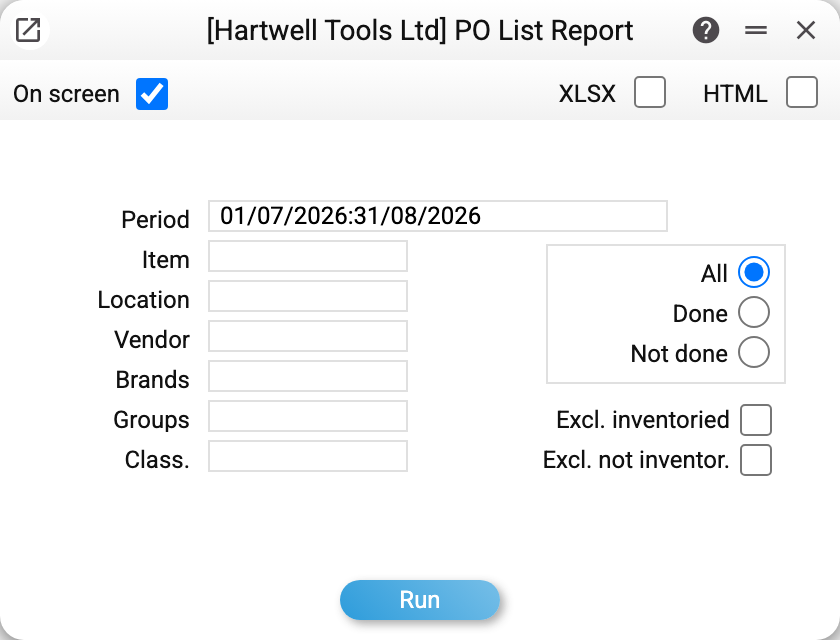
- Period — the frame, by order date.
- Item — a single code. An order appears only if it contains that item.
- Location, Vendor — the usual filters.
- Brands, Groups, Class. — several codes, comma-separated. A filter by item attributes rather than by counterparty: "show everything ordered under the Einsem brand".
- All / Done / Not done — by the "Done" checkbox on the order itself.
- Excl. inventoried — drop orders whose goods have all arrived (by approved goods receipts, minus approved returns); the quantity the supplier refused ("Ordered and received" return) is not awaited. Only what is still awaited remains.
- Excl. not inventor. — the opposite: keep only fully received orders.
The "Currency" and "Sum" columns, and with them the totals at the bottom, are visible only to users with the «Show cost price» right.
A worked example
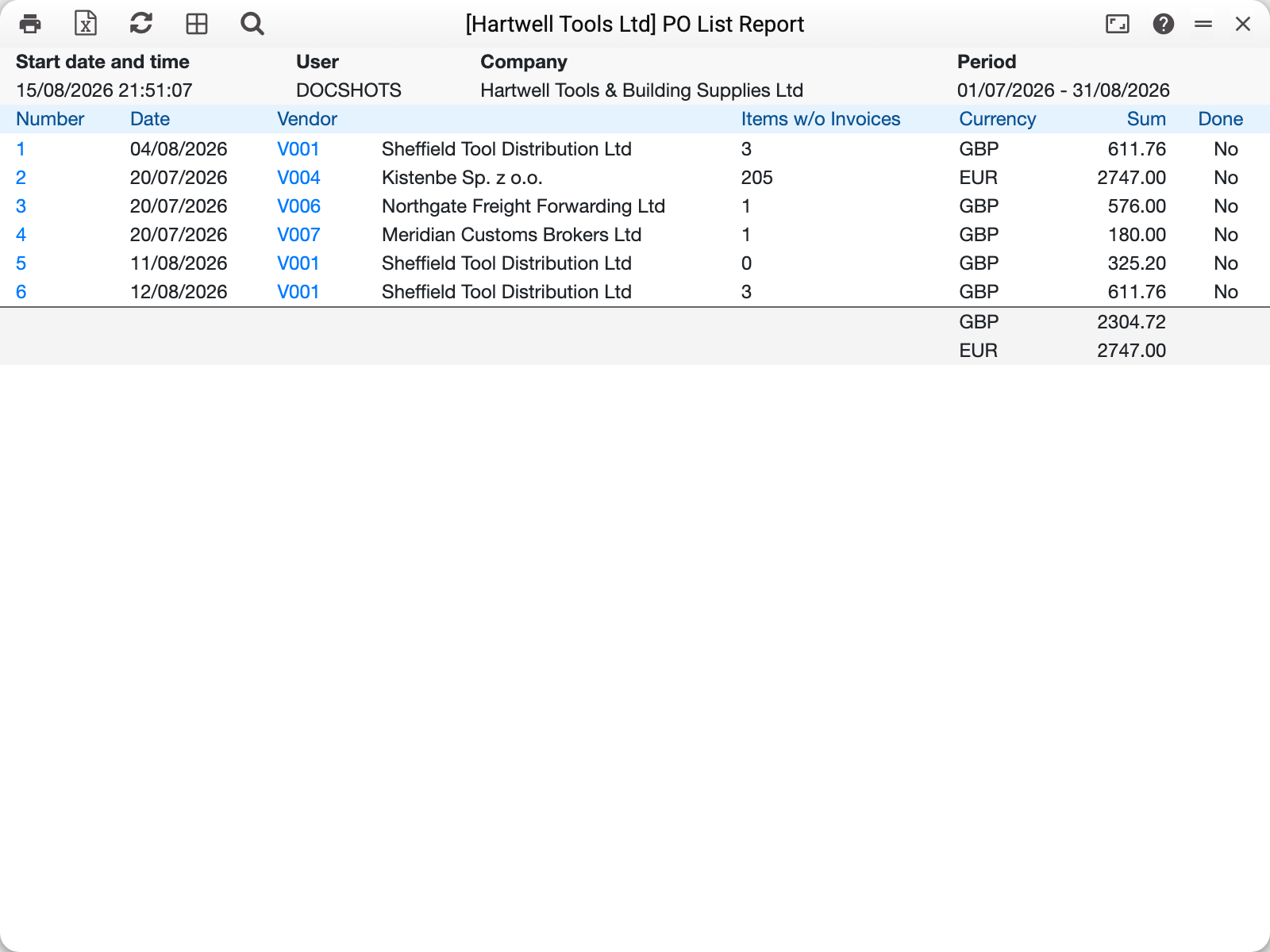
July–August, six orders. Start reading from the "Items w/o Invoices" column — the quantity ordered minus the quantity the vendor has already invoiced.
- Order No. 5 of 11/08/2026 shows 0. Goods received, invoice received, the order is done; its document-by-document breakdown is in the order status report.
- Order No. 1 shows 3: part of the goods arrived without paperwork.
- Order No. 2 shows 205: a large batch from a Polish supplier with no invoice yet.
- Orders No. 3 and No. 4 show 1 each: these are services (freight forwarding, customs broker) ordered as a single line.
At the bottom are the totals per currency, separately: GBP 2 304.72 and EUR 2 747.00. The system will not add different currencies together — which is right, as the rate on the order date and on the payment date are rarely the same.
The "Done" column is not the system's conclusion but a checkbox a person ticks on the order itself. That is why No. 5 still says "No" although everything about it is closed: the buyer simply has not marked it as finished. On an already approved order the "Done" checkbox can still be ticked or cleared — as can the comment; the rest of the header cannot.
If an order had an approved return to supplier with "Reduce quantities" = "Ordered and received", the quantity and the amount are lower by what went back (a "Received only" return does not reduce the ordered quantity). Usually this is already done in the order itself — approving such a return reduces the quantity and amount of its line — and the report shows the order as it is. Returns approved earlier did not reduce the order: the report subtracts them itself, so for such orders the row total may differ from the total on the document itself.
The order number and the vendor code are links: they open the document and the contact card.
How to use it
The daily "what are we waiting for" list. Period — the current month, "Excl. inventoried" on: only orders with goods still in transit remain.
Before closing the month. A non-zero figure in "Items w/o Invoices" means goods with no paperwork from the supplier — exactly the rows accounting hunts for at month end.
A brand review. The "Brands", "Groups" and "Class." fields give a slice by item attributes: how much has been ordered under one brand across all suppliers at once.
Sizing the commitment. The per-currency total is the money promised to suppliers over the period, before any invoices arrive.
Where to look next
- Purchase orders — the document itself;
- Purchase order status — a full breakdown of one order across documents;
- Purchase orders journal — the same orders, expanded to their lines;
- Goods receipts, Vendor invoices — the documents that close an order;
- Purchase order status recalculation — when the fulfilment figures look implausible.