Service Item Statuses
The short answer to "what is in the workshop right now": item, location, quantity.
Where to find it: Modules → Database Maintenance → Registers → Service Item Statuses
A worked example
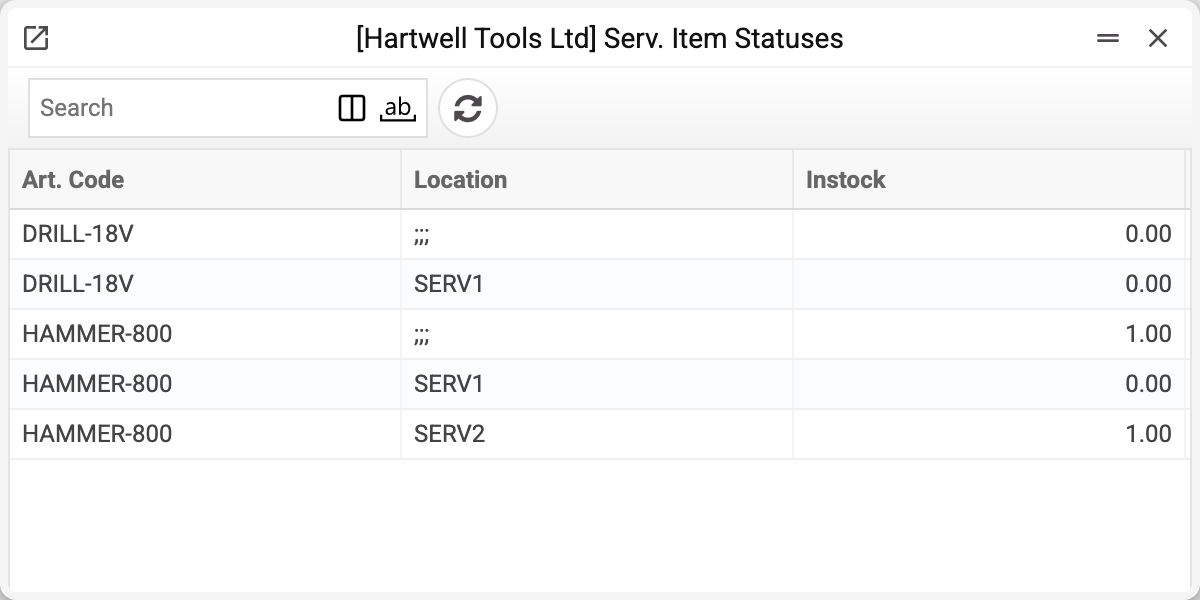
Three columns and no money at all. A row with the location ;;; is not a location but the device's total quantity over all locations. That is deliberate: someone else's equipment has no cost to us, so the register answers only the question of presence — unlike item statuses with their reservations and costs.
How to use it
The quickest way to gauge the workshop's load is to look here: how many devices sit at each point. A rising number at one workshop while its neighbours are empty is a reason to redistribute work.
The figures recalculate themselves: from the «Device accepted», «Gave out» and «Gave w/o paym.» checkboxes in service orders and from service stock movements between points.
Typical situations
The count does not match reality. Compare with the history: usually «Device accepted» or «Gave out» is not ticked in the order, or a movement is not finished.
A device has been in service for months. This register shows presence; for the reason look at the service order.
Where to look next
- Service item history — how the device got here.
- Service orders — the work itself.