Serial Number Range
Some goods are tracked unit by unit rather than as "five pieces": every single unit carries its own number. The item card has a serial-tracking checkbox for that, and from then on every unit received in a goods receipt needs a serial number.
Where to find it: Modules → Stock → Settings → Serial Number Range
Typing them by hand is slow, so the system has a "Generate serial numbers" button. This setting tells it which range to draw the numbers from.
A worked example
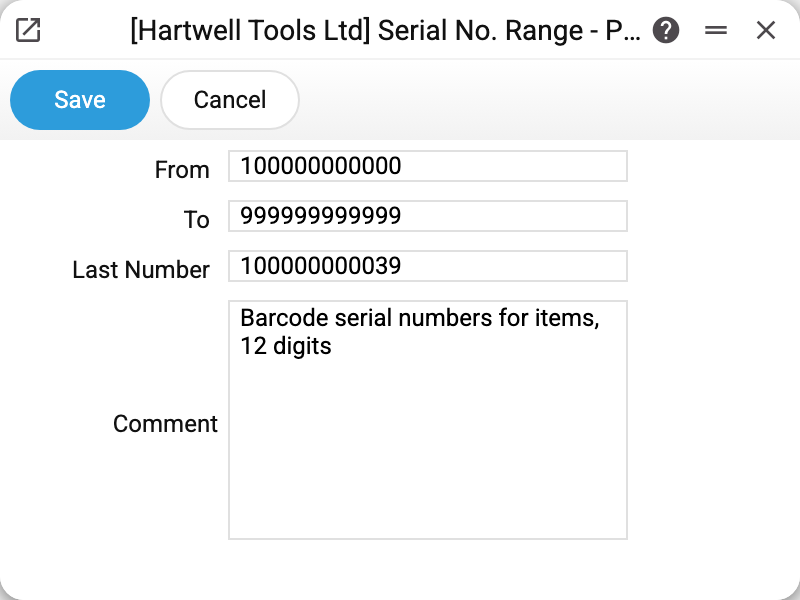
In the demo company:
- From —
100000000000; - To —
999999999999; - Last number —
100000000039; - Comment — what the range is for.
In August 2026 two angle grinders arrived. In goods receipt No. 9 the system split the two-piece line into two one-piece lines and issued the numbers 1000000000382 and 1000000000399, after which "Last number" became 100000000039.
Note that the range holds 12-digit numbers while the document shows 13-digit ones. That is intended — see the next section.
What the system does when generating
- It scans the receipt lines and picks the items whose card has serial tracking switched on.
- A line with a quantity above one is split into separate one-piece lines — otherwise there would be nowhere to put the number.
- It takes the next number above "Last number" and appends a check digit so that the result is a valid barcode. That is why an issued number is one character longer than the range values: 12 digits plus the check digit.
- It stores the 12-digit part of the last issued number in the "Last number" field.
Such a number can go straight onto a label as a barcode and be scanned at shipping.
Numbers typed by hand are left alone: generation only fills empty serial-number cells.
Typical situations
"The "Serial Number Range" setting is not filled in". The "From" and "To" fields are empty — generation will not run until they are set.
"Increase the serial number range in the "Serial Number Range" setting". Fewer numbers remain in the range than there are units in the document. The message suggests a recommended value — put it into the "To" field.
I need my own number format. There is only one format here: a number from the range plus a check digit. If you need the supplier's numbers or the ones printed on the housing, type them into the receipt line by hand and do not run the generator.
Numbers repeat across companies. They do: the setting belongs to each company separately and the counters are unrelated. If numbers must be unique company-wide, separate the ranges — say 100000000000 for the first company and 200000000000 for the second.
Where to look next
- Goods receipts — where generation is started and where the issued numbers are shown.
- Labels Print Setting — to get the serial number onto the label.
- Series of No. for items code generation — the neighbouring setting, but about card CODES rather than individual units.