Cash In/Out
Money in the till drawer moves for reasons other than sales. Change was needed — cash was brought in; the courier had to be paid — cash was taken out. The till records every such movement here: a cash in or a cash out, with the amount, the shift and the cashier.
Where to find it: Modules → POS → Registers → Cash In/Out
The register matters for two things: it shows how much money should be in the drawer right now, and it is what tells you how much the cashier handed over at the end of the day.
Menu: Modules → POS → Registers → Cash In/Out.
Worked example
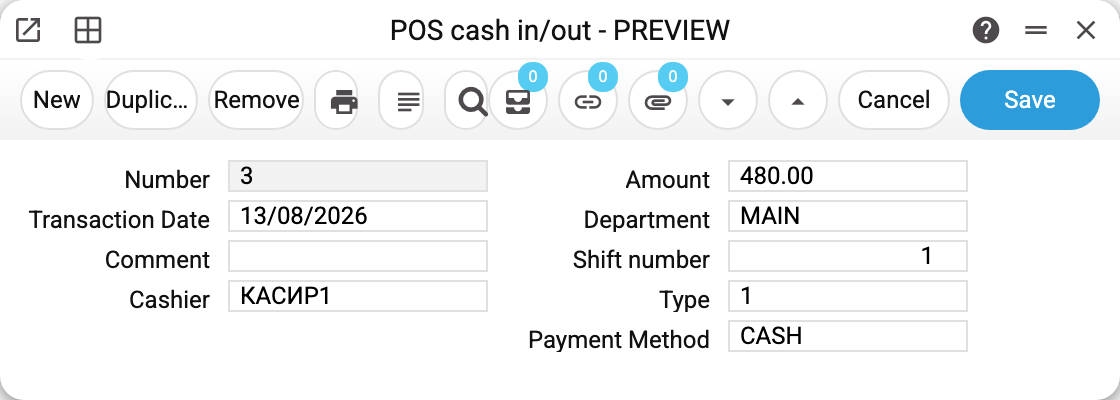
The example is a 480.00 withdrawal the till created itself when the shift was closed.
- Number — the running operation number;
- Transaction date — when the money moved;
- Cashier — who did it (the login);
- Amount — how much;
- Department — the department of the point of sale, taken from the till user's card;
- Shift number — which shift the operation belongs to; the till report gathers the day by this field;
- Type —
0cash in,1cash out; - Payment mode — the cash payment method code of this till (
CASH). It comes from the POS payment modes card, or, if empty there, from POS settings.
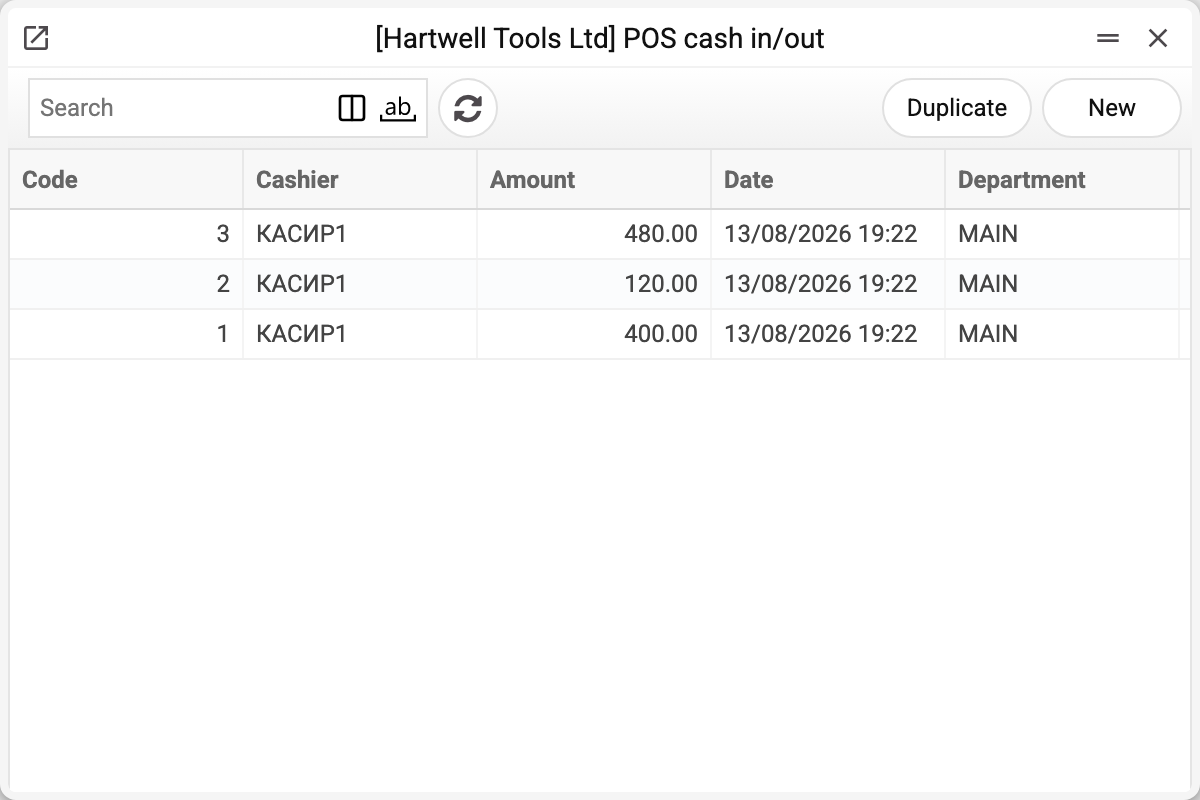
The demo shift shows all three movements: cash in 400.00, cash out 120.00 and the 480.00 withdrawal at closing.
Where the records come from
The operations are created by the till, not by the accountant:
- the "Cash in" and "Cash out" buttons on the cashier's screen (POS Buttons, types
cashInandcashOut) — the cashier types the amount into a dialog; - closing the shift: the withdrawal amount the cashier enters when closing the till is written here as a separate cash-out record.
Along with the record the system fills in: the shift (the open shift of this till; with no open shift the operation is refused — "There is no open shift on this cash register"), the cashier (whoever is authorised), the department (from the till card) and the payment method (from the POS cards). If the point of sale has a fiscal device, the service operation is fiscalised — see Vchasno.Kasa.
How the expected cash is calculated. The till takes the shift's opening amount, adds cash-ins, subtracts cash-outs and adds the cash part of the receipts of that shift. In the example: 200 + 400 − 120 − 480 = 0 — the drawer is empty after the withdrawal, because this shift had no sales.
Parameters
| Field | Description |
|---|---|
| Number | Operation number, assigned by the system. |
| Transaction Date | Date of the cash movement. |
| Cashier | Login of the cashier who performed it. |
| Amount | Amount paid in or taken out. |
| Department | Department of the point of sale. |
| Shift number | Shift the operation belongs to. |
| Type | 0 — cash in, 1 — cash out. |
| Payment mode | Cash payment method code of the till. |
| Comment | Free-text comment. |
Common situations
The till claims more money than the drawer holds. Compare the movements of the shift with the cash out report: it lists the same records with a running balance, and the unregistered movement stands out at once.
The withdrawal was never registered. Then the shift amount stays "in the drawer" at closing and carries over to the next shift. Register a cash out as a separate operation. A fiscal till (with a fiscal device) does not carry the remainder over: the system will not close a shift with cash in the drawer — "A fiscal shift is closed only with an empty till…" — take all the cash out first.
Card money. It is not here and cannot be: this register counts cash only. Card money is in the bank already, which is also why it is never collected.
"Payment mode" is empty. That means no cash payment method is set either in the till card or in the general setting. Worth fixing: without it there will be no cash collection posting either.
See also
- POS Sessions — the shift these movements belong to
- POS Cash Collection — handing the cash over at the end of the day
- Cash Out Report — the whole shift on one sheet