Client Aging Report
The main answer to "who owes us, and for how long". The report takes every open customer invoice as of a chosen date, works out how many days each one is overdue and spreads the amounts across age bands: fresh debt in one column, a month old in another, half a year old in a third. Worth opening before a round of collection calls and before shipping to yet another customer on credit.
Where to find it: Modules → Sales Ledger → Reports → Client Aging Report
Its neighbour, the unpaid invoices report, answers a simpler question — "which invoices are still open"; here the point is not the list but the age profile of the debt.
A worked example
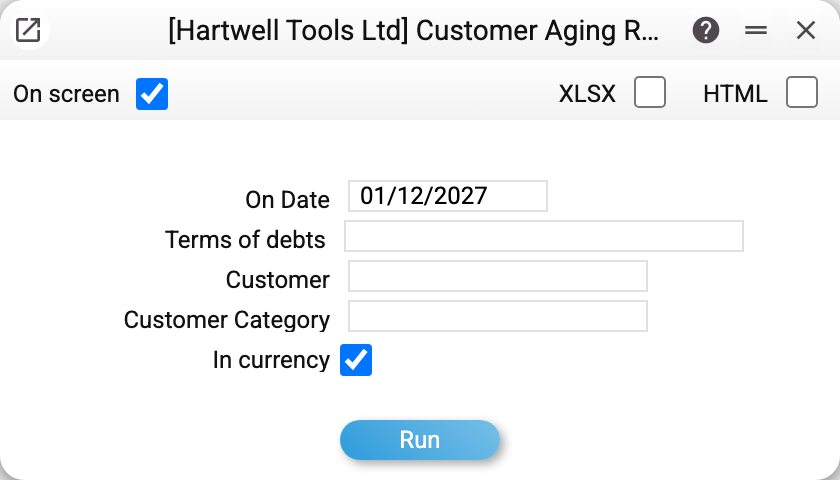
The parameter that matters is "On Date": everything is calculated as if today were that day. You do not have to fill it in — the window puts today's date there; you change it when you look at debts as of an earlier day. Run it for 01/12/2027:
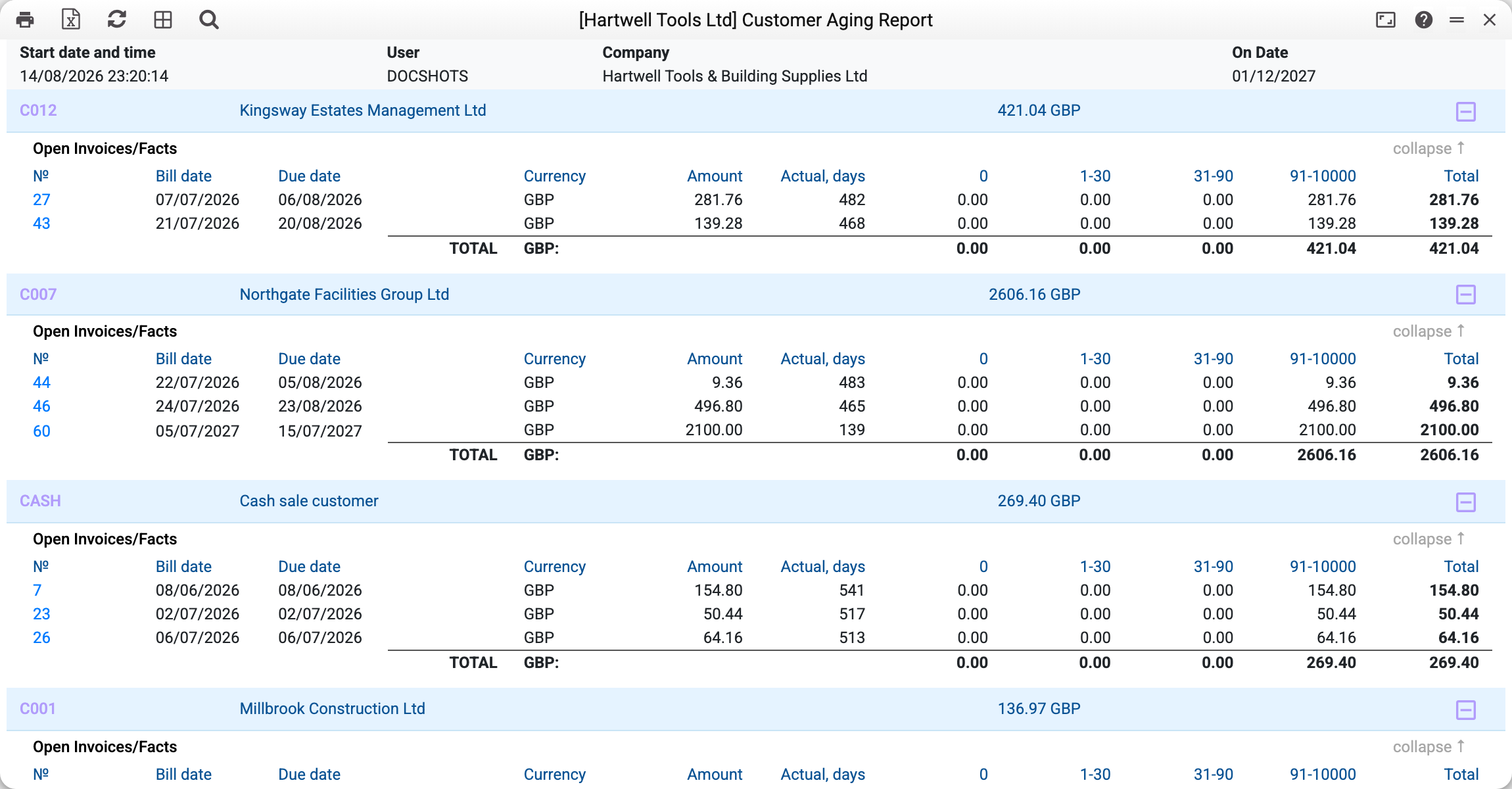
Every customer is a block with the total debt in its header; inside are that customer's open invoices. The columns on the right are the age bands; an invoice's outstanding balance lands in exactly one of them, and the bottom of the block totals each band. An invoice whose age no band covers is still in the report: zeros in the band columns, the amount in "Total".
The key column is "Actual, days": how many days have passed since the invoice's due date (not its issue date). So invoice 60 for Northgate Facilities, due 15/07/2027, shows 139 days and falls into "91-10000", while the older 2026 invoices of the same customer show 465–483 days and land in the same band.
At the very bottom the report totals the debt of the whole company.
Where the numbers come from
What counts as debt. Approved (OK) customer invoices except cash ones — those create no debt — together with every approved payment up to the report date. The difference is the outstanding balance. A credit note reduces the customer's debt.
The date the overdue count starts from is the invoice's due date. It is not typed by a manager: payment terms set it as invoice date + N days. Terms of 0 days give a due date equal to the invoice date, and the debt becomes overdue the very next day. An invoice cannot be approved without payment terms and a due date, so every invoice in the report has one.
Customer prepayments. A prepayment applied to an invoice has already reduced that invoice's balance. An unapplied prepayment is shown under the customer in a separate section — number, date and the balance on the report date. What happens next depends on the account it was posted to ("Prepayment account" in the customer card, or, if that is empty, in the "Account Usage" setting):
- the receivables account — the section "Unapplied prepayments (reduce the debt)": amounts with a minus sign, and they reduce the customer's debt and the grand total, so the report agrees with the receivables account. The aging columns show invoices only — a prepayment is not split by age, so in the "Debt Total" row the columns add up to more than "Total" by exactly that amount;
- a separate advances account — the section "Unapplied prepayments — on the advances account, do not reduce the debt": amounts for reference only, the totals do not deduct them, because receivables and advances are kept apart in the books.
The bands are not defined here. An empty "Terms of debts" field means "take the bands from the setting". If that is empty too, the report does not run: "Fill in the customer aging report settings" — enter the bands in the field or in the setting.
Parameters
| Parameter | What it does |
|---|---|
| On Date | The day the debt and the overdue days are calculated for |
| Terms of debts | Your own bands instead of the setting, comma separated: 0,1-30,31-90 |
| Customer | A single customer |
| Customer category | A group of customers (wholesale only, for instance) |
| In currency | On by default — amounts in the invoice currency; off — converted to the base currency at the document's rate |
Common situations
A customer who owes you is missing. Check that the documents are approved: an unapproved invoice does not exist for the report. The second reason is a cash invoice — those never create debt. An amount sits in the "0" column although the invoice looks overdue. Column "0" means "not due yet". Look at "Actual, days": a negative number means there is still time before the due date.
The debt does not match the invoice total. Then there is a partial payment or a prepayment applied — the report shows the remaining balance.
You need the report in the base currency. Clear the "In currency" checkbox and every amount is converted at its own document's rate.