Invoice Setting
Settings that decide how every new customer invoice behaves: which customer and which payment terms it gets when none are chosen, whether it takes goods off the shelf, whether it may be raised before the shipment, whether the system creates and approves it on its own, whether VAT is inside the selling price, and how the document VAT is calculated. Set once per company — after that the system carries it into each document.
Where to find it: Modules → Sales Ledger → Settings → Invoice Setting
What is inside
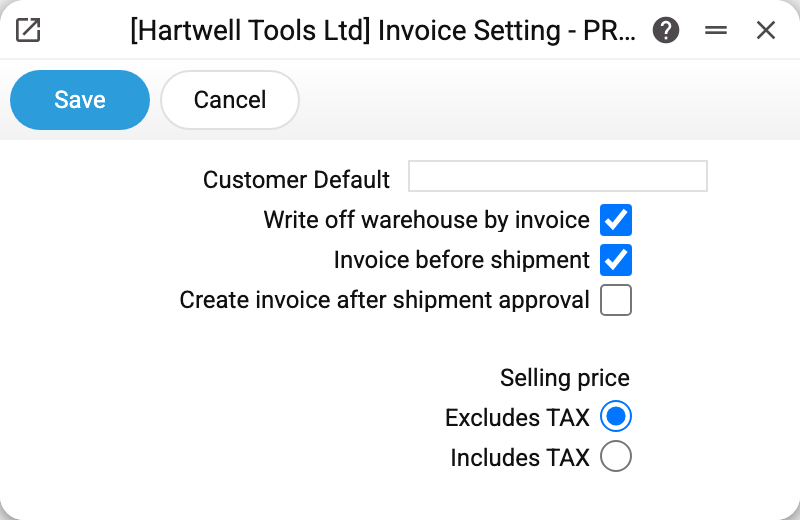
Customer by default — the customer filled into a new invoice and a new sales order when none is chosen by hand. It earns its keep in retail, where most sales go to one anonymous buyer. A personal default wins over it: if the "Client by default" field is filled in the operator's user card, that one is used.
Default Payment Deal — the payment terms an invoice takes when the customer card has none: in a new invoice, when a customer is chosen and when the customer is changed. The payment date is calculated from them as well. If the customer card has payment terms, those are used. A credit note does not take them from here: changing the customer on a credit note leaves its terms as they are. A till receipt does not take them either: its terms come from the customer card, and without them the till setting applies. Sales orders, quotations, contracts and purchases do not take this value either. Only terms that exist in the register can be chosen: with any other code the setting is not saved ("Payment deal does not exist"). With the field empty nothing is filled in: after switching to a customer without terms in the card, the terms and the payment date stay empty and must be filled in before approval.
Write off warehouse by invoice — a new invoice gets the "Update warehouse" flag, so approving the invoice itself removes the goods. That is how companies work when they raise no separate shipment: the invoice goes out, the stock goes down. Without the flag a new invoice does not get "Update warehouse" by itself (on an unapproved invoice with an empty "Orders Number" field it can still be ticked by hand) — then it is the shipment that moves stock and the invoice only asks for money.
Invoice before shipment — allows an invoice to be raised before the goods leave (a payment-in-advance arrangement). The flag is carried into the new sales order as its "Invoice Before Delivery" checkbox, and that checkbox decides whether an invoice may be raised from the order straight away.
Create invoice after shipment approval — when a shipment is approved, the system raises the invoice for what was shipped. Without the next flag it arrives unapproved: checking and approving it is a manual step. If the shipment is unapproved while that invoice is still a draft, the system deletes it — unless a file is attached to the invoice or it is open in someone's window at that moment.
Approve the created invoice — the invoice raised by a shipment approval (the flag above) is approved at once, the same way a person approves it: with every check, the customer's debt and the postings. If the invoice cannot be approved, the shipment is not approved either, and the screen shows why the invoice was refused. No draft is left behind by such a refusal. While the flag is on, a shipment whose invoice is already approved cannot be unapproved — the system names the invoice number and answers "Unapprove the invoice first, then the shipment".
Selling price: Excludes TAX / Includes TAX — whether the tax is inside the price typed into a document row. This is the fallback answer: if the document has a price list (it is filled in from the user card, the customer card or the customer category), the price list decides — its own "VAT" switch ("Excludes" / "Includes"). The system falls back here when the document has no price list, and it does so on every row recalculation, not only when the document is created. Do not leave the switch unset: documents then treat the price as including VAT, while an order created from a quotation price list link treats it as excluding VAT, and the amounts of such documents diverge.
Document VAT by VAT code — how the VAT in the document total is calculated. Without the flag (the initial setting) the document VAT is the sum of the rows' VAT. With the flag it is calculated per VAT code: the amounts of the rows of each code are added up (net amounts with prices excluding VAT, gross amounts with prices including VAT), the tax is taken from that sum at the code's rate and rounded once, and the document VAT is the sum over the codes. With prices excluding VAT the document total is the net amount plus the VAT by code. On a document with many rows the two methods can differ by a few cents. It applies to sales orders, invoices, quotations and contracts; worksheets always add up the rows' VAT. Documents already saved are recalculated only when they are edited (an invoice also when it is approved).
Common situations
Goods are written off twice. "Write off warehouse by invoice" is on, and the invoice for goods already shipped was entered by hand rather than from the shipment: the shipment removed the stock, then the invoice removed it again. Rows of an invoice created from a shipment (from its menu or by approving the shipment) leave the stock alone — they remember their shipment. Create the invoice for shipped goods from the shipment; if all sales go through shipments, the flag can be turned off.
Invoices for shipments have to be typed by hand. Turn on "Create invoice after shipment approval" — every approved shipment will then produce a draft invoice. To have the invoice approved at once, turn on "Approve the created invoice" as well.
A shipment will not approve, and the message is an invoice refusal. "Approve the created invoice" is on, and the invoice raised from the shipment fails a check (for example, the customer has no payment terms). Fix the cause named in the message or turn the flag off — the invoice will then be created as a draft.
A new invoice has empty payment terms and payment date. The customer card has no terms, and "Default Payment Deal" is empty too. Fill in the customer card or set default terms.
A row's amount is not price × quantity. Usually it is VAT: "Includes TAX" means the tax already sits inside the price. Check the document's price list first — its setting outranks this one.
The document VAT is a cent off the sum of the rows' VAT. "Document VAT by VAT code" is on: the tax is rounded once per code, not in every row. That is by design; to make the document VAT equal the rows' sum, turn the flag off.
Changes had no effect on existing documents. Most flags are read when a document is created: invoices and sales orders already raised keep the flags they were given at the time. The exceptions: "Document VAT by VAT code" applies to a document as soon as it is edited; "Selling price" applies to a document without a price list at its very next row recalculation; "Default Payment Deal" applies when the customer is changed on an invoice that already exists.