VAT
The VAT rate table: rate code, percentages and the tax accounts VAT postings land on. Every document row carries a rate code — when an invoice or goods receipt is posted, the VAT amount is computed from that code's percentage and posted to the accounts of that row. When legislation changes, new rates are added here — no system code changes involved.
Where to find it: Modules → Nominal Ledger → Settings → VAT
Walkthrough
The demo database setting holds two rates:
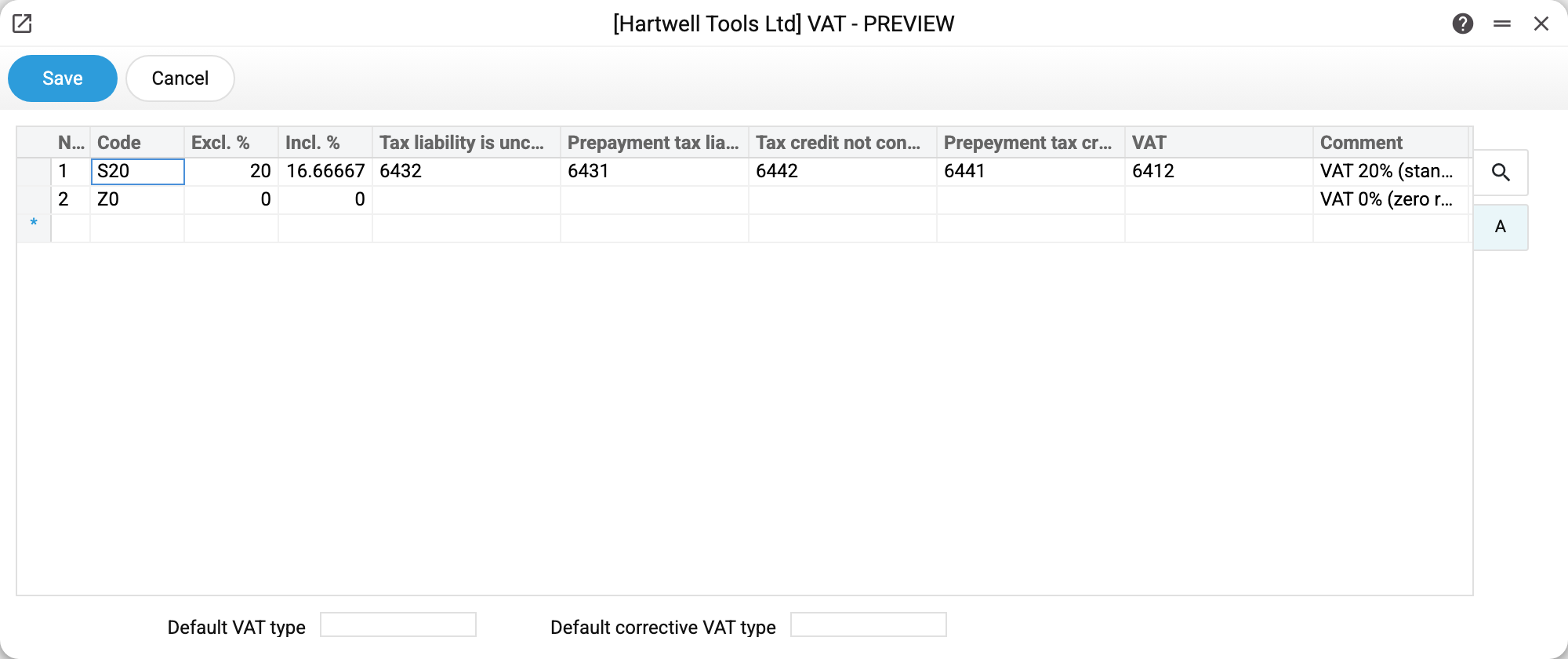
- Row S20 — the standard rate: "Excl. %" 20 (the percentage "on top", for VAT-exclusive prices), "Incl. %" 16.66667 (the percentage "inside", to extract VAT out of a VAT-inclusive amount: 20/120). Then five tax accounts — 6432, 6431, 6442, 6441 and 6412.
- Row Z0 — the zero rate: all percentages are zeros, no accounts needed. The code for VAT-free operations.
- At the bottom, the default tax invoice types: the type a new issued or received tax invoice gets (created by hand or from a document), and the type of a corrective one (and of one for a negative prepayment). An empty field — the new tax invoice gets an empty type.
Where 16.66667 comes from: a VAT-inclusive amount × 16.66667% equals the same tax as the net price × 20%. Both percentages describe ONE rate from two sides, which is why they are filled as a pair.
Where the postings go
Four "bucket" accounts match the tax lifecycle stages — before and after the "first event":
| Account in the row | Demo | When it is used |
|---|---|---|
| Tax liability is unconfirmed | 6432 | Shipment before payment: the liability is accrued but not yet confirmed |
| Prepayment tax liability | 6431 | Customer prepayment on an order with VAT: tax on the advance. An advance without an order posts nothing here |
| Tax credit not confirmed | 6442 | Goods received before paying the supplier |
| Prepayment tax credit | 6441 | Advance to a supplier |
| VAT | 6412 | Settlements with the budget — the final tax account |
Which rate code a new row of a sales document gets is decided by the chain: customer card → item card → item group → "VAT code" in Account Usage. The customer comes first: its code overrides the item's. If the code in the document header was set by hand, new rows take it until the customer or the price list changes. A code typed into the row by hand holds until the header code, the customer or the price list of the document changes: then the rows with an item get their code again — from the header or by the chain.
Common situations
Added a new rate — old documents did not recalculate. By design: the VAT of a row is computed from the code's percentage when the row is filled in or recalculated in the document, and is stored in the document; a new code does not touch old documents.
Change the percentage of an existing rate or add a new one? Add a new one with its own code — and stop putting the old code on items, contacts and documents. A rate has no validity date: the window has no such column, and documents do not read the hidden date field — a date cannot switch the old code off. A new percentage of an existing code is picked up by every document whose VAT is computed after the edit: a row changed in a draft, and with "Document VAT by VAT code" ticked in the Invoice Setting — also the VAT total of an invoice and its posting, which are computed anew when it is posted. The tax of old documents then drifts.
VAT computed, but posted to the wrong account. The tax account comes from the rate row of the code on the document row — check the code in the document first, then the accounts in its row here.
"VAT code … has no account "…": the VAT row of the document cannot be posted". The code on the document row has an empty account while the row's tax is not zero: "Tax liability is unconfirmed" for a customer invoice, "Tax credit not confirmed" for a supplier invoice. The document will not post until the account is filled in; it never posts silently without its tax row.
The rate exists but a document cannot see it. The code in the document/item does not match the row's code — codes are matched literally: "S20" and "S20 " (with a space) are different codes.