Settlements reconciliation
A document meant for the counterparty rather than for internal use: a ready-made form with two columns — your figures on the left, blank space for the other side's figures on the right — and signature lines at the bottom. You print it, sign it and send it to the customer to agree who owes whom as of a given date.
Where to find it: Modules → Sales Ledger → Reports → Settlements reconciliation
That purpose is what separates it from its neighbours: the aging report and the unpaid invoices report are tools for yourself, this one is paper for the counterparty.
A worked example
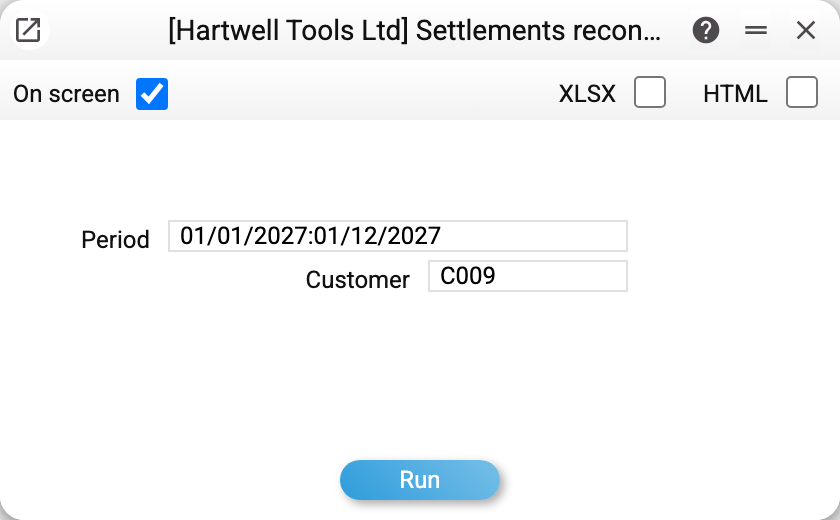
The customer is mandatory. A reconciliation is drawn up with one specific counterparty; leave the field empty and the system shows a warning instead of running the report.
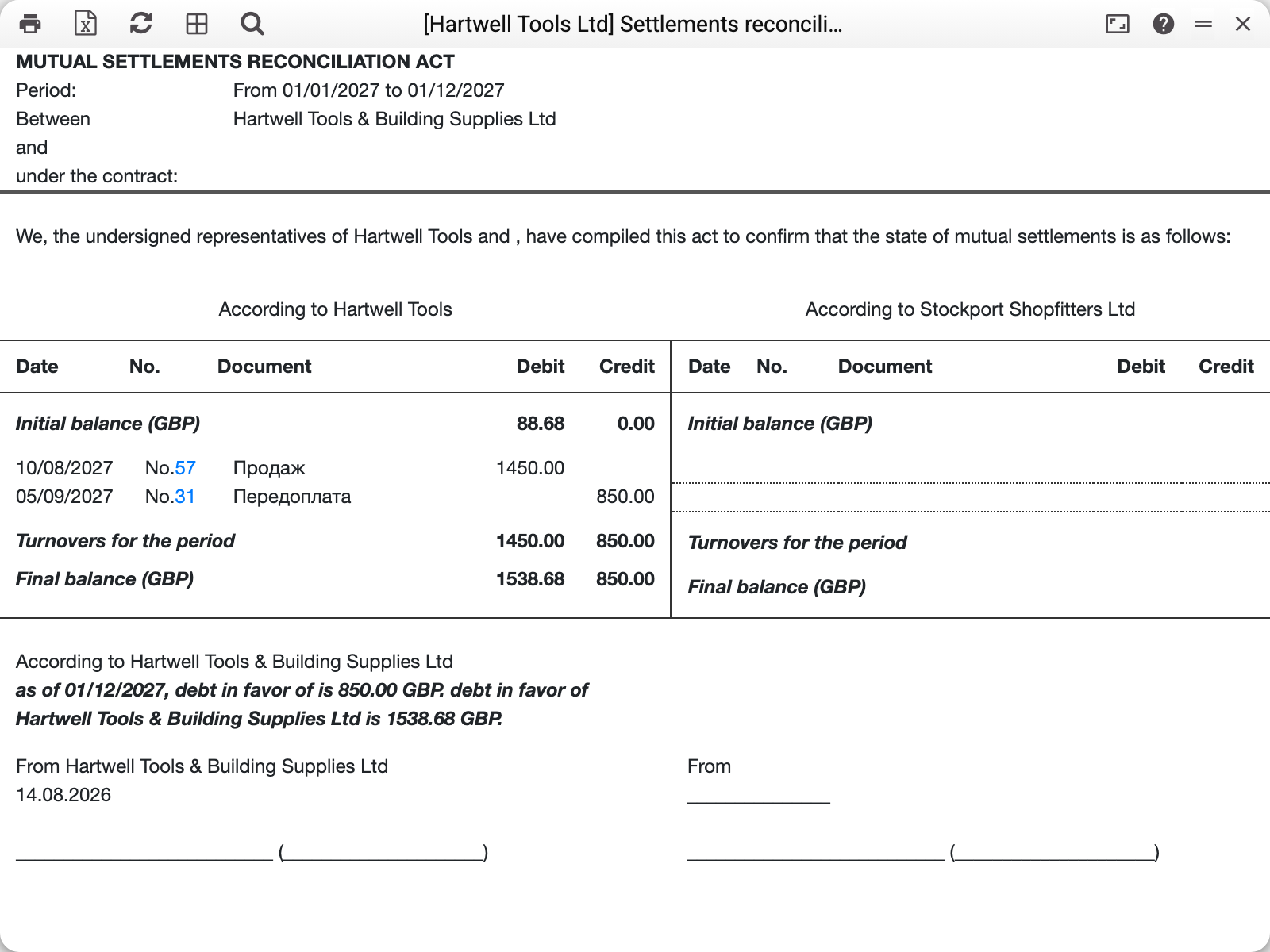
Read it top to bottom:
- the period and the two parties — from the parameters and from the company settings;
- opening balance — the state of the account at the start of the period;
- the movement rows — one line per document, with the sales in debit and the payments in credit; a payment whose line names an invoice is labelled "Payment", one without an invoice — "Prepayment", and the label stays the same after the advance is later applied;
- turnover for the period and the closing balance;
- a sentence underneath stating the amount and in whose favour it stands. For each currency it nets the debit and credit of the closing balance into one figure — who actually owes whom.
The right-hand column is empty on purpose. The counterparty fills it in with their own figures — that is the whole point of a reconciliation: both sides write down their numbers and see where they diverge.
What to keep in mind
The "and …" line in the header and the closing sentence show the customer's name from the card. The customer card has no separate field for the full legal name, so the statement uses whatever is in the "Name" field. (The exception is a service full-name field that the card window does not show: if an import filled it, the statement names the party by it.) If the signature needs the full legal name (for example, "Limited Liability Company…" instead of "LLC…"), enter it in "Name" or correct it on the printed statement.
The "under contract" line is empty too — the contract reference is not filled in automatically.
Payment at the till. An invoice that the customer partly paid at the till right away (in the receipt — in cash, by card or another way) goes as a "Sale" line with the invoice amount in debit and the part paid at the till in credit: the balance changes only by the unpaid remainder — the same as the invoice's debt after posting. An invoice paid in full at the sale (type "Cash" or a cash payment term) carries the same amount in both columns.
Debit and credit are from your company's point of view. Debit is what the customer owes you (sales), credit is what you owe them (payments, prepayments). Each currency has its own balance; paying an invoice in another currency (a EUR invoice paid in the base currency) shows in the invoice currency — the amount the payment posting removed, at the rate of the payment date.
Parameters
| Parameter | What it does |
|---|---|
| Period | The span the movements are shown for; balances are calculated at its start and end |
| Customer | The counterparty of the statement. Mandatory |
Common situations
The report will not run. The customer is empty — it is the one mandatory parameter.
The balance does not match the customer's own figures. That is what the statement is for: walk the movement rows and find the document the other side is missing. Usually it is an invoice issued in the last days of the period, or a payment applied to the wrong invoice.
You need a statement covering everything. Set the period back to the first year of trading — the opening balance is then zero and the whole history appears.
The statement has to be sent to the customer. Print it to PDF or export it to Excel with the buttons at the top left of the result window.