Customer Payments Information
A trial balance by customer: what they owed you at the start of the period, what was invoiced and received during it, and what is left at the end. Each customer gets a block listing the documents that moved the balance.
Where to find it: Modules → Sales Ledger → Reports → Customer Payments Information
It is the fullest of the money reports: the payments journal shows receipts only, the aging report shows the balance on one date, and here you see the movement — where the debt came from and what reduced it.
A worked example
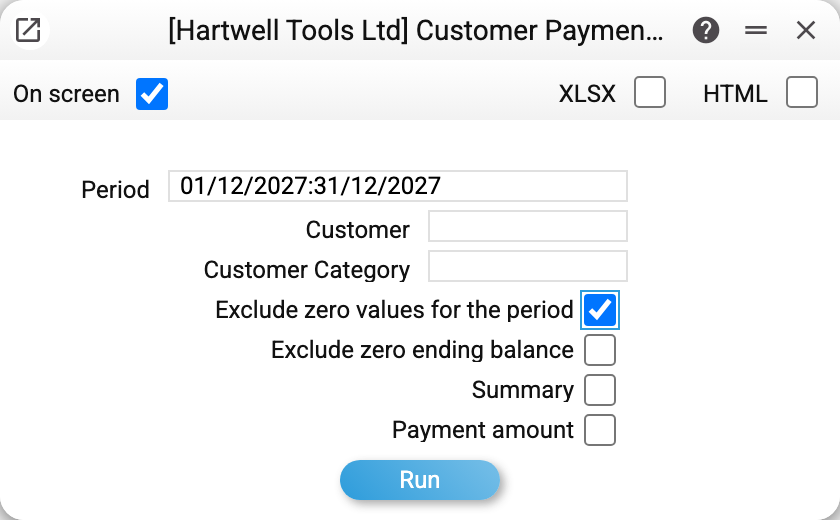
The period is December 2027, with "Exclude zero values for the period" ticked so that only customers with activity appear.
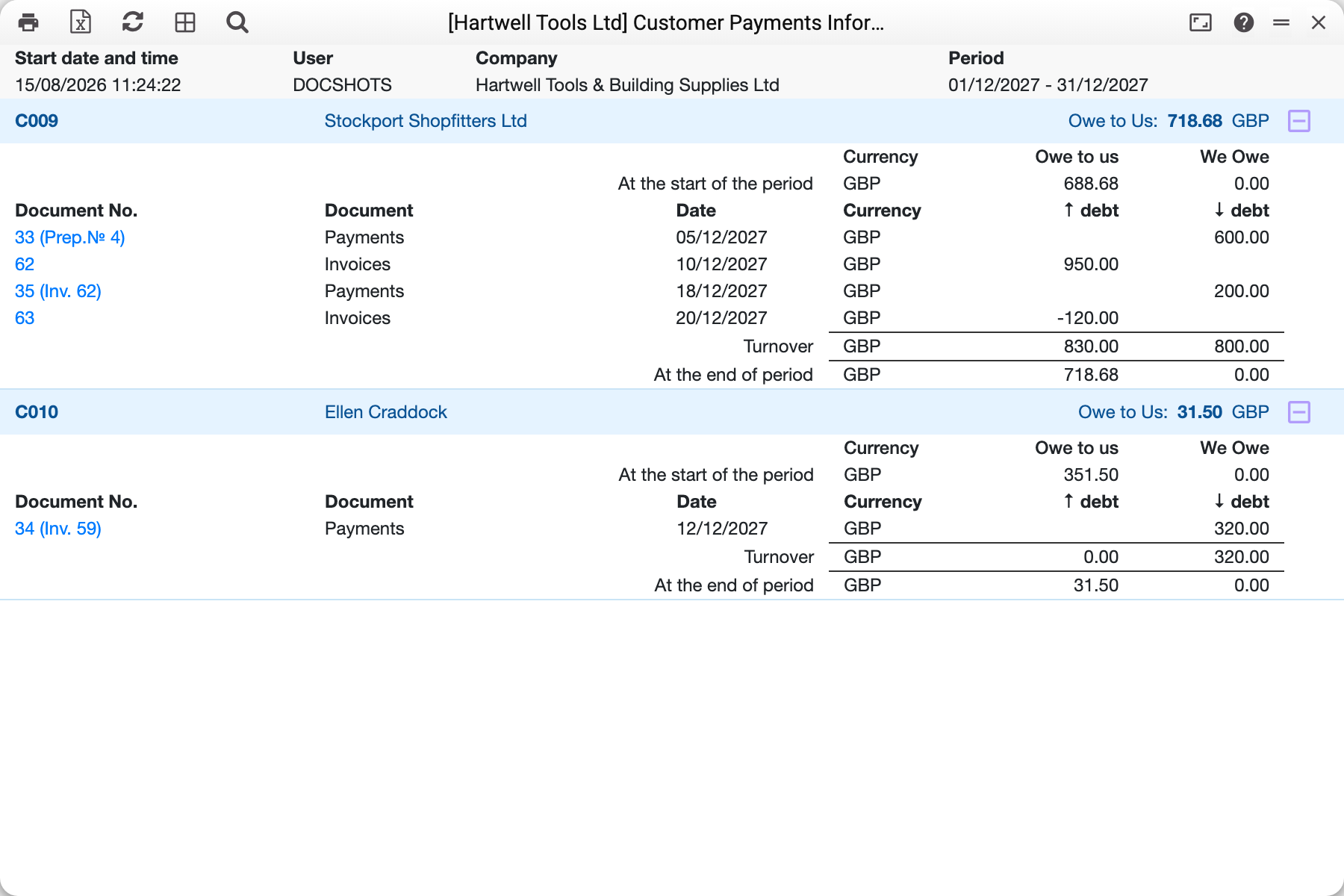
At first the report shows only the customer line with its closing balance; the table opens with the plus button on the right, the same way collapsed days work in the sales report.
Stockport Shopfitters (C009) — all four kinds of movement at once. They owed 688.68 at the start, then:
| Document | Date | ↑ debt | ↓ debt |
|---|---|---|---|
| Payment 33 (Prep.№ 4) | 05/12/2027 | 600.00 | |
| Invoice 62 | 10/12/2027 | 950.00 | |
| Payment 35 (Inv. 62) | 18/12/2027 | 200.00 | |
| Invoice 63 | 20/12/2027 | −120.00 |
Turnover for the period is 830.00 against 800.00, and the closing balance is 718.68 (688.68 + 830.00 − 800.00).
Two lines deserve a careful read. Payment 33 is marked "Prep.№ 4" — a prepayment: the advance reduces the debt before any invoice is raised. And invoice 63 carries a minus — it is a credit note; it sits in the "↑ debt" column with a negative sign because it lowers what was invoiced rather than raising what was paid.
Ellen Craddock (C010) — the simple case. 351.50 owed at the start, one document (payment 34 marked "(Inv. 59)"), turnover 0.00 against 320.00, and 31.50 left at the end.
Where the numbers come from
"Owe to us" is the total of the customer's approved invoices; "We owe" is the total of their payments and advances. The report does not force them into one figure: if the customer has overpaid, the remainder appears in the "We owe" column.
The opening balance covers every document up to the first day of the period, the closing balance up to the last. Turnover is what happened in between.
Cash invoices create no debt: they are settled as they are written, so in the movement such an invoice carries the same amount in both "↑ debt" and "↓ debt" and leaves the balance unchanged. An invoice that the customer partly paid at the till right away (in the receipt — in cash, by card or another way) carries the invoice amount in "↑ debt" and the part paid at the till in "↓ debt": the debt is only the unpaid remainder, as after the invoice is posted.
Currencies are kept apart. A customer with sterling and euro documents gets two lines, each with its own balance; the report does not convert them into one base-currency figure. Paying an invoice in another currency (a EUR invoice paid in the base currency) reduces the debt in the invoice currency — by the amount the payment posting removed, at the rate of the payment date. If there is no rate for that date, the payment row stays in the currency received.
Service orders and service payments count too — a service order raises the debt by its total repair cost, a service payment lowers it, even with no invoice involved.
Parameters
| Parameter | What it does |
|---|---|
| Period | The bounds used for the opening and closing balances |
| Customer | A single customer |
| Customer Category | A group of customers |
| Exclude zero values for the period | Drop customers with no activity — the report becomes a list of the active ones |
| Exclude zero ending balance | Drop customers who have settled in full |
| Summary | Short form: balances and turnover only, no document lines |
| Payment amount | Each payment as one row for the full payment amount in its own currency — without the split by invoice and without the "(Inv. …)" and "(Prep.№ …)" notes. A payment covering several customers shows each customer their own part: the sum of their rows of the payment |
Common situations
The report is enormous and lists the whole customer base. Tick "Exclude zero values for the period" — only customers with activity remain. Both boxes together give the shortest view: active and still owing.
The balance disagrees with the aging report. Check the dates: aging is calculated on one specific date, this statement at the end of a period. And remember credit notes: here they are a negative in the "↑ debt" column, in the aging report they reduce the invoice amount.
A customer shows a debt although they paid everything. Look at the notes in brackets (they are shown while "Payment amount" is off): a payment without "(Inv. …)" is attached to nothing — the money sits as an advance while the invoice stays unpaid.
You need a document for the counterparty, not for yourself. This is an internal report; what you sign with the customer is the statement of reconciliation.