Serial Balance
Stock counted unit by unit: not "five drills" but a list of individual units with serial numbers and the location each one sits in.
Where to find it: Modules → Database Maintenance → Registers → Serial Balance
A worked example
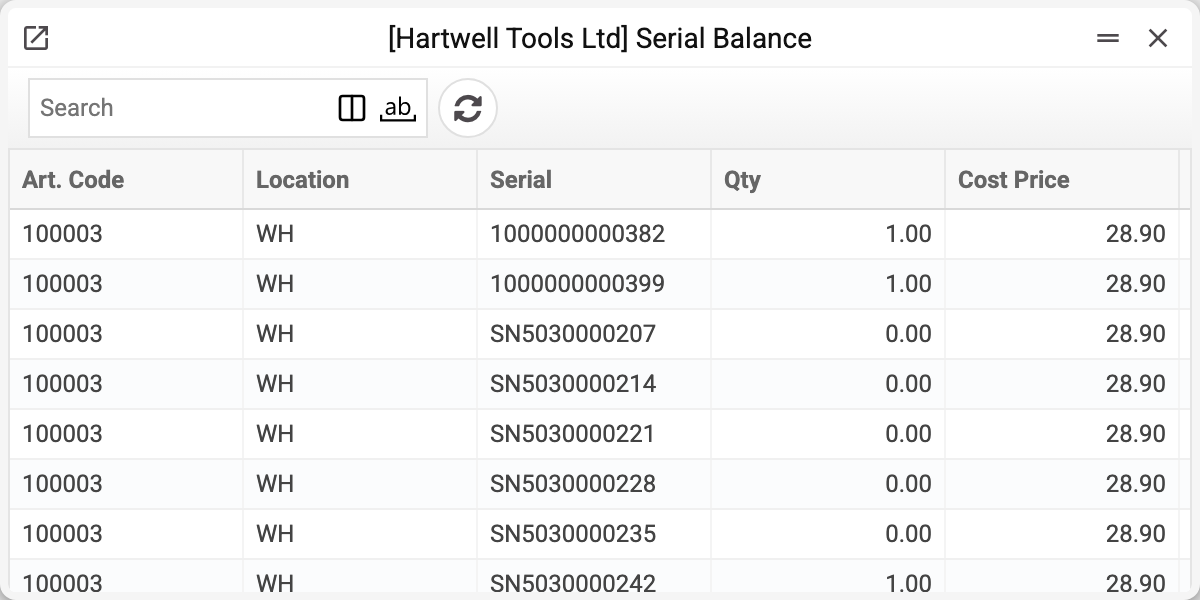
A row is one serial number: item, number, location, quantity and the cost of that particular unit. The quantity is almost always one — that is the point of unit-level tracking; more than one happens only for an item with a batch number. A sold or moved unit keeps its row: the row stays with quantity 0.
Why it matters
Three practical reasons:
- warranty — by the number, the item history shows when and by which document that exact device left; this register only shows where it is now;
- service — at intake it is clear whether the item is one of ours;
- cost — each unit has its own, and a sale writes off that price rather than an average.
Which is why this register does not duplicate item statuses: there you get quantities, here you get specifics.
Typical situations
A serial number is missing. The receipt document is not posted yet, or the item was flagged as serialised on its card after the receipt. The system will not post a receipt of a serialised item without a number: "This product requires a serial number per unit".
The number is here but the stock is not. A row with quantity 0 means the unit has already left (sale, transfer, write-off): such a row always stays. Quantity 1 while the unit is not there means the records diverged from reality: check the item history and record the movement with a document; do not edit the card here — a manual edit diverges from the documents.
One number in two locations. After a transfer that is expected: the old location keeps the row with quantity 0. It is an error only when the quantity is non-zero in both: a serialised unit physically exists once. "Goods Receipts" and "Returns From Customer" will not receive a number that is already in stock a second time: "For this product, the serial number must be unique per unit". A credit invoice with the "Update warehouse" mark does not check this.
Where to look next
- Item statuses — the quantitative side of the same warehouse.
- Item history — the movements behind the balance.