Item Statuses
The warehouse at a glance: how much is on hand, how much is reserved, how much customers have ordered and how much is expected from suppliers — for every item-and-location pair.
Where to find it: Modules → Database Maintenance → Registers → Item Statuses
A worked example
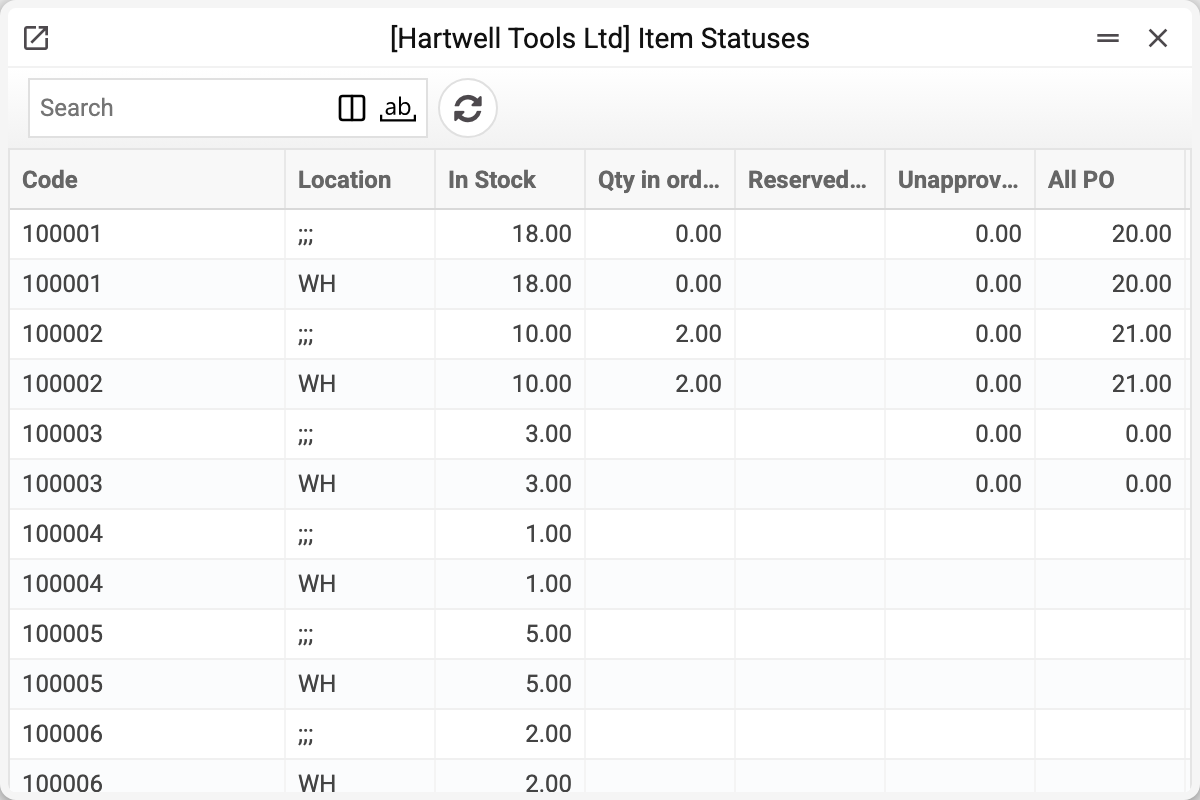
A row is a state, not a movement. It holds several different quantities, and they must not be confused:
| Figure | What it means |
|---|---|
| Instock | physically present |
| Reserved qty | set aside for customer orders that have the "Reserved" checkbox ticked |
| Qty in orders | ordered by customers and not yet shipped — demand, not incoming supply |
| All PO | not yet received on open purchase orders — approved ones and drafts alike |
| In unapproved POs | the part of the previous figure that falls on purchase orders not yet approved |
| In shipment | not filled in by the system, always empty: goods leave "Instock" the moment the shipment is approved |
| In production orders | not filled in by the system, always empty: materials issued to the workshop reduce "Instock" straight away |
Besides the rows for individual locations, each item has a summary row with the location ;;; — the totals across all locations together. Customer orders without a location go to a separate row with an empty location.
The record card shows the same figures for a single item and location:
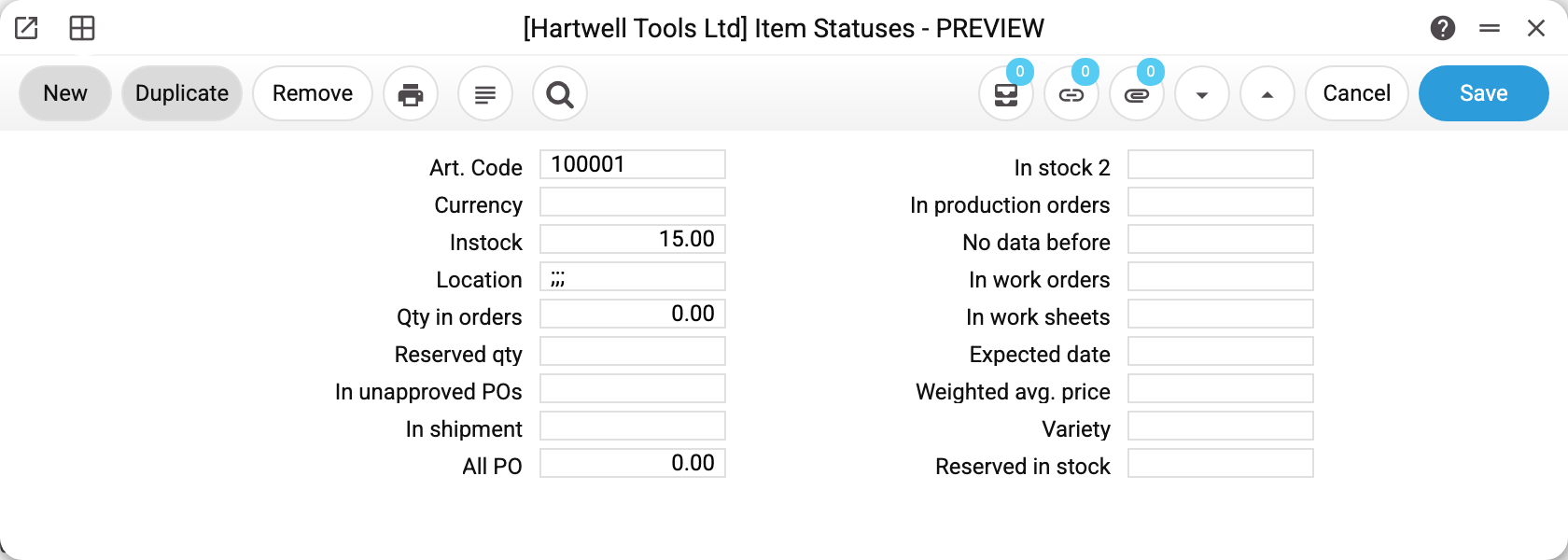
The other card fields — "In stock 2", "Weighted avg. price", "Expected date" and the rest — are not filled in by the system.
The quantity available to sell is not the first number but a difference: "Instock" minus "Reserved qty".
Where the numbers come from
The register recalculates itself: an approved goods receipt raises "Instock"; a saved customer order with the "Reserved" checkbox raises "Reserved qty", and every open customer order raises "Qty in orders"; an approved shipment lowers "Instock", and lowers its order's reservation and "Qty in orders" by the quantity shipped. Drafts of stock documents do not change the balance.
That is why everyone who needs a quick answer reads it: approving a shipment, an invoice or a stock movement checks here whether there is enough stock; the marketplace takes its storefront quantity from here, and shortage reports compare it against minimum levels.
Do not edit the figures in the card by hand: the system does not recount a row from scratch, it adds every later movement to it, so a number corrected by hand stays out of line with the documents.
Typical situations
The item is there but cannot be sold. Check reservations: the physical stock is spoken for.
The figure does not match a physical count. First look for drafts: unapproved goods receipts, shipments and stock movements have not changed the balance yet. A real difference is recorded with a stocktake and closed with separate documents — a stocktake by itself does not change the balance.
A negative "Instock" figure. The system does not let you ship a stock item ahead of its receipt: approving a document that takes out more than is in the location is refused. So a negative figure means the records have drifted: do not edit it in the card — pass the item code and location to an administrator.
"Qty in orders" or "All PO" do not match the documents. This happens after an import or changes made around the documents. The figures are rebuilt by the Item status recalculation in sales orders and Purchase orders statuses recalculation maintenances.
Where to look next
- Item history — how the balance came about.
- Serial balance — when each individual unit matters.