Item History
The full record of what happened to an item: when it arrived, when it left, at what cost, and how much was left after each movement. This is the report to open when the question is "where did that balance come from".
Where to find it: Modules → Stock → Reports → Item History
Parameters
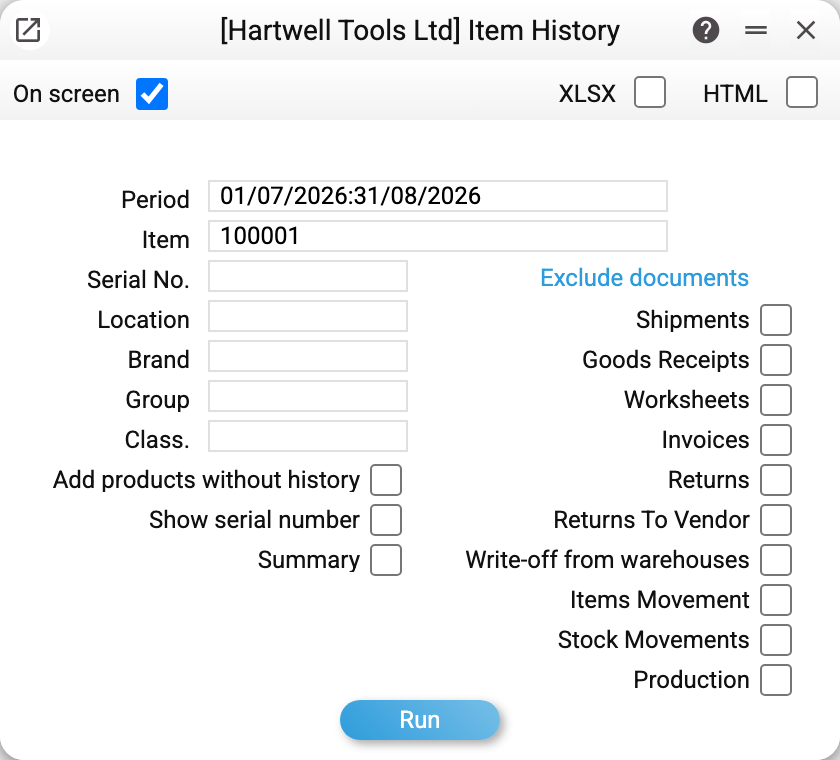
- Period — the report's frame. Everything before it is collapsed into a single "opening balance" line.
- Item, Serial No., Location — narrow the selection to one item, one unit or one place.
- Brand, Group, Class. — filters by card attributes, for looking at a family rather than a single item.
- Add products without history — also show items with no movements in the period but a non-zero opening balance — the quantity (and for those who see cost prices, the quantity or the value) (together with Summary — every card that passes the item, brand, group and classification filters). The box does not change the opening balance: with it or without it the balance follows the same filters — location, serial number and "Exclude documents".
- Show serial number — fills the «Ser. №» column and does not merge records of different serial numbers into one line.
- Summary — totals only, without the document-by-document breakdown: opening, into stock, out of stock and balance quantities.
- Exclude documents — ten checkboxes, each dropping one document type from the report. Handy for "what does it look like without shipments".
Each checkbox is named exactly like its register in the menu: "Stock Movements" drops transfers between warehouses, "Service Stock Movements" drops service movements, the traffic of customer devices.
A worked example
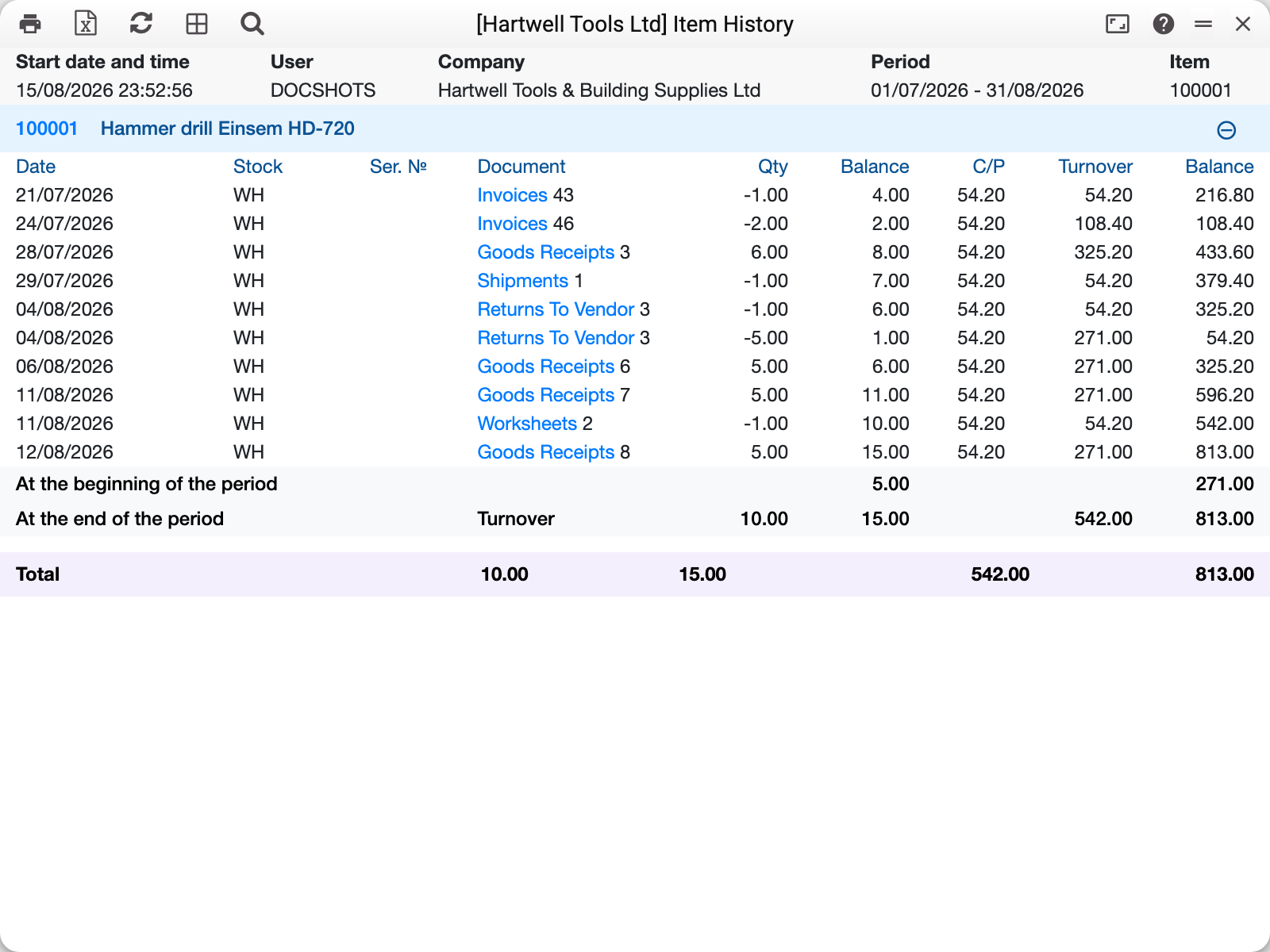
The drill 100001 over July and August. The report reads top to bottom as a timeline of events: a return, an invoice, a goods receipt, a shipment, more receipts — with the balance recalculated in its own column after every line.
Three totals sit at the bottom: opening balance, turnover and closing balance. You see not only what is left but exactly when the balance rose or fell.
On the right the same movements in money: C/P — cost per unit, Turnover — the value of the movement, Balance — the value of the remaining stock. The money columns are seen only by those whose role allows the «Show cost price» action; for everyone else the report comes without them, with quantities only.
The document number is a link: from any line you can open the receipt or the shipment itself and see where the movement came from.
How to use it
"Why is the balance what it is?" The main use. Every movement shows separately, so a mismatch between the books and the shelf takes minutes to find.
The cost jumped. The cost column shows exactly which receipt changed the price.
Stock disappeared from a location. Filter by location and you will see which document took it away.
Reconciling with balances. The closing balance here should match the location report on the same date, while the item status report shows the split across locations.
Where to look next
- Location report — balances on a date;
- Item status — where the stock sits and how much is reserved;
- Stock movement report — transfers between locations as a list;
- Items/Services — the item card.