Attachments
Files can be attached to any record in the system: a scanned delivery note to a goods receipt, a contract to a contact, a photo of damaged goods to a return. The "Attachments" register is the common journal of everything attached; the files themselves are added in the record card, not here.
Where to find it: Modules → System → Registers → Attachments
Attaching a file
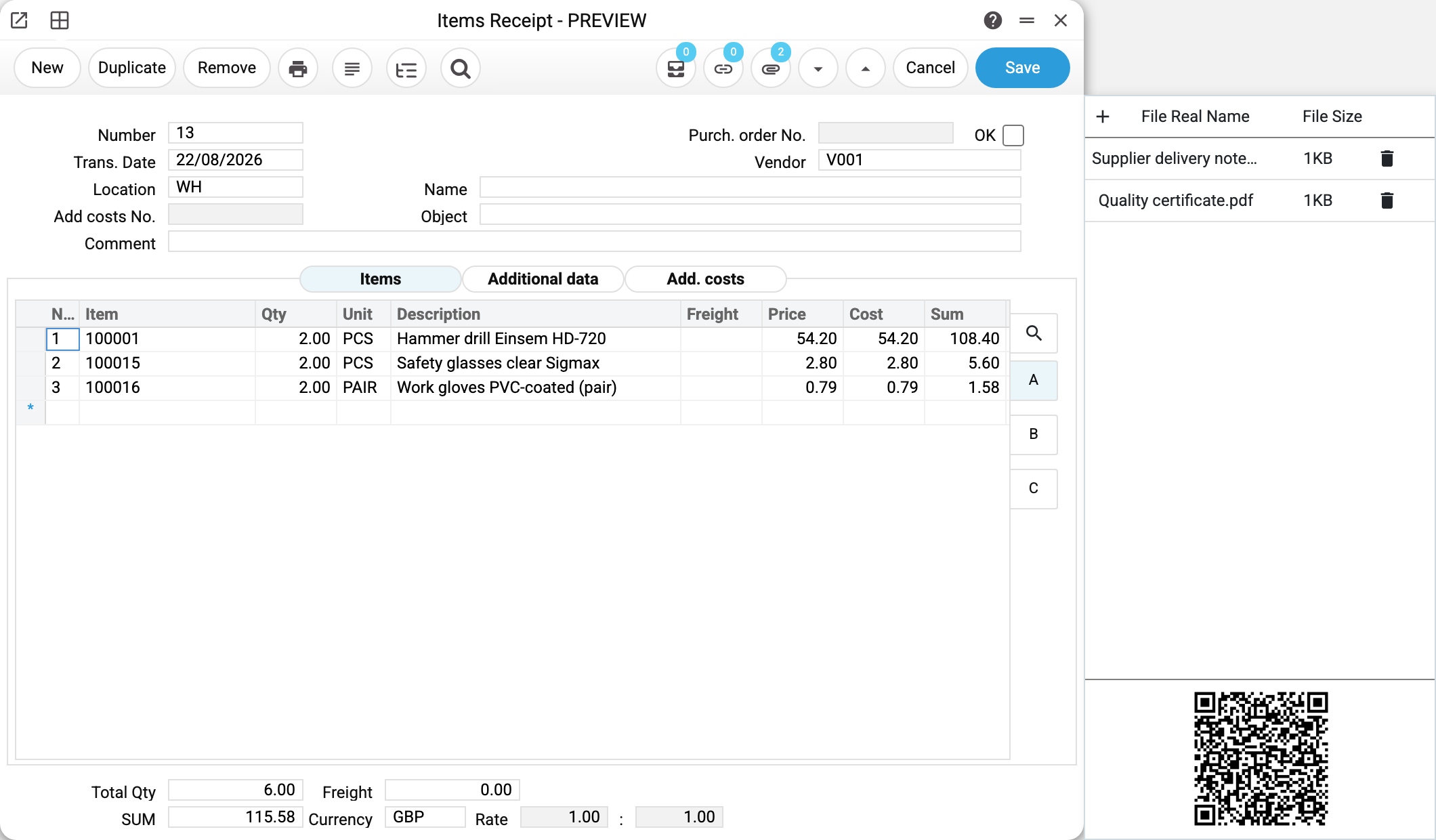
Files live in the side panel of a card. Open any document or reference book and press the paper-clip button in the header — a panel slides out on the right. The button carries a counter: how many files are already attached to this record; while there are none, the counter is hidden.
The panel is the whole toolset:
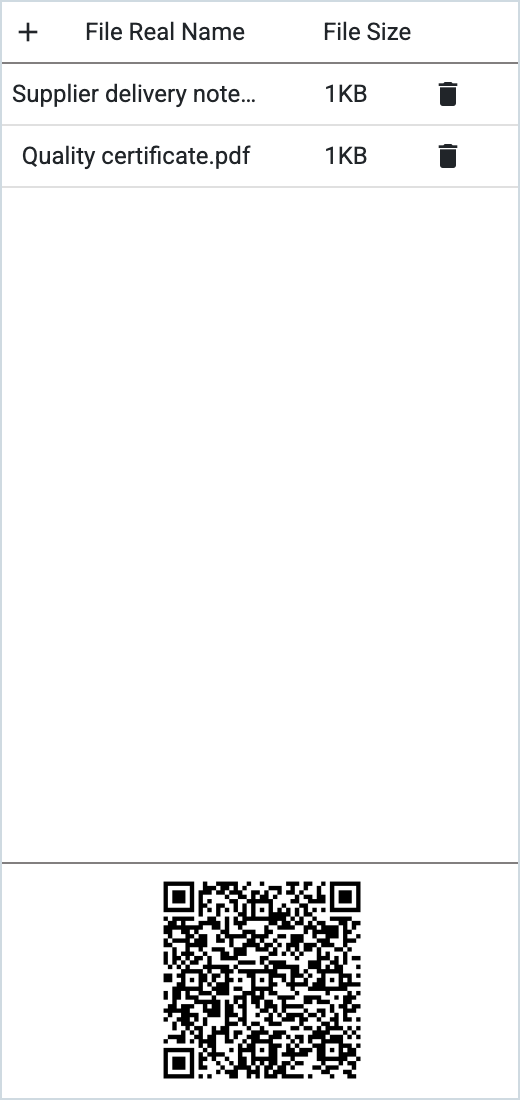
| Action | How |
|---|---|
| Add files | the + button at the top left (several at once is fine) or drag files straight into the panel |
| Download a file | double-click the name — the "Download or preview" window, button "Download" |
| Copy the file name | right-click the name — it goes to the clipboard |
| Delete | the bin in the file's row |
| Add from a phone | scan the QR code at the bottom of the panel |
The QR code is the shortest route when the paperwork is in your hands and there is no scanner: point the phone camera at it, an upload page opens in the browser, and the photo you take lands straight into this record. The code lives five minutes; if you miss it, close and reopen the card for a fresh one (reopening the panel in the same card shows the same code).
A worked example
Goods receipt No. 13 holds two files — the supplier delivery note and a quality certificate. The panel shows the name and size of each, and the paper-clip button in the header shows 2.
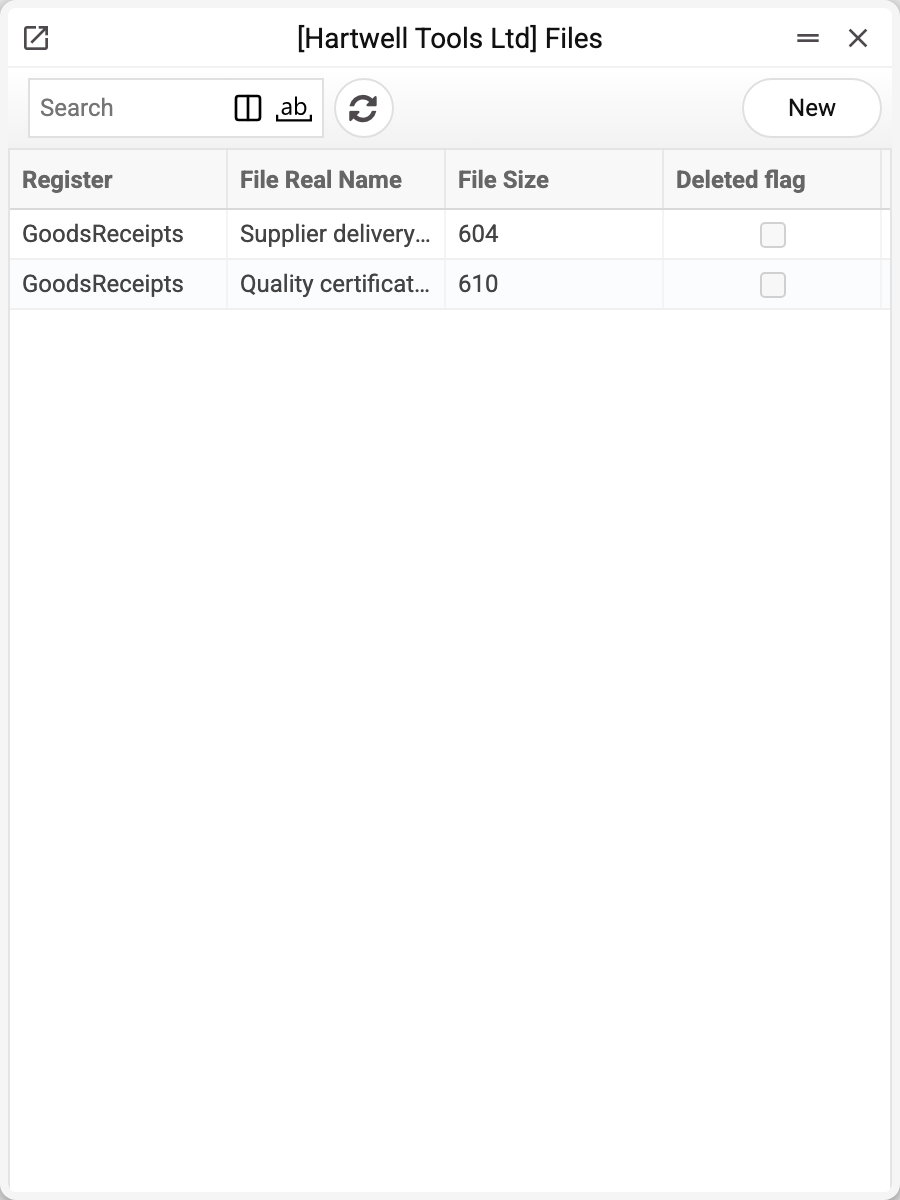
The same thing in the "Attachments" journal:
| Column | What it means |
|---|---|
| Register | which register's records the file is attached to (GoodsReceipts — goods receipts) |
| File Real Name | the original name the file was uploaded with |
| File Size | in bytes (the card panel shows the same size in kilobytes) |
| Deleted flag | the file is marked for deletion but not wiped yet |
The journal answers what the panel cannot: how many files the database holds in total, which records accumulated them, and how much space they take.
What the system does with a file
On disk the file is not stored under its own name: the system gives it a service identifier and keeps the original name in the database. So two files with the same title do not overwrite each other, and a name with spaces or non-Latin letters does not break the storage.
If attachment encryption is on, the file is encrypted as well — see Encrypt / Decrypt Files.
Upload limits:
- file size up to 10 MB; anything larger is refused;
- uploads from a phone via QR additionally reject executables (
exe,bat,cmd,msi,sh,jarand the like); - the cloud edition enforces a storage quota: once it is used up, an upload is refused with "Too many uploads".
Who can see attached files
A file inherits the rights of the register whose record it is attached to. No right to read goods receipts means no access to the delivery note attached to one: the system answers "Permissions denied". There are no separate "per-file" rights to hand out.
Anyone who can see the document can attach a file — the view right is enough. Deleting takes the right to edit the document; for everyone else the bin answers "Permissions denied".
In a database with several companies, files are separated exactly as records are: another company's files are not visible.
Deletion in two steps
The bin in the panel does not wipe the file — it only marks it, which the journal shows in the "Deleted flag" column. A deletion made by mistake can still be undone while the file has not been wiped.
A marked file disappears from the card panel and can no longer be downloaded: the download button in the journal answers "File not found on a server".
The final wipe is done by the Cleanup attachments service: it removes whatever has been marked for longer than the chosen term (one, two or three months). Besides the manual run, the system itself wipes files marked more than two months ago once a week. Until the wipe, the file stays on disk and takes up space.
Typical situations
The file will not upload, the system complains about the size. The limit is 10 MB per file. A scan of several dozen pages should be compressed or split.
I attached a file and a colleague cannot see it. The question is not about the file but about register rights: your colleague has no access to the document itself.
I deleted a file by mistake. Until the cleanup service runs, the record stays in the journal with the deletion mark. The card panel does not show marked files, so open the record in the "Attachments" journal and clear "Deleted flag".
Disk space was not freed after deletion. That is by design: the bin only marks. Space is freed by the cleanup service.
I did not manage to take the photo through the QR code. The code lasts five minutes. Close the card and open it again for a new one; reopening the panel in the same card does not renew the code.
I need to know what a file in the journal belongs to. The "Register" column names the register, not the particular document. Going the other way round is easier: open the document and look at its file panel.
Where to look next
- Cleanup attachments — the final wipe of marked files.
- Encrypt / Decrypt Files — turning the storage into an encrypted one.
- Print Forms — printed-form templates; they are files too, but live in a register of their own.