Offline Sales
The journal of receipts arriving from standalone tills. On the till a receipt is light: items, quantities, prices, cash. It touches neither stock nor ledger — the server does that when it turns the receipt into a full invoice.
Where to find it: Modules → Offline → Registers → Offline Sales
A worked example
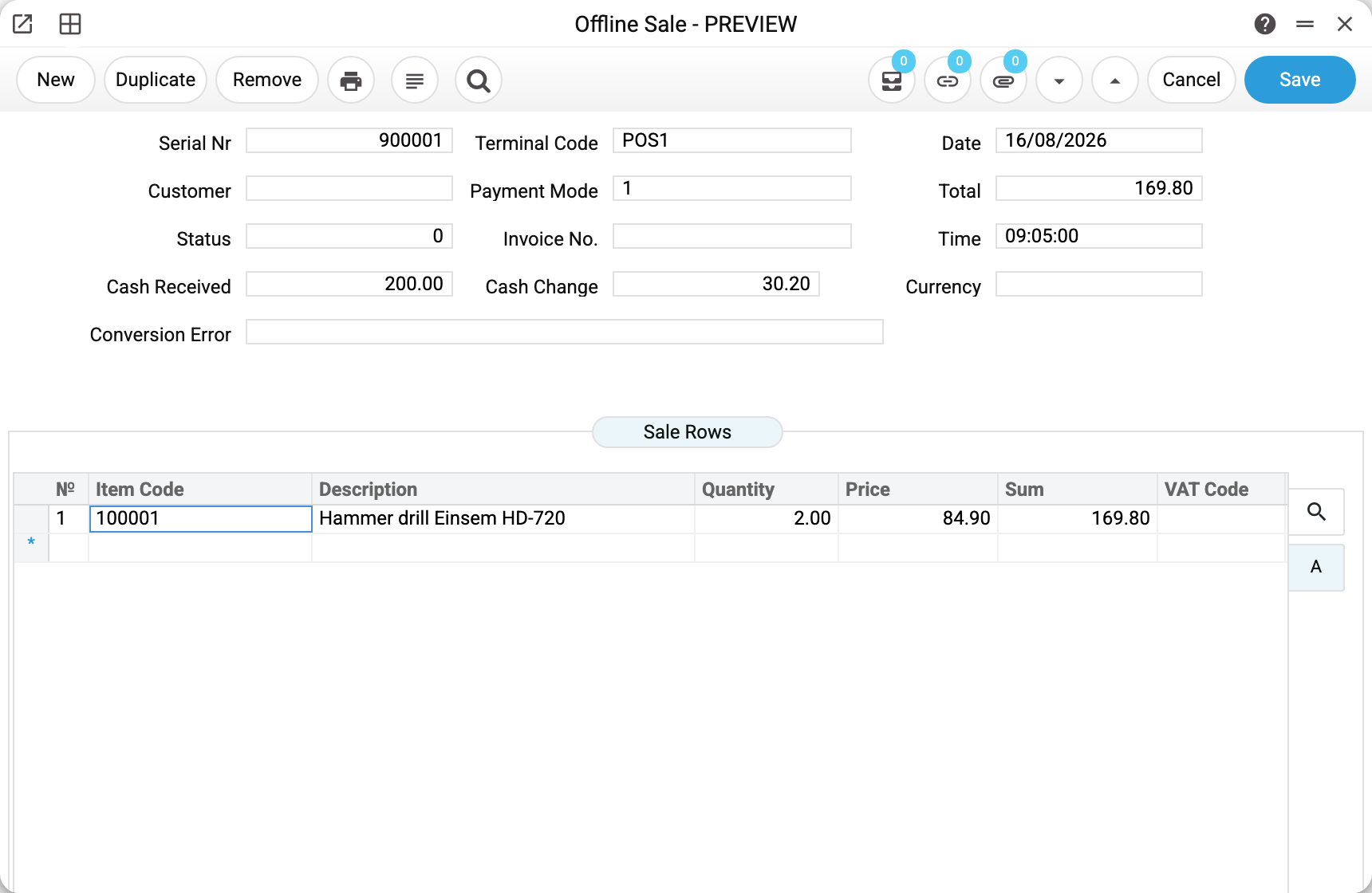
Receipt 900001 from till POS1 on 16 August: the line items, the total, the cash taken and the change given.
The empty fields carry meaning too:
- Customer is blank — an ordinary retail sale; the default buyer from the sync settings is filled in during the conversion;
- Status 0 — there is no invoice from the receipt and no error either — no conversion outcome is recorded in the receipt (see the table below);
- Invoice No. and Conversion Error are empty — they are filled by the conversion, which the server runs right when it takes the receipt from the till.
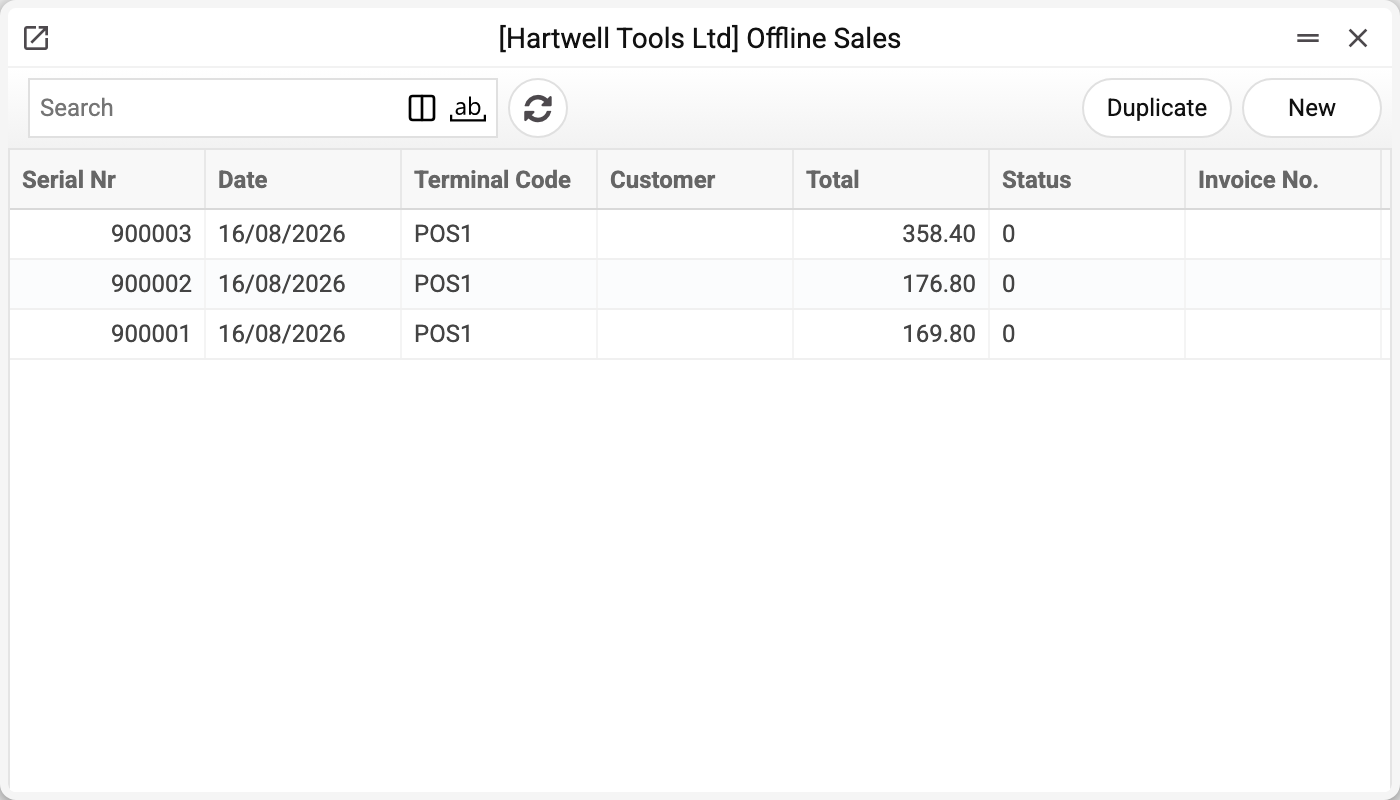
The list shows the day's receipts and, at a glance, what stage each is at.
Three statuses and what to do about each
| Status | What happened | What to do |
|---|---|---|
| 0 | the receipt was accepted but holds no conversion outcome: its mark was not written after the conversion, or the receipt was entered on the server by hand | do not wait — there is no later processing, the conversion runs only on intake from the till; look for the invoice with the same number ("Convert again" refuses for status 0) |
| 1 | a posted invoice was created; its number is in "Invoice No." | nothing: the sale is posted |
| 2 | no invoice was created, the reason is in "Conversion Error"; or it was created but awaits approval — then "Invoice No." is filled in too | fix the cause or approve the invoice, then click "Convert again" in the receipt window menu (see below) |
The important part: a failed conversion never loses the receipt. It stays in the journal with the error text, so no sale disappears even when the reference data is in a mess.
What the server does with a receipt
The invoice is created already posted: the ledger entries and the stock write-off from the terminal's location happen in a single transaction — all or nothing. Stock is written off by the same rule as for online till receipts: when stock updating is switched on in the invoice settings. The invoice inherits the receipt's number, and the header totals are recalculated from the lines rather than trusted from the till.
The invoice's payment terms are the default terms from the offline sync settings, just as for an online till receipt: the receipt's customer does not change them. If that field is empty, the terms come from the customer card. The default terms of the invoice setting are not applied here.
The invoice currency is the receipt currency (empty in the receipt — the base currency), not the currency of the customer card: the invoice row sums are the receipt sums. If the customer card names another currency, no invoice is created — the receipt gets status 2 with the cause "Customer currency does not match document currency!".
The exception is an approval rule for invoices. If one applies to such an invoice, the invoice is created unposted and waits for approval, and the receipt gets status 2 with the invoice number and a note. Approve the invoice, then click "Convert again" in the receipt window menu: the receipt gets status 1, and no second invoice is created.
The usual causes of status 2 come from one short list:
- the terminal has no location set;
- the receipt has no customer and the settings have no default one;
- there are no payment terms in the offline sync settings or on the customer;
- the payment mode on the receipt does not exist in the payment modes.
Typical situations
The same receipt arrived twice. No duplicate appears: the terminal-plus-number pair is unique, so a repeat delivery simply changes nothing.
A receipt is stuck at status 2. Read the error text and fix the reference data. Then open the receipt and click "Convert again" in the window menu: the server repeats the same processing — on success the receipt gets status 1 and the invoice number; otherwise status 2 again with the new cause. Sending the receipt again from the till will not help: the server recognises a receipt it already has and skips it.
Status 2, but "Invoice No." is filled in. The invoice already exists and awaits approval. Approve it, then "Convert again" — the receipt gets status 1 without a new invoice. Until the invoice is approved, the command refuses and names its number.
Finding the invoice for a receipt. Look for the invoice with the same number — it is inherited.
Where to look next
- Offline terminals — where the receipt came from and which location it draws stock from.
- Offline sync settings — the defaults used during conversion.
- Offline sync log — when the exchange actually happened.