Main Company
The details that go into every document and print form: name, address, bank data, director. This is not a register but a single card per company — and it is what the customer sees on an invoice.
Where to find it: Modules → System → Settings → Main Company
A worked example
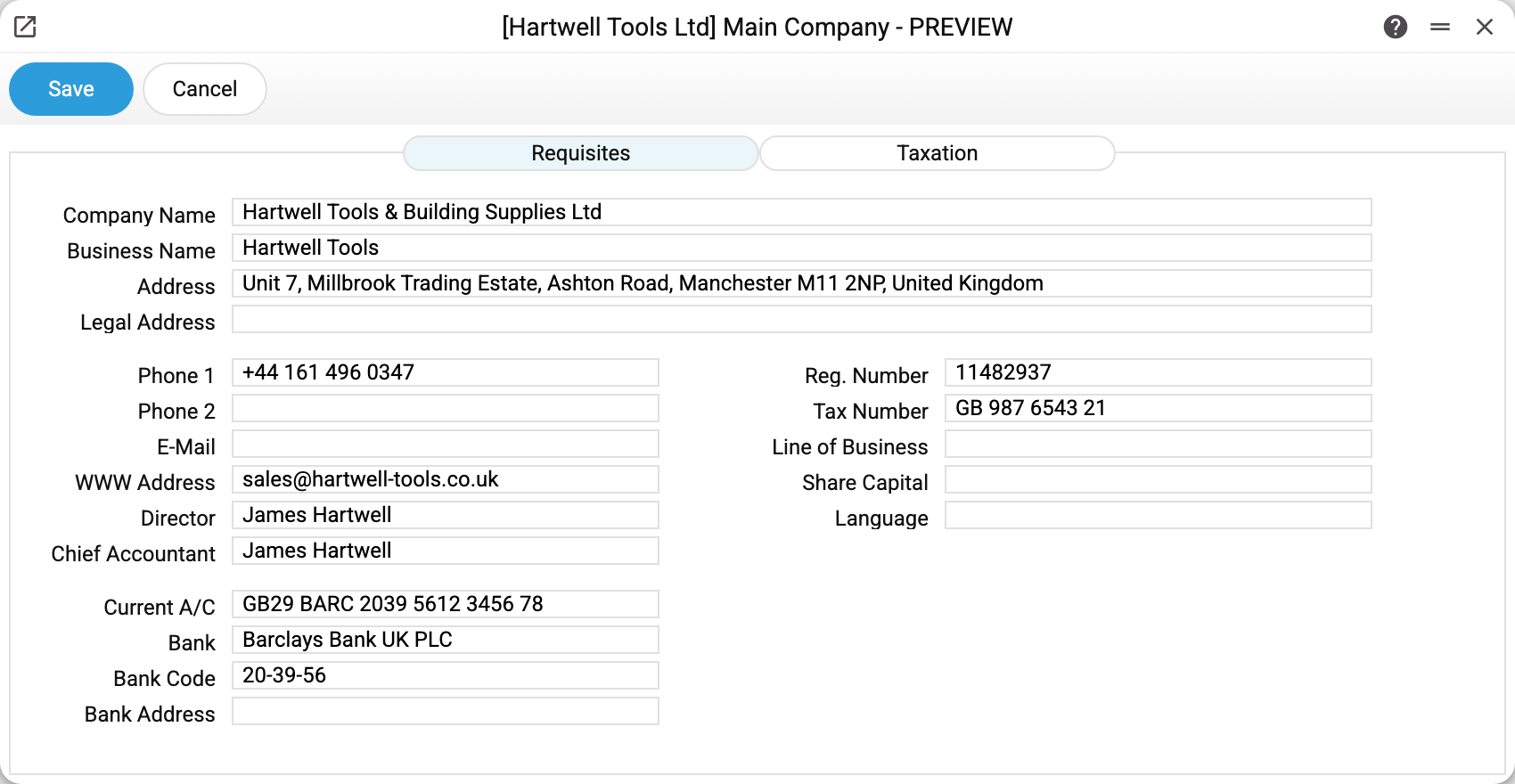
The Requisites tab of the demo company carries the full and short names, the address, telephone numbers, the registration and tax numbers, the director, and the bank details: account, bank and sort code.
The second tab is Taxation. Of everything filled in here, two blocks actually reach calculations and reporting: the VAT payer flag (read by Add Costs and the "Customs clearance status report": for a non-payer the row's VAT goes into the cost of the goods) and the VAT Export block — Region number and District number go into the Medok XML export (without them, or without the registration number, the export will not run: "Fill in the region number, district number and registration number in the company card"), while Region and District only reach the print variables.
The rest of the tab — the taxation scheme, the unified tax group and the Printable information box — is kept as company reference data, but the system computes nothing from it: these values take no part in reports or in the standard printed forms. The scheme still works as a switch inside the window: choosing "Unified tax" opens the group block, and switching to another scheme clears the chosen group. Neither the group nor — despite its name — Printable information is passed to printing: they are not among the print form's variables, so adding the field to the template alone will not print them — that takes a change to how printing is prepared.
Why this is not "just a setting"
Three reasons to fill the card in carefully:
- print forms take the document header from here — a typo travels straight to the customer;
- bank details are printed on the invoice people pay against;
- in a multi-company database each company has its own card, and that is precisely what distinguishes them.
Typical situations
The address or bank changed. Correct it here: documents will print with the new details. A print form is built at the moment of printing, so an old document printed again also comes out with the new details; only files saved earlier (PDFs, attachments) stay as they were.
A different signature is needed on documents. The director's and chief accountant's names come from here too.
Several companies show identical details. That happens on a demo stand; in production it is a mistake — check which company you are working in.
A new company prints documents with an empty header. In a multi-company database a new company gets an empty card: the main company's details are not copied, and VAT payer is unticked, so Add Costs treats it as a non-payer. Fill the card in right after creating the company.
A variable prints empty. Company_OKONH, Company_BIK, Company_ANA_Code, Company_BankAccount2, Company_SortKey and Company_CEO have no field in this window — there is nowhere to fill them in. In a template use the variables of fields the window does have: bank code — Company_BankCode, director — Company_Director.
Where to look next
- Number series — the numbering of the documents these details go on.
- Mail texts — the covering e-mail for the document.
Print variables
Values this record adds to printed form templates — its own and those of the documents that refer to it.
Record variables:
Requisites
| Variable | What it holds |
|---|---|
| Company_Name | Company Name |
| Comp_Name | same as Company_Name |
| Company_NameShort | Business Name |
| Business_Name | same as Company_NameShort |
| Company_AddressBusiness | Address |
| Address | same as Company_AddressBusiness |
| Company_AddressLegal | Legal Address |
| Legal_Addr | same as Company_AddressLegal |
| Company_Phone1 | Phone 1 |
| Tel1 | same as Company_Phone1 |
| Company_Phone2 | Phone 2 |
| Tel2 | same as Company_Phone2 |
| Company_Email | |
same as Company_Email |
|
| Company_Web | WWW Address |
| WWW_Addr | same as Company_Web |
| Company_Director | Director |
| Director | same as Company_Director |
| Company_ChiefAccountant | Chief Accountant |
| Chief_Accountant | same as Company_ChiefAccountant |
| Company_RegNr | Reg. Number |
| Reg_No | same as Company_RegNr |
| Company_VATNr | Tax Number |
| Tax_No | same as Company_VATNr |
| Company_Activity | Line of Business |
| Line_Of_Business | same as Company_Activity |
| Company_Equity | Share Capital |
| Share_Capital | same as Company_Equity |
| Company_Language | Language |
| Company_BankAccount | Current A/C |
| Bank_Acc | same as Company_BankAccount |
| Company_BankName | Bank |
| Bank | same as Company_BankName |
| Company_BankCode | Bank Code |
| Bank_Code | same as Company_BankCode |
| Company_BankAddress | Bank Address |
| Bank_Addr | same as Company_BankAddress |
Taxation
| Variable | What it holds |
|---|---|
| Company_Region | Region |
| Company_RegionNr | Region number |
| Company_District | District |
| Company_DistrictNr | District number |
Other variables
| Variable | What it holds |
|---|---|
| Company_OKONH | Territory code (KOATUU/OKONH) |
| Company_BIK | Bank sort code |
| Company_ANA_Code | Company's analytical code |
| Company_BankAccount2 | Personal bank account |
| Company_SortKey | Sort key |
| Company_CEO | Chief executive |
| User_Login | Login of the user printing |
| User_FirstName | Responsible person's first name |
| User_LastName | Responsible person's last name |
| User_Role | User's role |
| User_SalesGroup | User's department |
| User_FName | same as User_FirstName |
| User_LName | same as User_LastName |
| User_SG | same as User_SalesGroup |