Units
Pieces, hours, metres, pairs, sets. The unit sits on the item card and travels from there into every document and every printed form — invoice, delivery note, service report. The register exists so that these labels are the same across the whole database instead of "pcs", "pc." and "pieces" in three different documents.
Where to find it: Modules → Stock (the item is present in other modules too) → Registers → Units
A worked example
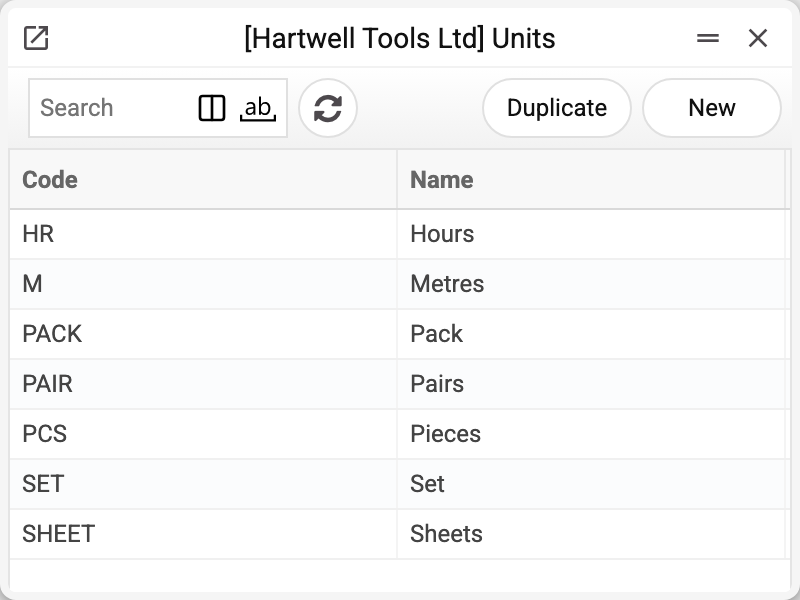
The demo company keeps pieces, packs, metres, sheets, sets, pairs and hours — enough for a tool shop: tools are counted in pieces, fixings in packs, gloves in pairs, service work in hours.
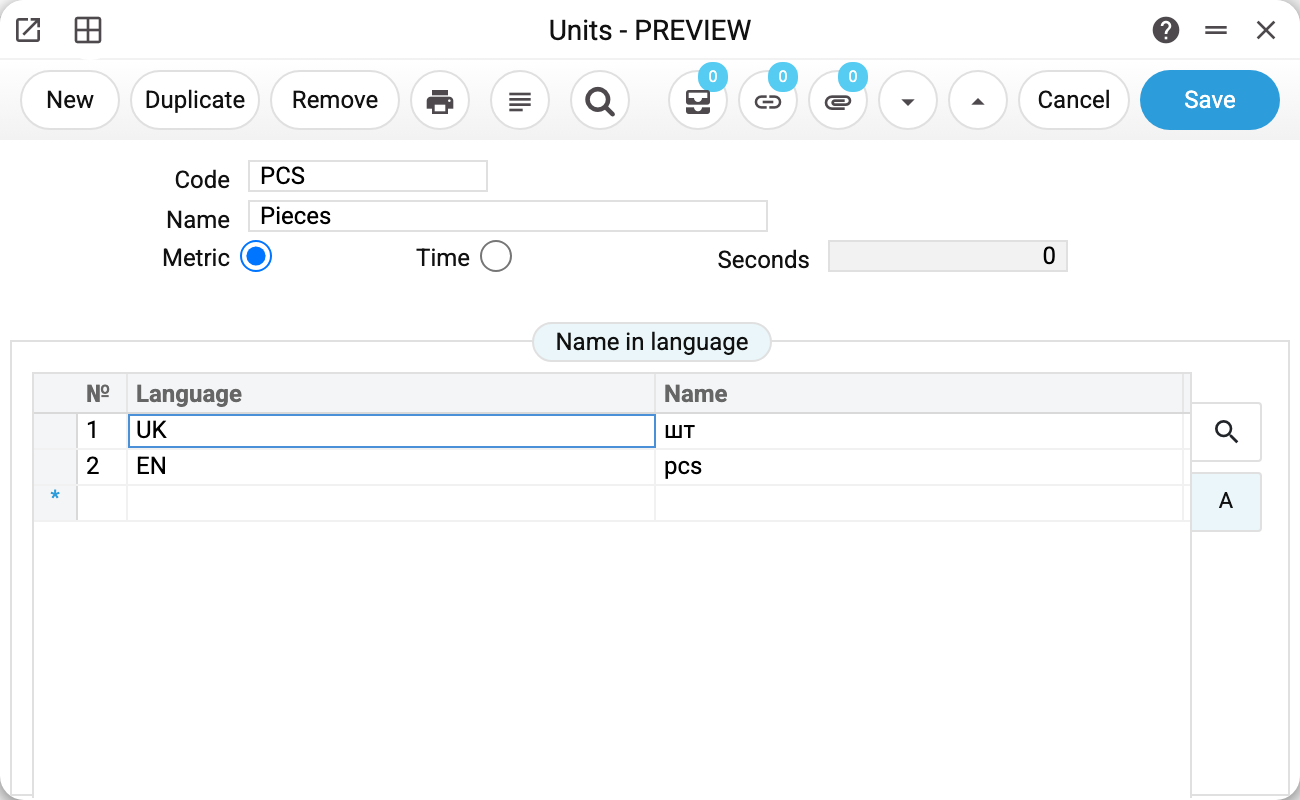
There are few fields on the card, and each of them earns its place:
- Code — what is stored on the item card and printed on documents;
- Name — the human-readable version;
- Metric / Time — which kind of unit this is. "Time" enables the Seconds field — how many seconds the unit holds. Only the "Machines Load" service reads it (turning an item's planned quantity into machine time), and that service is not in the menu now, so the field has no effect on work;
- Name in language — a translation table. For "PCS" it holds
UK — штandEN — pcs.
At the moment no document reads the translation table: printed forms of invoices, delivery notes and other documents take the unit's code (and some take its name from the unit card), but not a translation into the customer's language. The Until_LangCode and Until_Text variables exist only when printing the unit card itself (see "Print variables" below).
Typical situations
The unit on a card is text, not a link. The item stores the unit's code as a string, so changing a unit's name in the register does not change documents already entered. The code itself cannot be changed once saved — the system refuses: "Can't change code". A unit that appears on an item card, in document rows or in settings cannot be deleted, though: deletion is refused and names the place. An item card accepts a new or changed unit only from the register.
Two units meaning the same thing. A register that grew by itself easily ends up with "HR" and "HOUR" side by side. The system does not object, but a report by unit will show two lines instead of one — better to settle on one from the start.
A unit is not a pack size. If screws arrive in boxes of 100 and are sold singly, that is not two units but two items, or a conversion on receipt: the card carries one unit.
Hours for service work. Work sheets do not read the "Time" type or the seconds: job duration is entered there as a quantity. There is no need to fill in the seconds now: the only service that reads them is not in the menu.
Where to look next
- Items/Services — where the unit is chosen;
- Work sheets — job rows have no unit field: the printout of a row takes the unit from the item card.
Print variables
Values available in this document's printed form templates. How to write a variable in a template — see Print Forms.
Header fields:
| Variable | What it holds |
|---|---|
| Until_No | Code |
| Until_Comment | Name |
Row fields:
| Variable | What it holds |
|---|---|
| Until_LangCode | Language |
| Until_Text | Name |