Turbo SMS Settings
The connection to the TurboSMS bulk service: credentials, sender signature and balance control. TurboSMS is one of the three operators the system sends SMS through: which one actually sends is decided by the "Sender service" switch in notifications (BSG, TurboSMS, Atompark or "Automatically"). Notifications decide who gets written to and when, while the money and the channel come from here whenever TurboSMS is the one sending.
Where to find it: Modules → Telephony → Settings → Turbo SMS Settings
A worked example
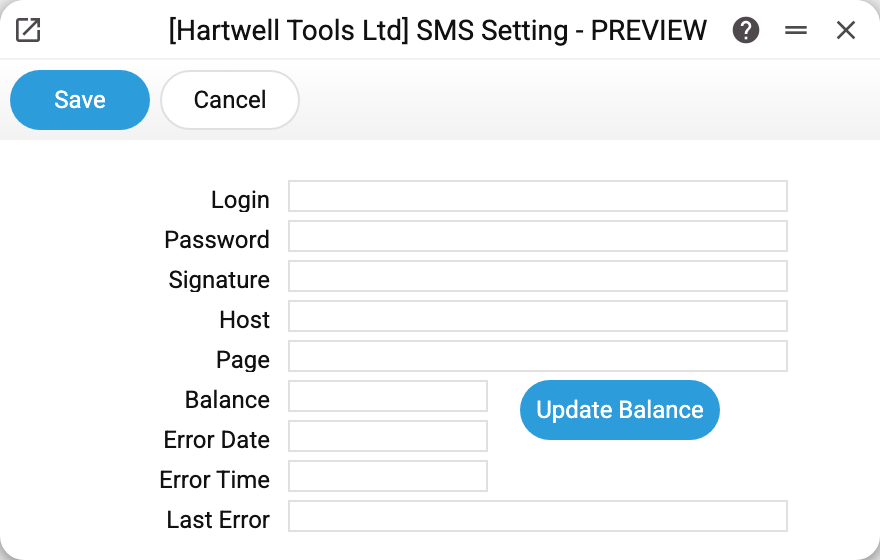
The fields group by purpose:
- Login, Password, Host, Page — access to the service: the first two from the TurboSMS account, the other two the server address and the API path;
- Signature — the sender name the customer sees instead of a number;
- Balance and the Update Balance button — what is left on the service account; the system also refreshes it after every send through TurboSMS;
- Last Error, Error Date, Error Time — the trace of the last request that did not reach the server (details below).
In the demo company the fields are empty: bulk SMS is not connected.
The password shows as a mask
The password is stored encrypted and never handed back to the interface, exactly like a user's password. If a password is set, the field shows a mask of eight dots (it does not give away the length); if not, the field is empty with the hint "Not set".
- Field left untouched — the old password stays on save.
- A new one typed — it replaces the old one.
- Mask erased (or
-typed) — the password is removed on save; the field warns about it with the hint "The secret will be removed when you save". Without a password TurboSMS counts as not configured.
If a password is already saved and you change Host or Page, type the password again — otherwise saving is refused: "The saved password is sent only to the saved server. To use another server, type the password".
The "all five or silence" rule
A text goes out through TurboSMS only when login, password, signature, host and page are all filled in — and the notification itself is switched on. Miss any one of them and TurboSMS does not send: with "Automatically" the system takes the next configured operator (BSG, then Atompark), and if "Sender service" is set to TurboSMS itself, no SMS goes out at all.
One more detail: if the service order's customer has a Telegram id and the bot is running, the service order status notification goes to Telegram instead of SMS. That is not a fault but a saving — SMS stays the fallback channel. A manual SMS and the "SendSMS" maintenance always go by SMS.
What the error fields tell you — and what they do not
The system does not read TurboSMS's answer. So "Last Error" is filled only when a send request did not reach the server at all (network drop): if the service took the request and refused it — wrong password, unregistered signature, zero balance — the SMS looks sent in the system and the error field keeps its old value. Do not trust the error date: it is recorded wrongly (empty, or with day and month swapped), and the error time is not recorded at all. What really happened to a message is in the sending history of the TurboSMS account.
Typical situations
Nothing is sending. Press "Update Balance". The refusal "TurboSMS server is unavailable" means a wrong host or no network. Text instead of an amount in the "Balance" field is the service's answer to the login or balance request — look for the reason in it and in the TurboSMS account. Zero means the money has run out.
The sender signature is rejected. Sender names are registered with the provider in advance; an arbitrary value will be refused, and the system will not show that refusal.
The password was changed in the provider's portal. Enter the new one here. Until then the system does not recognise the login refusal: messages either look sent or sending (and "Update Balance") stops with the refusal "TurboSMS did not open a session: check the login and password!" — that happens when the service opens no session on login. The last-error field does not show an access refusal.
Where to look next
- SMS notifications — who gets written to, and on which event.