Service Order Required Fields
This setting decides what an intake clerk cannot save an order without. Rather than asking people to "fill it in carefully", it makes omission technically impossible.
Where to find it: Modules → Service Orders → Settings → Service Order Required Fields
A worked example
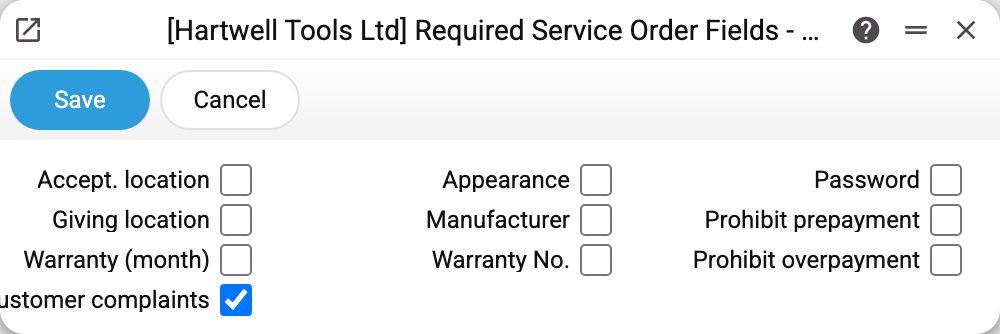
Each checkbox makes the matching order field mandatory:
| Checkbox | What it demands |
|---|---|
| Accept. location / Giving location | the service points |
| Warranty (month), Warranty No. | the warranty term and number |
| Customer complaints | the fault as described by the customer |
| Appearance | the device's condition at intake |
| Manufacturer, Password | the device's details |
In the example only customer complaint is on — the minimum without which an order is meaningless.
Two checkboxes that work the other way
On the right sit Prohibit prepayment and Prohibit overpayment. They make nothing mandatory; they prohibit. The first stops money being taken in advance, the second stops accepting more than is due. They sit here because of the shared "control at intake" idea, but their effect is the opposite.
Both concern paying the order. The prepayment ban fires when "Pay" is pressed and looks only at whether "Total repair cost" is filled: while the field is empty, the payment window will not open — "Prepayment is prohibited!". A zero in the field is no longer empty: with it the payment goes through. The overpayment ban fires in the "Payment" window when OK is pressed: if the repair cost is above zero and the payment exceeds it — "Overpayment is prohibited!".
Why it matters
Every enabled checkbox is a dispute that will not happen later. "Appearance" saves you from scratch claims, "Customer complaints" from arguments about what was supposed to be fixed, "Accept. location" from hunting for the device around the workshop.
The flip side is intake speed. So switch on what has actually caused conflicts, not everything at once.
Typical situations
The order will not save. The system names the missing field — it is enabled here. Fields are named one at a time: fill one in and the next save names the next. "Warranty (month)" set to 0 counts as not filled.
An old order will not save. The requirements apply to every save of the card, not only at intake. Tick a box, and an order created earlier without that field will not save (a status change included) until the field is filled.
A maintenance order is not created from a rental object. Creating a maintenance order from a rental object card checks the same requirements: if a required field is missing, no order is created, and the reason given is the same refusal text.
When is the warranty number required. In two cases. First, when "Warranty No." is ticked in this setting — then no order saves without it. Second, when "Warranty" is selected in the order's "Warranty" block (for a repeat device still under warranty the system selects it itself) — then both the number and the warranty date are required, regardless of this setting.
Clerks complain about extra fields. Clear the checkboxes that earn nothing in your particular service.
Where to look next
- Service orders — the card itself.
- Engineers — who does the work.