Vendor settlements reconciliation
The document you send to a supplier: this is how we see our settlements — check it against yours. Unlike the other reports in this section, it is meant not for internal reading but for correspondence with the counterparty.
Where to find it: Modules → Purchase Ledger → Reports → Vendor settlements reconciliation
A worked example
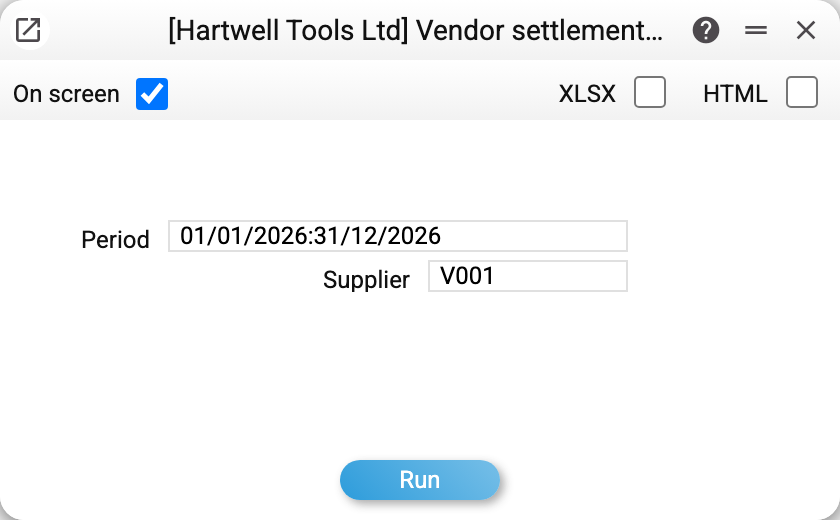
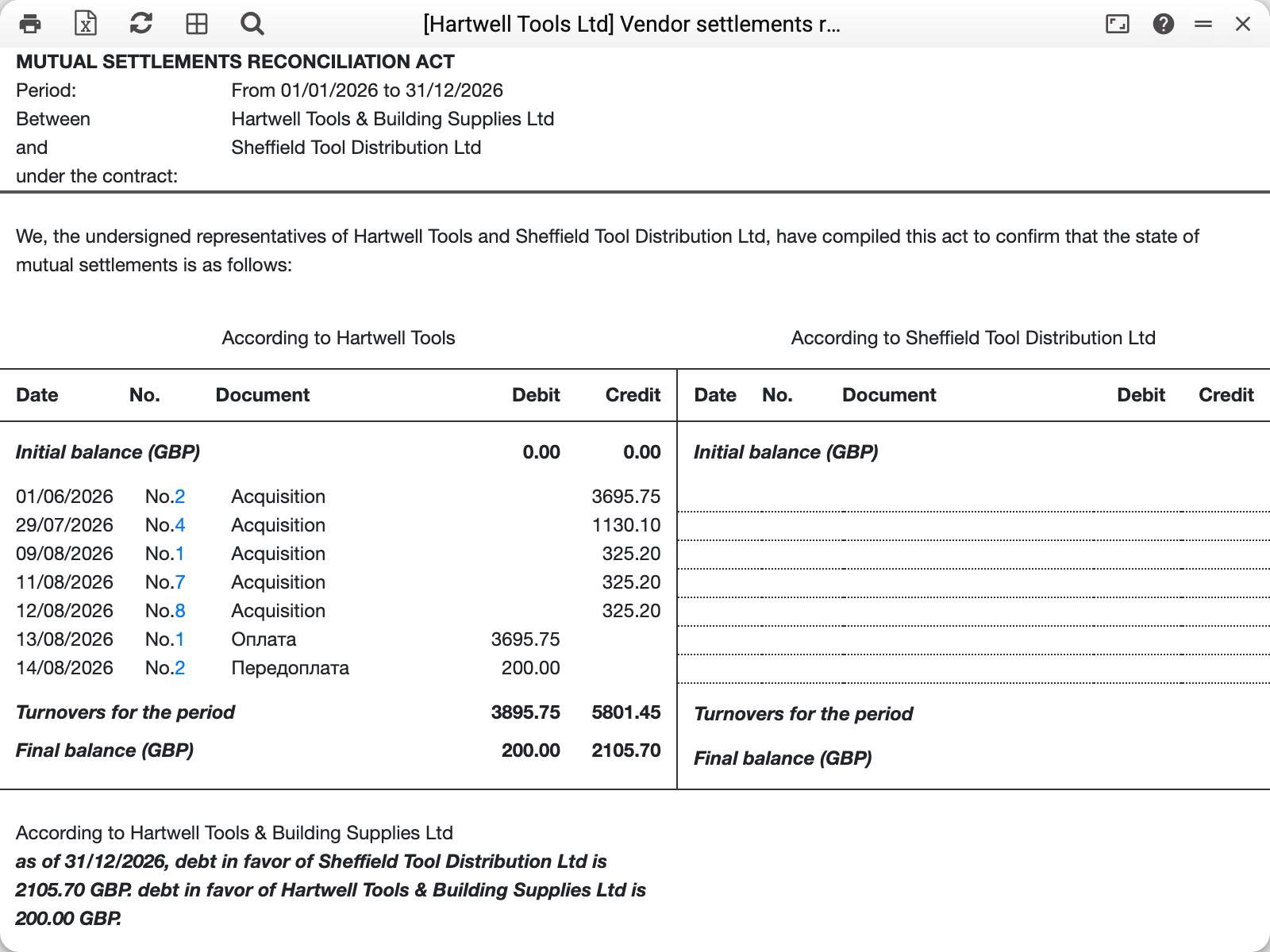
The form follows the layout accountants expect. At the top — the period, the names of both parties and a slot for the contract number. Then the "We, the undersigned…" sentence, and a table of two halves:
- the left one — according to our data: filled in by the system;
- the right one — according to the supplier's data: deliberately empty, with dotted lines to write on. The counterparty fills it in and returns the act with their own figures.
The first line is the opening balance: the total of all approved documents dated BEFORE the period, that is, the debt carried into it.
Then come the movements of the period, one line per document:
- "Acquisition" — vendor invoices, which increase the debt and sit on the credit side. A supplier credit note is an "Acquisition" too, with a minus sign; an invoice of the "Cash" type sits on both sides — it is paid at once; if a prepayment has been applied to it, the debit side holds only the part paid at once (the amount minus the applied prepayment) — the prepayment covered the rest;
- "Payment" — a payment to the supplier line against an invoice, which lowers the debt and sits on the debit side;
- "Prepayment" — a payment line with no invoice, that is, an advance; also on the debit side. The label comes from the payment line itself: an advance stays a "Prepayment" after it is offset against an invoice, so later offsets do not change an act for a past period.
At the bottom — the turnover for the period and the closing balance, and below the table the system spells the result out in words — one net balance per currency: the debt on invoices and an unapplied advance in the same currency are netted, so there is one sentence: a debt in favor of the supplier (we owe more than we paid in advance), a debt in favor of our company (the advance exceeds the debt) or an overpayment in favor of our company (invoices paid above their sum). When every currency nets to zero — no debt. Signature lines for both parties close the form.
Currencies are separated into blocks of their own: settlements in euro get their own balance lines. A payment or an advance made in a currency other than the bank's (the supplier is in EUR, we pay in hryvnia) stands in the currency of the invoice or the advance — at the amount the payment's posting recorded.
What matters
The supplier is mandatory. The act is drawn up with a specific counterparty; running the report with the field empty produces the message "Specify vendor!" (a request via API/MCP without a supplier gets the refusal "Field "Supplier" is required!").
Only approved documents are taken. Drafts are not shown — quite rightly: there is no point showing a counterparty a payment that has not been made.
The empty right half is by design. It is left for the counterparty. If you need the act for internal analysis, vendor cred report or the settlements statement are more convenient.
The finished act is printed or exported. The result window has print and XLSX buttons: the file can be finished off and sent.
Common situations
The opening balance disagrees with last year's act. Check whether documents were approved retroactively after the previous act had been sent: balances are calculated on the fly, so "history" moves together with the documents.
The supplier sent different figures. The usual reasons: we have an invoice they do not have (or the other way round), the same payment carries different dates, or a document fell into the neighbouring period. Comparing by number and date is easiest — both appear on every line.
An act per contract is required. The "contract" field in the header is left to be filled in by hand when the document is prepared.