Prom Options
The connection point to the Prom.ua marketplace. Here live the access key, the API address and the answers to "what goes where": which warehouse feeds the stock export, which price list feeds the prices. The rest of the module is the maintenances that use this connection.
Where to find it: Modules → Prom → Settings → Prom Options
Walkthrough
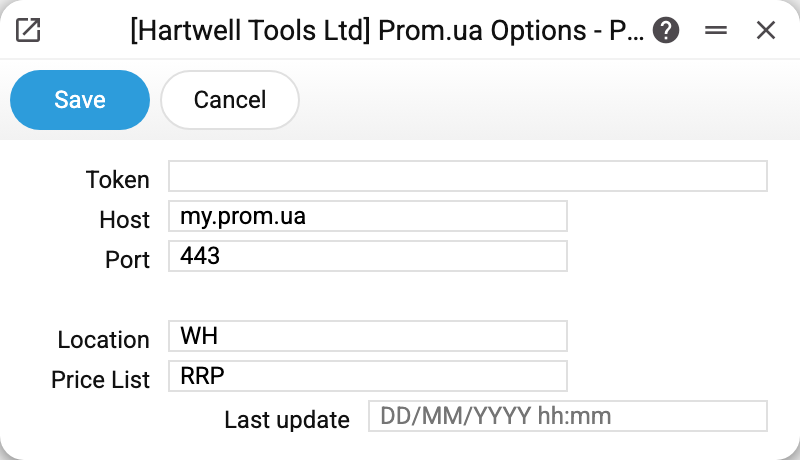
- Token — the API key of your Prom seller cabinet (created there: Management → API tokens). The token is "write-only", like a password: the window does not show a saved token — only the mask "••••••••" (a newly typed token replaces the old one, and erasing the mask deletes it); in the database it is encrypted. Without a token the maintenances refuse: "Prom options are empty".
- Host — the marketplace API address:
my.prom.ua. Changed only for the platform's regional clones (satu.kz, deal.by). - Port — 443; may be left empty, the system defaults to it. If you change the host or the port while a token is already saved, type the token again, otherwise saving is refused: "The saved token is sent only to the saved server. To use another server, type the token". An empty port and 443 are the same address.
- Location — the code of the warehouse whose stock goes to Prom via "Prom: update stock". Several warehouses may be listed via comma — the stock adds up, and "Prom: update orders" places a new order on the first one.
- Price List — where "Prom: update prices" takes the price from: a row of this price list; a product missing from the list, or with a zero price in it, falls back to the base price of its card. Left empty, the maintenance takes the product's row from ANY price list, and if the product is in several, which price goes out is undefined — so with several price lists, fill the field in.
- Last update — a service stamp: when prices were last exported. Set by the maintenance automatically; touched by hand only to force a full export (clear it — and the next run sends everything).
The integration as a whole
- Stitch the catalogues — "Prom: update item keys": the product's sku on Prom must equal the item code in ERPJS; the maintenance writes Prom's internal id into the item card.
- Download the statuses — "Prom: download statuses" fills the "Prom Statuses" directory.
- Regular exchange: "Prom: update orders" pulls customer orders (creating customers by the "Prom Creation of New Cust." rules), while "update prices" and "update stock" push prices and stock out. All three go on the scheduler via the "Scheduled" button of the maintenance window.
Common situations
A maintenance says "Prom options are empty". The token or the host is missing. Without a Location, "Prom: update stock" and "Prom: update orders" refuse differently — "Set Stock in Prom options settings!". This setting is the first thing to check.
Wrong prices are exported. Look at "Price List": filled — prices come from it, with the card's base price for products it lacks; empty — from any price list that has the product (with several, whichever turns up), and the base price only for products in no price list.
Need to re-export ALL prices, not just changed ones. Clear "Last update" and run "Prom: update prices" — the maintenance will assume it never exported anything.