Inventory Accounting Form
A statutory form from the Ministry of Finance order: a sole trader dealing in goods must keep a record of stock and produce it on demand for the tax office. The system assembles the form itself, from the approved stock movement documents of the period.
Where to find it: Modules → Stock → Reports → Inventory Accounting Form
It is a printed form with nine numbered columns, signatures and references to the clauses of the Procedure — not a report for internal use but a document shown to inspectors.
Parameters
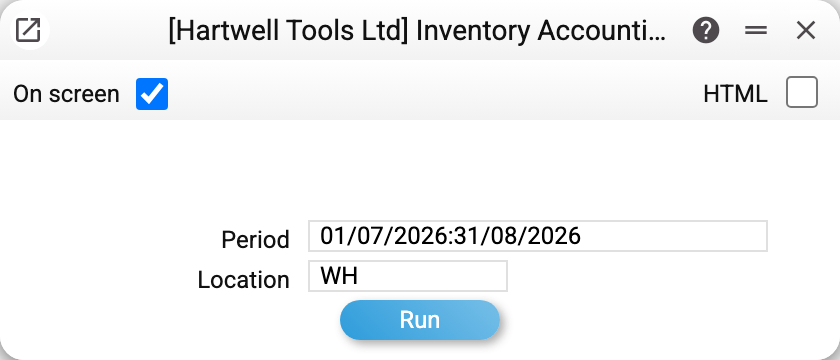
- Period — the range of entries to collect;
- Location — the place of sale, a detail of the form. If no location is chosen, the place of sale in the header comes from the Main warehouse setting, but documents are not filtered by it — for a form for one place of sale, choose the location.
A worked example
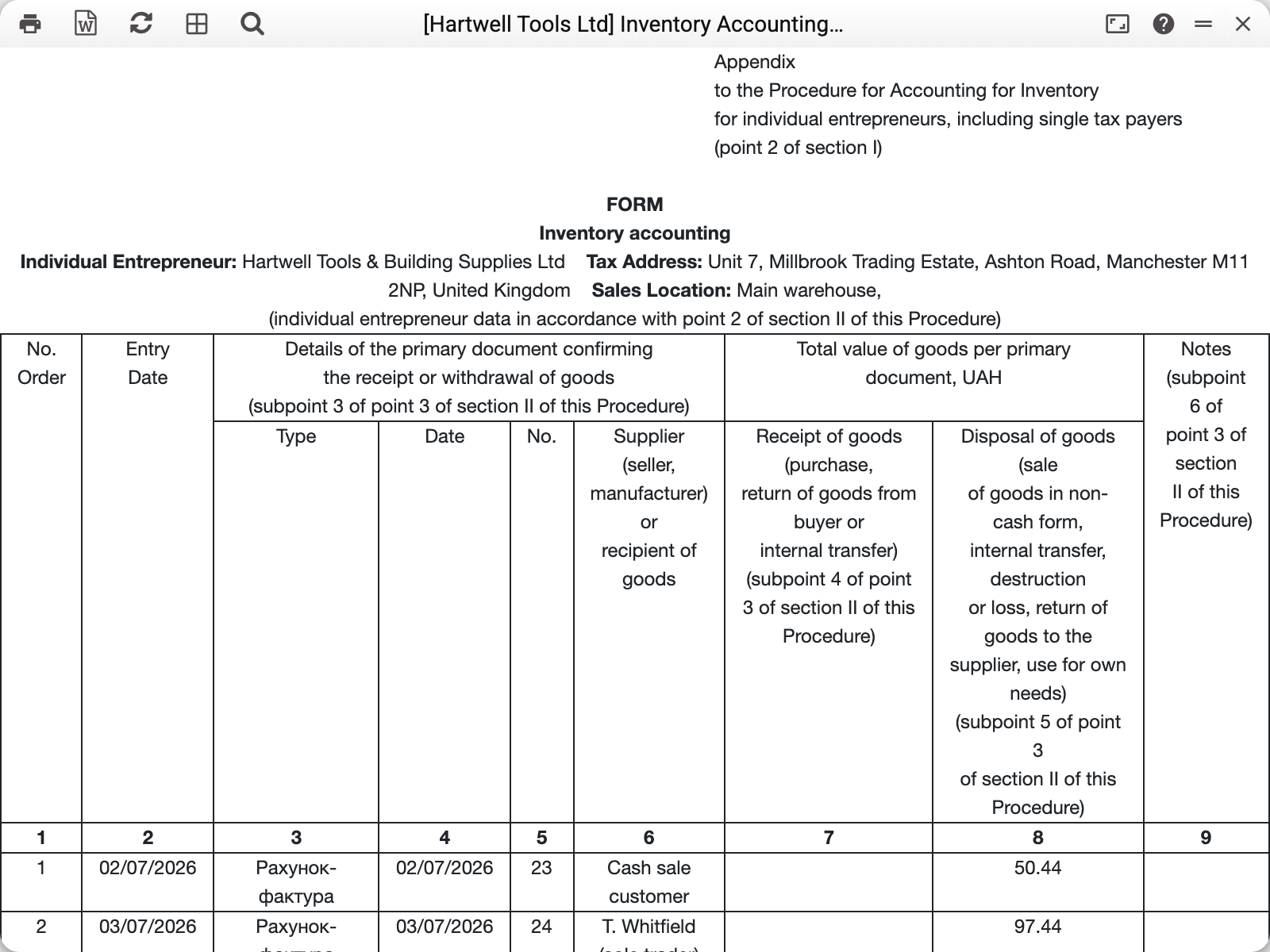
The header is filled with the company's details: name, tax address, place of sale — what would be written by hand on the paper version.
Below is the table, where each row is one source document:
| Column | What it holds |
|---|---|
| 1 | Sequential entry number |
| 2 | Date the entry was made |
| 3–5 | The source document: type, date, number |
| 6 | Supplier or recipient of the goods |
| 7 | Total value of goods received |
| 8 | Total value of goods disposed of |
| 9 | Notes |
The form is therefore a chronology of stock movement in money. It takes the approved documents of the period:
- invoices — sales (column 8), while credit notes go in as "Return From Customer" (column 7); invoices of the "Cash" type stay out — by the form itself column 8 counts non-cash sales;
- vendor invoices linked to a goods receipt — receipts (column 7), while their credit notes go in as "Return To Supplier" (column 8); a vendor invoice without a receipt or of the "Cash" type stays out;
- stock depreciations — disposal at cost;
- stock movements — only when a location is chosen: what left it is a disposal, what arrived is a receipt, at cost.
A customer invoice stands in the form only with the sum of its goods rows, including VAT: rows of the «Work/Service» item type and rows without an item code stay out of the column, and an invoice for services only does not enter the form at all. A vendor invoice is the full document total. The cost of movements and depreciations is seen only by those whose role allows the «Show cost price» action; for everyone else those columns are empty. Every row names its document — type, date and number — so any figure can be found in the system and traced back to its source.
The export button in the corner of the window produces the form as a Word file — in the shape in which it is submitted.
How to use it
An inspection. Generate the form for the period required and print it — this is the stock record the tax office asks for.
Self-checking. An unposted document is not in the form at all. An empty amount in a row means a zero document, a foreign-currency document without a rate, or a stock movement or depreciation seen by someone not allowed to «Show cost price»; an odd amount is a reason to check the document's type and rate. Invoice amounts are in the company's base currency, at the document's own rate.
One location, one form. With several places of sale, the form is produced for each separately: the place of sale is a header detail.
Where to look next
- Locations — where the place of sale comes from;
- Item history — the same movements, in quantities and for one item;
- Location report — the balance on a date.