Actions Setting
The setup that saves the service department manual work: as soon as a service order moves to a new state, the system creates tasks for the right people on its own.
Where to find it: Modules → CRM → Settings → Actions Setting
A worked example
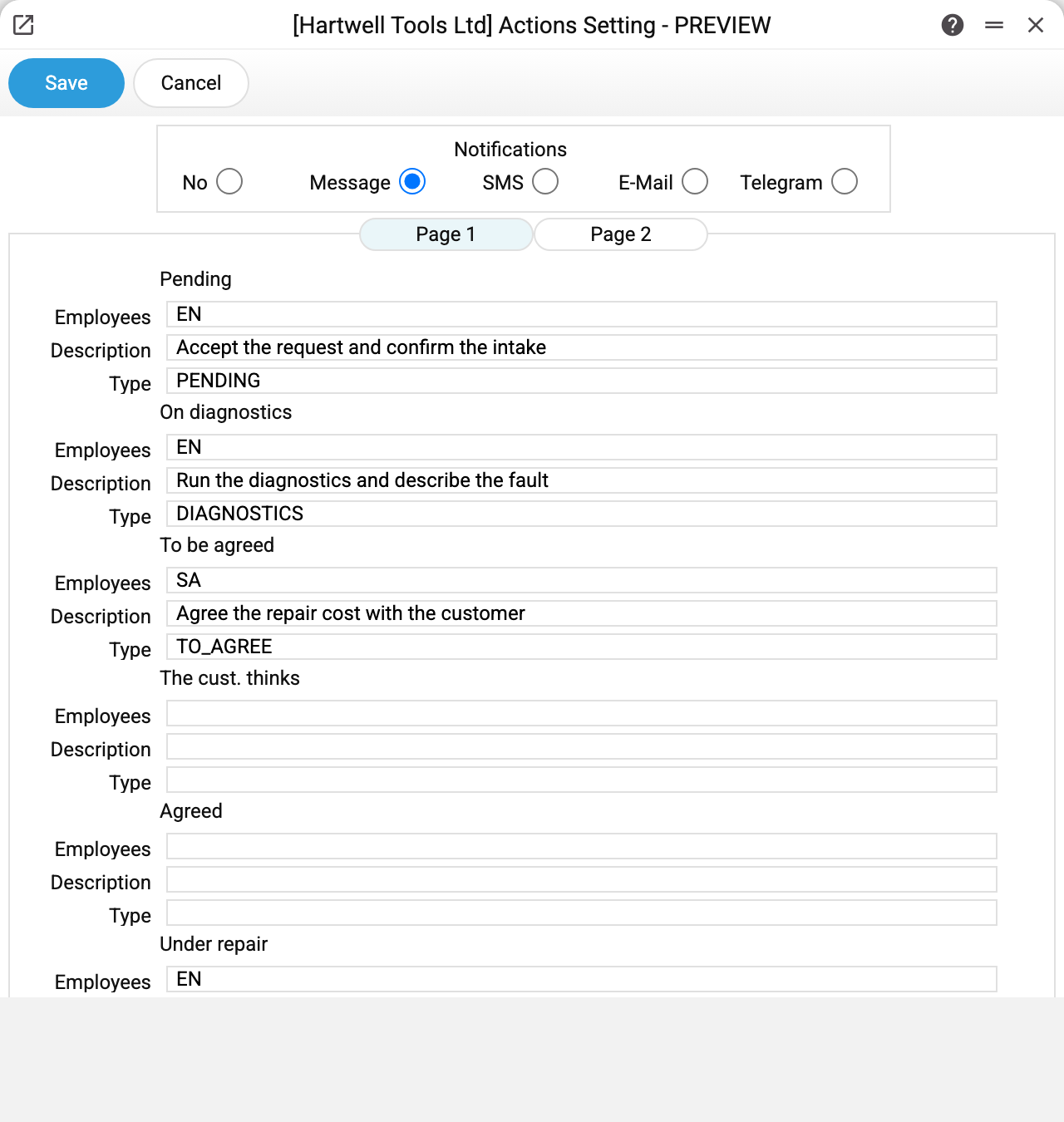
At the top is the notification type («Notifications») for the tasks from the blocks: «No», a system message, SMS, e-mail or Telegram. Below, on the «Page 1» tab, are the blocks, one per service order state: «Pending», «On diagnostics», «To be agreed», «The cust. thinks», «Agreed», «Under repair». The «Page 2» tab continues the list: «In remote service», «Order parts», «Wait. for a spare», «Ready», «Return. for repair» and «Refusal» — the states in the order itself carry the same labels.
Every block holds three fields:
| Field | What it sets |
|---|---|
| Employees | Comma-separated logins — they become the executors of the task |
| Description | The text that goes into the task description: what exactly has to be done |
| Type | The task type the task is marked with |
In the example four states are filled in: intake and diagnostics go to EN, agreeing the cost to SA, and the repair back to EN.
How it works
- A manager changes the state of a service order.
- The system takes the block of that state and creates a task named «Service Order No. …» with the description and type from the block; the order's open task of the previous state is closed at the same time.
- The listed employees become the executors, and each of them is notified the chosen way.
A block without employees or without a task type creates nothing and closes nothing. Separately from the setting, on every state change the system gives a task to the responsible person (the order's «Responsible» field) or reopens the earlier such task — provided the task types contain a type with the code of that state. That task does not depend on the blocks or on the notification type at the top: it always notifies with a system message. In the starter database such types exist for all twelve states.
Three states also talk to the customer, provided the order has a phone number (without it nothing goes out): when an order moves to «On diagnostics» (a message that it has been accepted), becomes ready or is refused, an SMS goes out using the template from the message texts, if sending SMS is switched on there. A contact connected to the Telegram bot gets a short Telegram message instead of the SMS — even when sending SMS is switched off. An order created straight in the «On diagnostics» state gets no message; one created straight as ready or refused does.
Typical situations
No tasks are created. Check whether the block of that state is filled in: with no employees or no type there is no task.
The order does not move to the new state: «Action type "…" does not exist». The block of that state names a type that is not in task types, and the system does not save the order itself. Correct the type in the block or create it in task types.
The setting does not save: "User '…' is not set". One login of the list does not exist or is mistyped — the refusal names exactly that login. A closed user is refused too: "User '…' is closed". Spaces after the commas are fine.
Tasks are created but nobody knows about them. The employees have no contact filled in for the chosen channel — or «No» is selected at the top: then the blocks' tasks are created with the «Notification» box cleared, and their assignees get no messages at all (as intended; until 10.10.2026 «No» mistakenly worked as a system message). «No» does not silence the task for the responsible person.
Different people should handle different states. That is exactly the design: every block is independent and has its own list of employees.