Quotation Price Lists Recalc
A quotation price list is a snapshot: when it was built, the system walked through the item filters, pulled prices from the price lists and composed a table. Life then moves on — prices change, items come and go — while the page the customer opens through their link stays exactly as it was generated.
Where to find it: Modules → Sales Orders → Maintenances → Quotation Price Lists Recalc
This maintenance rebuilds price lists in bulk, so nobody has to open every card and press "Create quotation price list" by hand.
Menu: Modules → Sales Orders → Maintenances → Quotation Price Lists Recalc
A worked example
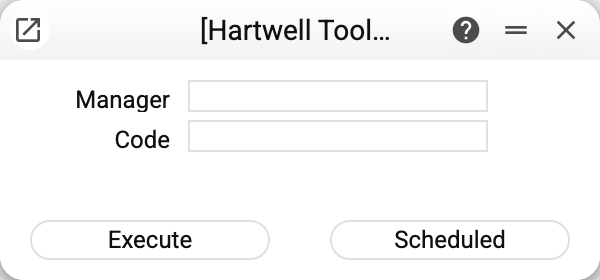
Two fields, both narrowing, both optional:
"Manager" — rebuild only the price lists of that salesperson (the "Manager" field on the price list card). Handy when prices moved in one sales direction.
"Code" — rebuild one specific price list.
Empty fields mean "everything that qualifies" — and not everything does:
- closed price lists are skipped — if the card is marked "Closed", the maintenance leaves it alone;
- expired ones too — those whose "Valid to" date has passed. A price list with no expiry date counts as current and is always rebuilt.
In other words, the maintenance refreshes exactly what a customer can open right now.
"Execute" starts the recalculation immediately; "Scheduled" puts it into the task schedule. The latter is the main mode: a nightly run means every customer sees current prices and stock in the morning.
What happens inside
Every price list is rebuilt in its own transaction. That matters: if one fails, the ones already processed stay updated instead of rolling back with it. At the end the maintenance answers with "Quotation price lists recalculated: …", and every price list it stumbled on gets its own line "Quotation price list …: …" with the reason and a triangle instead of a tick. The next run retries those price lists.
One case is handled separately — another operation saving the same price list at that very moment (a concurrent write conflict in the database): the maintenance retries the rebuild at once — up to three attempts in all — instead of failing. A card somebody has merely opened for editing is not waited for: it is rebuilt anyway.
When to use it
- Regularly, on a schedule — nightly or weekly, depending on how often your prices move.
- Once after a price change — you raised prices and customers should see the new ones. Narrowing the run by code or manager helps here.
- Not needed when only stock figures have to be refreshed: that is the lighter quotation price lists stock recalculation, which leaves prices and the item selection untouched.
Typical situations
- A price list was not updated. Check the card: "Closed" or an expired "Valid to" date — those are skipped on purpose.
- Only some were updated. See whether the run was narrowed by "Manager": other people's price lists are then out of scope.
- Items disappeared from a price list. Not a failure: the rebuild walks the card's filters again, and an item that no longer matches them (its group changed, say) drops out.
- The summary says "The quotation price list of another company is rebuilt only by that company". The price list belongs to the main company of register sharing, and the run was started from yours. The service does not rebuild the rows of such a price list: it would build them from your items and prices, not from the main company's. Run the recalculation in the main company.
Nearby
- Quotation price lists — the price list itself
- Quotation price lists stock recalculation — stock only
- Price lists — the source of prices
- Task schedule — putting the maintenance on autopilot