Service Item History Report
Every repair of a specific device in one place: each service order with receiving and give-out dates, the work done and the warranty. It answers "have we seen this one before?" — and settles the conversation when a customer brings the same tool in for the third time with the same complaint.
Where to find it: Modules → Service Orders → Reports → Service Item History Report
The report lives in the Reports menu of the Service Orders module. A device can be found three ways: by model code, by serial number or by order number — at least one field must be filled.
A worked example
Looking at the history of model DRILL-18V:
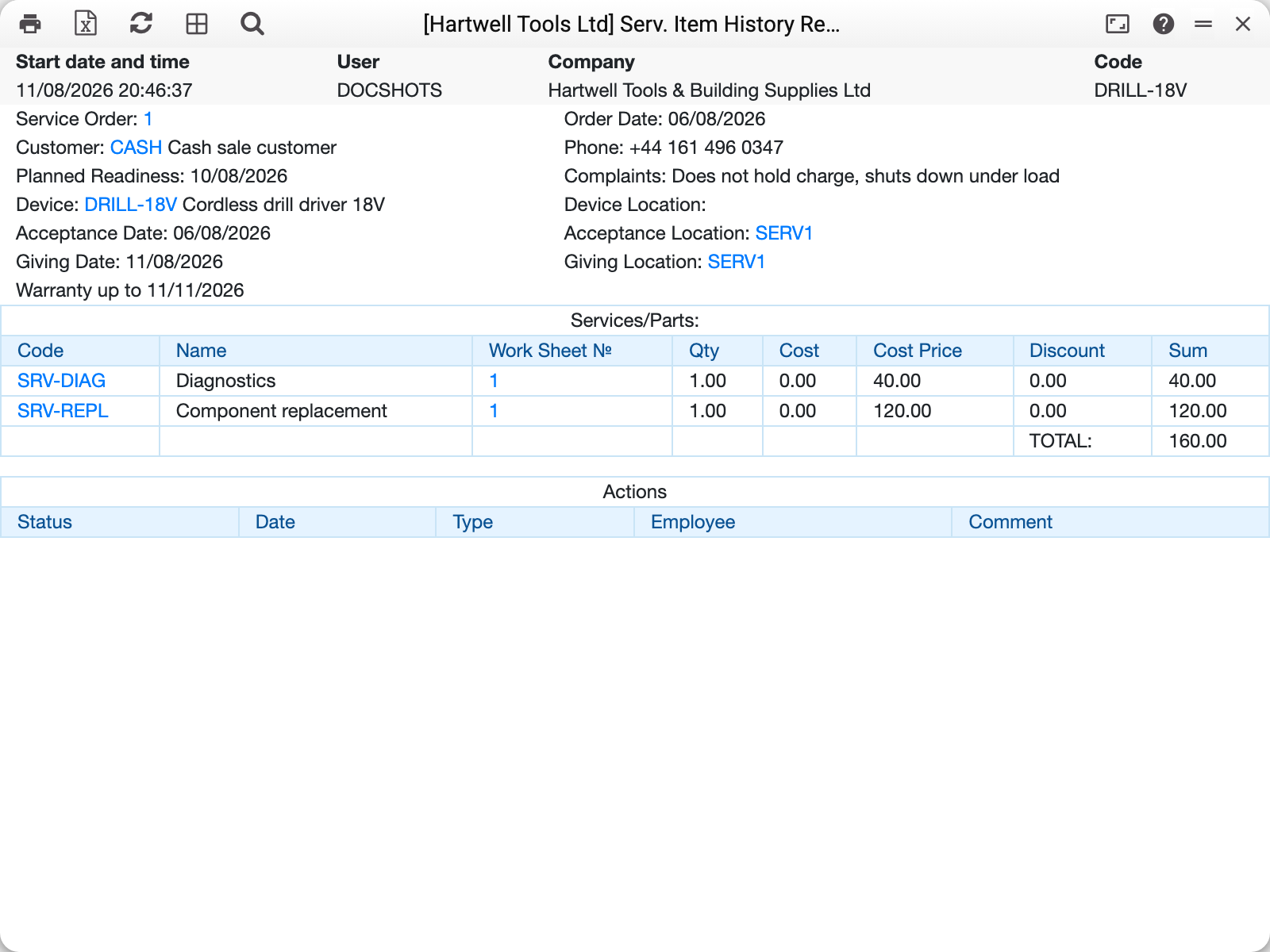
For each order the report assembles the same picture as the SO Status Report, just grouped by device: the header with the complaint, worksheet lines with amounts, receiving and give-out dates, repair warranty.
The warranty period here is practical: when a customer returns with the same serial number within the warranty, the system marks the new order as a repeated warranty repair automatically.
Common situations
"You must enter at least one of the fields!" The report will not run with no parameters at all — give a code, a serial number or an order number.
History is empty for a serial number. The orders have the serial spelled differently (or not at all) — search by model code instead.
Parameters
| Parameter | What it does |
|---|---|
| Art. Code | Device model — all its orders |
| Service Order No. | History via a specific order |
| Serial No. | Exact unit by serial number |