Vendor Payments
The document that records money paid out to a supplier. A single payment can settle several invoices at once and even pay in advance — every row stands for one amount and one reason: either a vendor invoice or a prepayment.
Where to find it: Modules → Purchase Ledger → Registers → Vendor Payments
Until the payment is approved it is only a draft: the money "leaves" the company when you tick OK. At that moment the system reduces what you owe the supplier, posts the transactions and — for an advance payment — creates a prepayment that a future invoice will offset.
A worked example
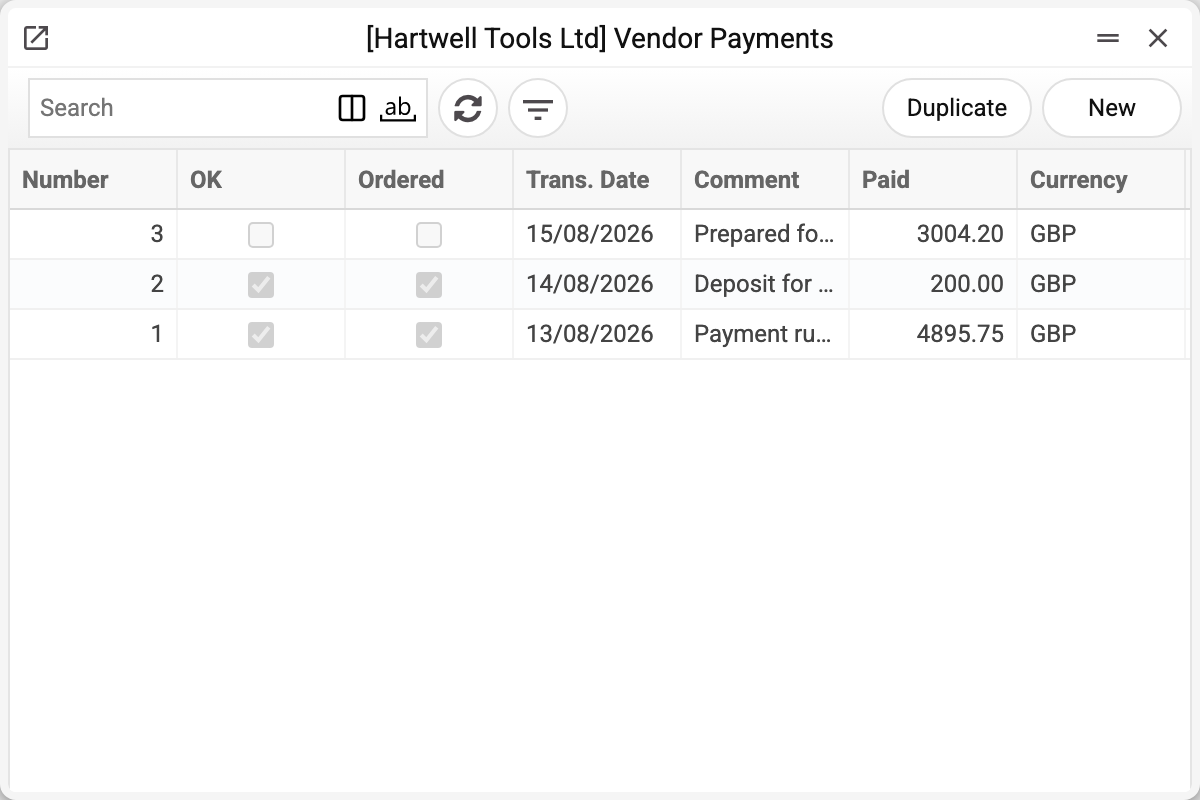
Let us open payment No. 1 dated 13/08/2026:
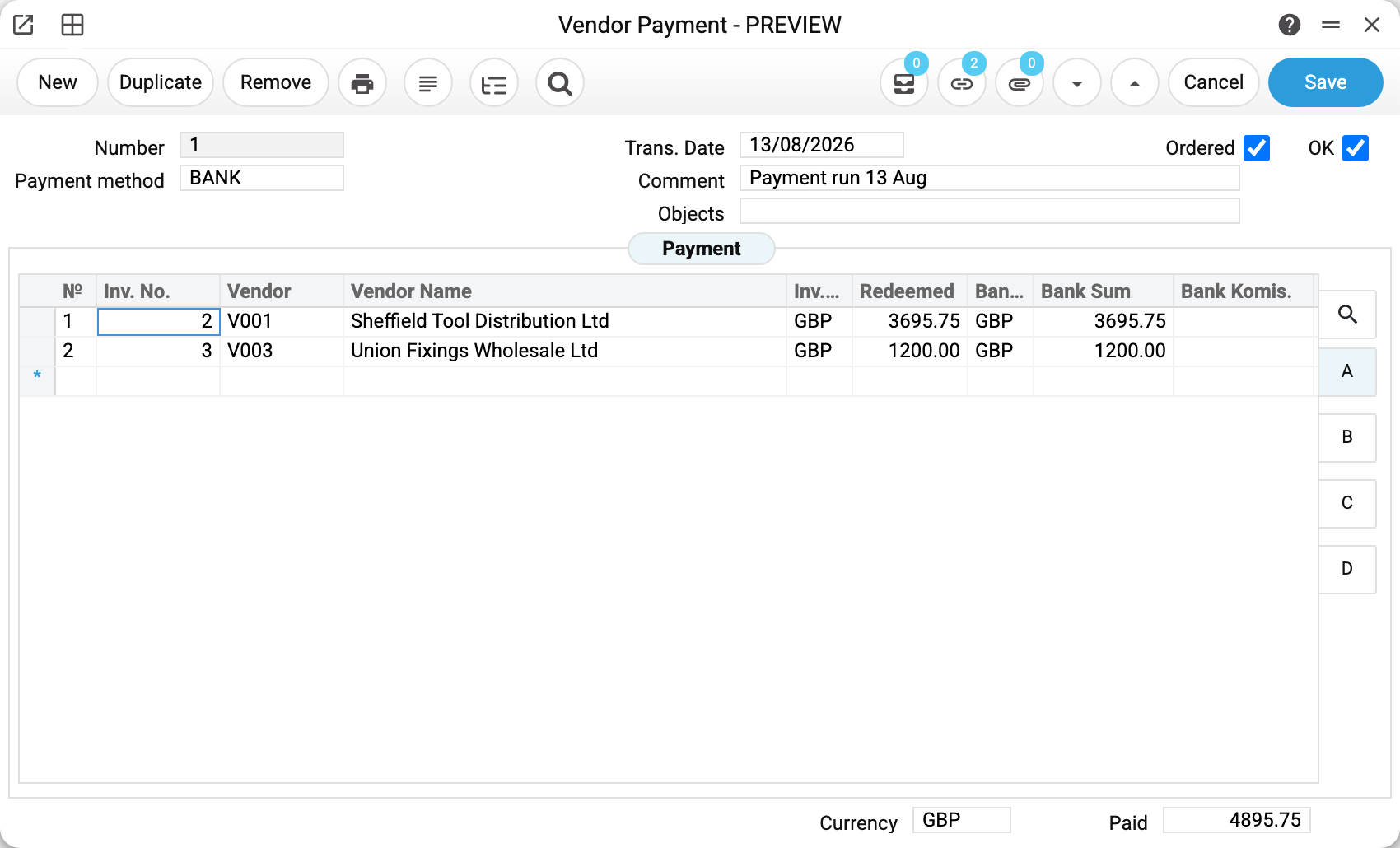
The header's main fields are the number, the payment mode (BANK — bank transfer in GBP), the transaction date and a comment; next to them are the analytical objects. The payment mode decides which account the money leaves from: every code in payment modes carries a financial account — cash desk, bank or card terminal.
Choosing the payment mode, and also changing the transaction date, overwrites the header "Comment" with the comment from the payment mode row (if one is set there), and with no payment mode the comment is cleared. At the same time the bank currency of every row becomes the currency of the payment mode, and the bank amounts are recalculated. So write your own comment after choosing the mode and the date.
There are two rows in the table:
| Inv. No. | Vendor | Currency | Redeemed | Bank Sum |
|---|---|---|---|---|
| 2 | V001, Sheffield Tool Distribution Ltd | GBP | 3695.75 | 3695.75 |
| 3 | V003, Union Fixings Wholesale Ltd | GBP | 1200.00 | 1200.00 |
The first invoice is settled in full, the second one in part: out of 2392.60 we paid 1200.00 and the rest stays as debt. The total at the bottom of the card, "Payment Amount 4895.75", is what will leave the bank account.
You do not have to fill the row in by hand. As soon as you type the invoice number, the system pulls in the vendor, the invoice currency, the whole outstanding balance into the "Redeemed" column, the exchange rate from the invoice and the bank amount. Paying less? Simply correct "Redeemed" — the bank amount follows. The bank amount itself is not edited separately when the invoice is in the same currency: the system puts it back to the payment amount — otherwise the invoice would close for the whole "Redeemed" and the difference would be posted to the exchange-rate difference account. Next to it is "Sent Value" — the same payment in the bank currency; it differs from "Redeemed" only when the invoice currency and the bank currency differ.
An advance to a supplier
The second common case is paying before the invoice exists. Such a payment looks different:
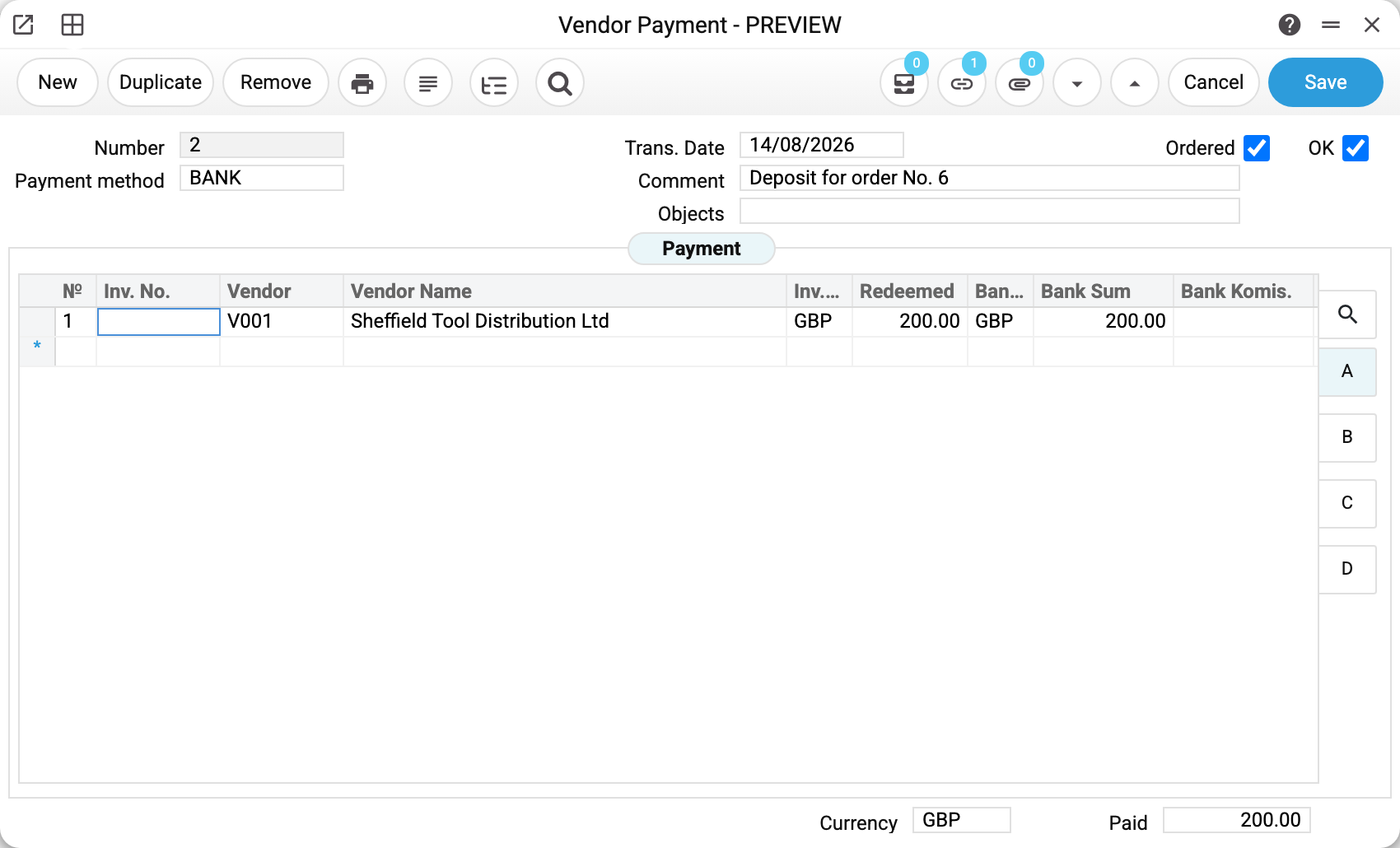
There is no invoice number in the row. Everything that matters sits on tab B to the right of the table:

The "Generate prepaym. No." box is ticked, so the system assigned the advance number 1 by itself. Next to it is purchase order No. 6, the order we are paying against: 200.00 GBP. From here the advance lives its own life — a vendor invoice will offset it when the goods arrive, and until then it shows up in the prepayments history.
The key rule for a row: either an invoice or a prepayment. Filling in both ends with the error "It is forbidden to pay both invoices and prepayment!".
Table tabs
To the right of the table you see A, B, C and D. These are not different rows but different sets of columns over the same rows; hover over a letter and a tooltip lists its columns:
- A — invoices: invoice number, vendor, amounts, bank charge;
- B — prepayments: advance number, number generation, purchase order, "Cred. Account". The posting does not read the last column: an advance always goes to the vendor's advance account — from their card, then from the category, otherwise from Account Usage, the "Creditors" tab, the "Advance Account" field;
- C — exchange rates;
- D — payment purpose (for the bank file export) and the "Payment sent" mark (the row went to Ukrsibbank — see the section below).

In a payment made in the base currency tab C shows ones — there is nothing to convert. Rates start to matter when the vendor invoice is in a foreign currency: the invoice rate is taken from the invoice itself (so that the debt closes with the very amount it was booked at), and if foreign-currency balances have been revalued by closing the books since the invoice — the rate on the date of the latest revaluation: the debt is already carried at that rate. The bank rate is taken on the payment date. The difference between them goes to the exchange-difference accounts: if the payables account has an FX difference accounts setting in the chart of accounts — to that setting's profit and loss accounts, otherwise — to the accounts from the account settings.
What approval does
Ticking OK starts several things at once.
1. The debt goes down. A row with an invoice number finds that invoice among the open ones and subtracts the amount paid. Invoice No. 2 from the example disappeared from open vendor invoices altogether; invoice No. 3 stayed there with a balance of 1192.60.
2. Transactions appear. For payment No. 1 the system posted two lines per settlement:
| Account | Dr | Cr |
|---|---|---|
| 631 Trade payables — domestic suppliers | 3695.75 | |
| 311 Current bank accounts in national currency | 3695.75 | |
| 631 Trade payables — domestic suppliers | 1200.00 | |
| 311 Current bank accounts in national currency | 1200.00 |
The payment posts only if the "Vendor Payments" box is ticked on the "Accounting" tab of the "Records from Subsystems" setting; without it the payment is approved with no transaction and no warning.
The payment takes the payables account from the vendor invoice being paid — exactly the one that invoice put the debt on. The invoice itself gets it in three steps: the field on the vendor's card, then the vendor category, and only if both are empty — the account settings. So editing the vendor's card changes the ledger account for new invoices, while the ones already entered are paid against their own account.
3. An advance creates a tax credit. Payment No. 2 (a 200.00 prepayment against order No. 6) produced four lines instead of two:
| Account | Dr | Cr |
|---|---|---|
| 371 Advances paid to suppliers | 200.00 | |
| 311 Current bank accounts in national currency | 200.00 | |
| 6442 Tax credit not confirmed | 33.33 | |
| 6441 Tax credit on prepayments | 33.33 |
The tax amount is calculated in proportion to the order: we paid 200.00 out of 611.76, i.e. 32.7 % of the order, and the same share of its VAT. The rate comes from the order; if the payment is not linked to an order, it comes from the VAT rate on the vendor's card.
A foreign-currency advance without an order. If an advance row is not linked to an order and the invoice currency in the row is not the base one, the advance VAT is calculated in the row currency (at the rate from the vendor card, rounded) and converted into the base currency at the same exchange rate as the advance on the vendor account itself. For example, an advance of 1000 EUR with 20 % VAT is 166.67 EUR of VAT; at a rate of 43 the tax credit is 7166.81 in the base currency. If the row is linked to a purchase order, the VAT is converted at the order's rate.
4. The bank commission from the "Bank Komis." column is posted as a separate pair: debit — the "Bank Commission" account from Account Usage, the "Creditors" tab; credit — the payment mode's account. A negative commission on an ordinary payment goes the other way: debit the payment mode's account, credit the commission account. If the commission account is not set there, a payment with a commission will not post.
Reversing a payment
Clearing the OK flag puts everything back: the debt on each invoice grows by exactly the amount this payment cleared (an invoice it paid in full reappears among the open invoices), the transactions are reversed and the advance disappears from open prepayments. Other payments against the same invoice stay in force. Verified on the demo stand: after the flag was cleared, a fully paid invoice returned to the list of debts and a partly paid one returned to the amount it had before this payment. Only a user whose role has the "Can remove OK" action can clear the OK flag.
In an approved payment only the header "Comment" can be changed: edit it and save, no need to clear OK. Anything else: clear OK, correct, tick OK again. An approved payment cannot be deleted — clear OK first.
An advance that has already been offset by an invoice cannot be reversed: the system will say the payment exceeds the prepayment balance. Clear the OK flag on the vendor invoice first, and only then on the payment.
Approving a payment
If approval rules are set up for vendor payments, ticking OK first starts the approval: the payment stays unposted, and the message "Confirmation request sent!" appears; if the request is rejected — "Request rejected!". The "Ordered" flag in the header shows that the request has gone out. The request can also be sent separately — document menu → "Approval request", and withdrawn while the payment is not posted — "Cancel approval request".
Sending to Ukrsibbank
In the Ukrainian version of ERPJS a saved payment can be sent to Ukrsibbank Business straight from the window — document menu → "Send to Ukrsibbank". Rows without the "Payment sent" mark go: the amount is the "Bank Sum", the purpose comes from tab D, the recipient is the requisites of the row's contact. Rows the bank accepted get the mark and do not go a second time; such a row cannot be changed, moved or removed, and a payment with it cannot be deleted. To repeat a send after a failure — menu → "Clear "Payment sent" marks", once you have checked in the bank that the payment is not there. Only someone whose role has the "Can send payments to the bank" action can send and clear the marks. Connecting, the bank sign-in and every refusal — in the Ukrsibbank Business Settings.
Common errors
"The amount exceeds the amount of the invoice! 7427.5 > 6427.5" — you are trying to pay more than is left on the invoice. "Redeemed" must not exceed the outstanding balance; an overpayment is entered as a separate prepayment row.
"Line 1: «Bank amount» 100 differs from «Redeemed» 3500 in the same currency!" — the payment was written bypassing the window (import, API) with different bank and redeemed amounts, although the invoice and the bank are in one currency. Enter the payment in "Redeemed" — the bank amount follows it.
"Line 1: invoice currency EUR differs from the currency UAH of invoice 2560!" — the row names a currency other than that of the vendor invoice (this only happens when writing bypassing the window). Select the invoice in the row again — the currency is taken from it.
"It is forbidden to pay both invoices and prepayment!" — one row carries both an invoice number and the advance flag. Split it into two rows.
"You cannot save a document with an empty payment matrix!" — a payment without a single row. At least one row is required.
"Payment date before invoice date" — the transaction date is earlier than the invoice. Fix the date in the header.
"Select a Payment Method!" and "This payment method code is not registered in the system!" — the payment mode is empty or contains a code that does not exist in payment modes.
"Repeating the prepaid number is prohibited!" — two rows of this payment share an advance number. A number already used in another payment gives a different refusal — see below.
"Prepaid number already in use!" — on posting, an advance row with a positive amount carries a number that a prepayment has already had. If "Require unique prepayment numbering" is ticked on the Creditors tab of Account Usage, a number already paid in by another payment blocks even saving a draft — unless the row exactly closes an overpayment on that number in the same currency. Tick "Generate prepaym. No." — the system assigns a new number.
"Repeating lines is prohibited!" — the same vendor invoice or the same purchase order stands in two rows of the payment. Pay one invoice in one row.
"You cannot create a negative prepayment!" — a negative amount in an advance row whose number is not among the open prepayments. A refund from a supplier is entered differently: in "Prep. No." pick the open prepayment — the row fills with its balance with a minus. The amount must be negative in all three columns of the row at once, otherwise the system answers "Amounts with different signs!"; no more than the prepayment balance can be refunded.
"Field 'Currency' is not filled!" — the payment rows are in different bank currencies: the payment currency is then empty, and such a payment does not post. Split it into separate payments, one per currency.
"You cannot delete a confirmed payment!" — the payment is posted. Clear OK first.
Where to look next
- Vendor Payments Journal — how much was paid over a period and through which account;
- Vendor Payments Information — who owes whom at the end of the period;
- Prepayments Vendor History — what happened to each advance;
- Payment Terms — where the due date of an invoice comes from;
- Ukrsibbank Business Settings — sending payments to the bank from the payment window.
Print variables
Values available in this document's printed form templates. How to write a variable in a template — see Print Forms.
Header fields:
| Variable | What it holds |
|---|---|
| Payments_Number | Number |
| Payments_PaymentMethod | Payment method |
| Payments_Date | Trans. Date |
| Payments_Comment | Comment |
| Payments_Objects | Objects |
| Payments_OK | OK |
| Payments_Received | Payment Amount |
| Payments_Currency | Currency |
Row fields:
| Variable | What it holds |
|---|---|
| MNo | Row position number |
| MInvoiceNumber | Inv. No. |
| MCustomer | Vendor |
| MCustomeName | Vendor Name |
| MBankVal | Bank Sum |
| MBankCom | Bank Komis. |
| MReceivedCurrency | Bank curr. |
| MReceived | Sent Value |
| MInvoiceCurrency | Inv.Curr. |
| MNotPaid | Not Paid |
| MPaid | Amount paid on the invoice |
| MPaymentType | Payment type |
| MCheckNumber | Rec. No. |
| MAccountNumber | Order No. |
| MPrepNumber | Prep. No. |
| MGeneratePrepNumber | Generate prepaym. No. |
| MInvoiceCurrencyToRate | ↑ Rate Inv. |
| MInvoiceCurrencyFromRate | ↓ Rate Inv. |
| MReceivedCurrencyToRate | ↑ Bank Rate |
| MReceivedCurrencyFromRate | ↓ Bank Rate |
| MVAT | VAT |
| MVATSum | VAT Sum |
| MVATAdd | VAT add |
| MObjects | Objects |
| MAccRounded | Round. acc. |
| MRounded | Rounding |
| MNextPayment | Next payment |
| MLinkNumber | Ref. No. |
| MDebtorsAccount | Cred. Account |
| MDebContr | Credit contract No. |
| MComment | Comment |
| MBankCurrency | Cur. C/A |
| MPaymentDate | Payment Date |