Contract billing
The maintenance that turns contracts into invoices or sales orders — which of the two is set by the "Create" switch in the contract itself. It walks through approved contracts, computes the next invoice date for each and creates every invoice that falls into the given period. This is the "subscription that bills itself" — run by hand or on a schedule.
Where to find it: Modules → Sales Orders → Maintenances → Contract billing
Menu: Modules → Sales Orders → Maintenances → Contract billing.
A worked example
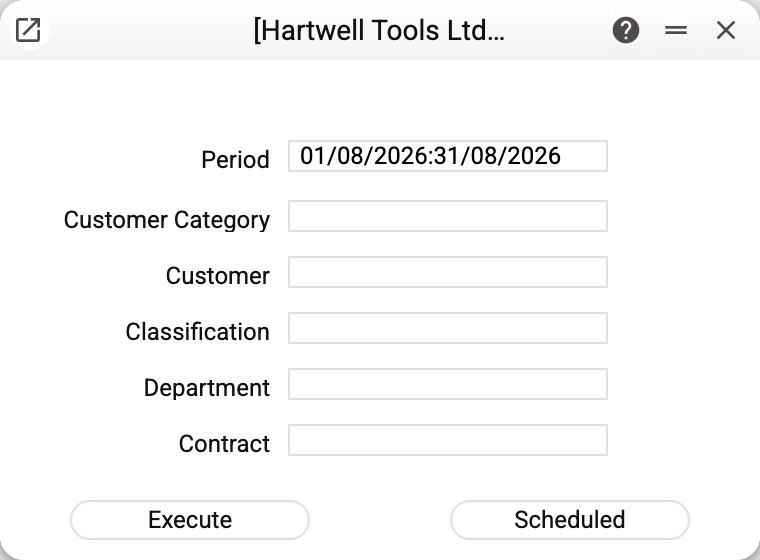
"Period" is the main parameter: up to which date this run bills. The maintenance creates invoices for every not yet billed contract period dated no later than the end of the "Period" — including ones that were due before its start. A monthly contract with a two-month period yields two invoices at once.
The other fields narrow the run and are all optional:
- "Customer Category" and "Classification" — only contracts of customers in that category or classification;
- "Customer" — one customer's contracts;
- "Department" — your department's contracts;
- "Contract" — a single specific contract.
"Execute" starts the pass now; "Scheduled" puts it into the task schedule. The usual production mode is a daily run with the period "today": invoices then appear exactly on their computed dates. On a schedule the period shifts every time: the same length as when it was scheduled, ending on the day of the run.
After the run the maintenance reports "Processed: …, skipped: …, errors: …"; if some periods were left to the manager, it adds "Periods not billed, manager review required (see tasks): …", and one "Contract No. …: reason" line per error.
What it does with each contract
- Takes approved (OK) contracts only, whose validity intersects the run's period and which have at least one line.
- Computes the next invoice date from the contract's period boundary: "before period" — minus that many days, "after period" — plus.
- If the date is no later than the end of the run's period and there is no document for that period yet, the document chosen in the contract's "Create" switch ("Invoices" or "Orders") is created: lines and payment terms from the contract, and on an invoice also the due date from those terms, the sales account from the contract (when empty, from the terms) and "Update warehouse" from the "Write off warehouse by invoice" setting. The document is left unapproved — posting it is your job. A period is already covered when a document linked to this contract is dated within it — the service then skips it.
- If there is no linked document, but the period has a document of the same kind for the same customer, linked to no contract and carrying at least one item of the contract (it looks raised by hand), the service creates nothing: the contract's "Salesman" (or, without one, whoever ran the service) gets a task to check that document. A re-run does not open a new task for the same period.
- Writes the last invoice date into the contract and moves the internal anchor to the next period. Re-running therefore creates no duplicates: whatever has been billed is skipped.
- Links document and contract both ways. If a previously created document was deleted, the next run notices the gap and recreates it (by the same rule: a hand-made document without a link is not duplicated but goes to the manager).
- Each contract is processed on its own: an error in one rolls back only its documents of this run, the other contracts are billed.
Typical situations
- "Processed: 0" although contracts exist. In order: is the contract OK'd; does it have lines; does its validity intersect the run's period; did a filter (customer, department, category) narrow the run too much; is the period already covered by a linked document or left to the manager — then the summary has the manager-review line and the manager has a task.
- An invoice was expected but did not appear. Check the date: with "before period" and N days, next month's invoice appears N days before the month starts — it may simply not be due yet. Widen the run's period and retry.
- Too many invoices. The run's period covered several contract periods — that is by design: the maintenance catches up on everything dated up to the end of the given period, including what was missed earlier.
- The invoice is created but not posted. As intended: the maintenance prepares documents and leaves approval to a person.
- Refusal about a register shared with another company. If your company takes contracts in shared use from another one, the maintenance refuses: invoices for shared contracts are raised only by the company that owns them.
Nearby
- Contracts — where the invoice content comes from
- Invoices — what is created
- Task schedule — putting it on autopilot