Payment Methods
The directory of "how the money arrived — which account it landed on". Each row is one method: cash, bank, card terminal, a foreign-currency account. When you pick a method in a payment, a cash order or while taking a service order payment, the system pulls the posting account from this directory — no need to type it by hand.
Where to find it: Modules → Sales Ledger (the item is present in other modules too) → Settings → Payment Methods
Walkthrough
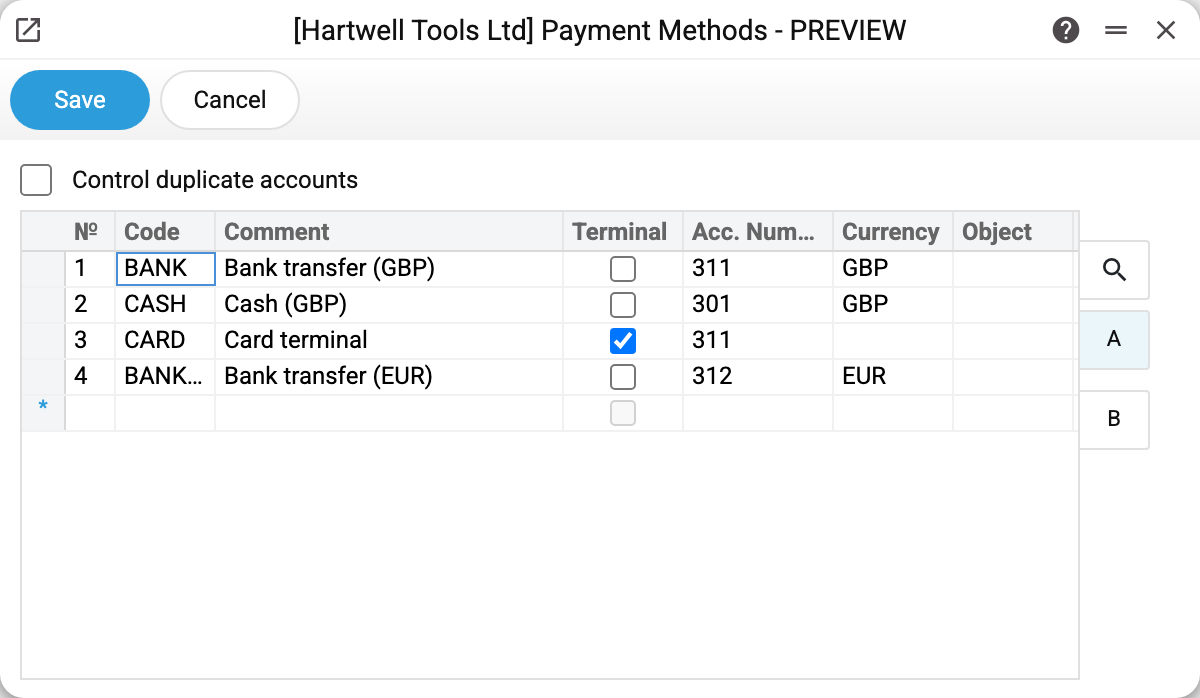
Four methods in the demo company:
| Code | Comment | Account | Currency |
|---|---|---|---|
| BANK | Bank transfer (GBP) | 311 | — |
| CASH | Cash (GBP) | 301 | — |
| CARD | Card terminal | 311 | — |
| BANKEUR | Bank transfer (EUR) | 312 | EUR |
Note how CARD and BANK share account 311 while BANKEUR gets its own 312 — the chart of accounts keeps national and foreign currency money apart, so a method is really "account + currency" as a pair. There can be more methods than accounts.
Tab A columns:
- Code — a short identifier; typed in capitals, no commas or dots (those are separators elsewhere in the system);
- Comment — the name the cashier sees in a document;
- Terminal — the acquiring flag: such a method is treated as a card payment, not cash, when taking service order payments. The till (POS) does not read this flag: there cash is told from card by the payment field the method stands in;
- Acc. Number — where the posting goes; the account must exist in the chart of accounts;
- Currency — when filled, documents with this method work in that currency; empty — the currency is chosen in the document;
- Object — optional analytics: the object is stamped on the payment posting automatically.
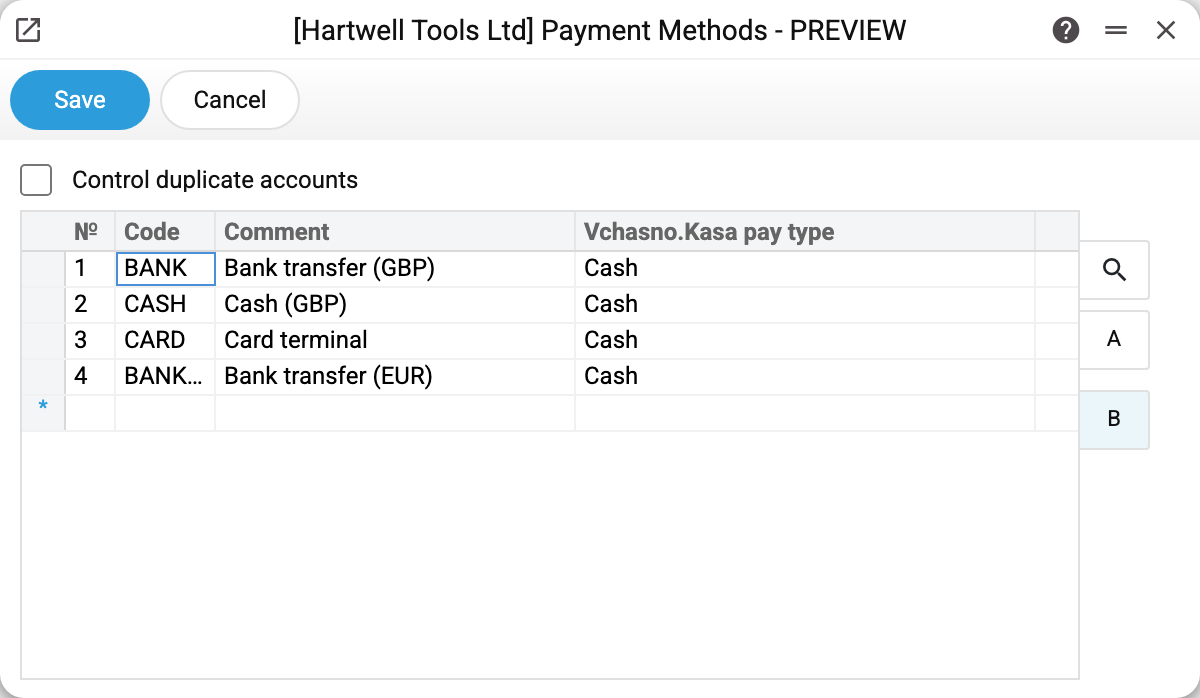
Tab B holds the "Vchasno.Kasa pay type" column: the mapping of payment methods to the Vchasno.Kasa fiscal service (Ukrainian receipt fiscalization). Not configured in the demo, the column is empty.
An empty cell means the type follows the invoice field that holds the payment method: "POS cash" is cash, "POS terminal" is card. "POS other payment" and "POS cheque" have no default type: the receipt is not fiscalized until a type is set. "0 - Cash" is a choice of its own: with it the receipt goes as cash from any field.
Who uses payment methods
- Customer payments and vendor payments — the bank/cash account of the posting comes from the method;
- cash in and cash out, including the mobile cash desk;
- service order payments — the payment list of a department is built from these rows, and the Terminal flag splits the takings into cash and card;
- POS: point-of-sale settings reference these codes;
- payroll payouts;
- currency purchase and sale — the accounts are picked from payment methods (BANKEUR in the demo was added exactly for that).
Worth knowing
- The code is unique within a company: a second row with the same code will not save — "Code "…" is already used". The comment must be unique too: the database will not save two rows with the same name. In a database with several companies both limits apply within each company (the Ukrainian and Russian demo companies simply name their methods differently — ГГ/БГ and НГ/БНГ).
- The "Control duplicate accounts" checkbox switches on a real validation. While it is off, the same account may repeat freely. Once you tick it, saving requires that two rows carrying the SAME account number differ in currency or objects; otherwise the save is rejected and the offending account is named in the message. Several methods on one account remain perfectly normal — that is exactly why the check looks at the pair "account + currency/object" rather than at the account alone (the three cash methods on 301 above pass it: their currencies differ). The reason: the cash book report tells payment methods apart by that same pair, and two identical rows cannot be told apart at all.
- Avoid deleting a method that documents already reference: the code stays in old documents, but the account behind it can no longer be resolved.
Common situations
A payment landed on the wrong account. Look at the account in the document's payment method — fix it here, not in the transaction.
Need a second foreign-currency account. Add a separate method with a new code and its own account — any number of methods may point to one account or one currency.
The terminal takings count as cash. Check the Terminal flag on the method's row — without it the payment is treated as cash.