Accounts reconciliation
The "which result account closes where" table. At period end, closing periods carries the balances of income and expense accounts to the financial result accounts — and it takes the pairs from here.
Where to find it: Modules → Nominal Ledger → Settings → Accounts reconciliation
Walkthrough
The setting in the demo:
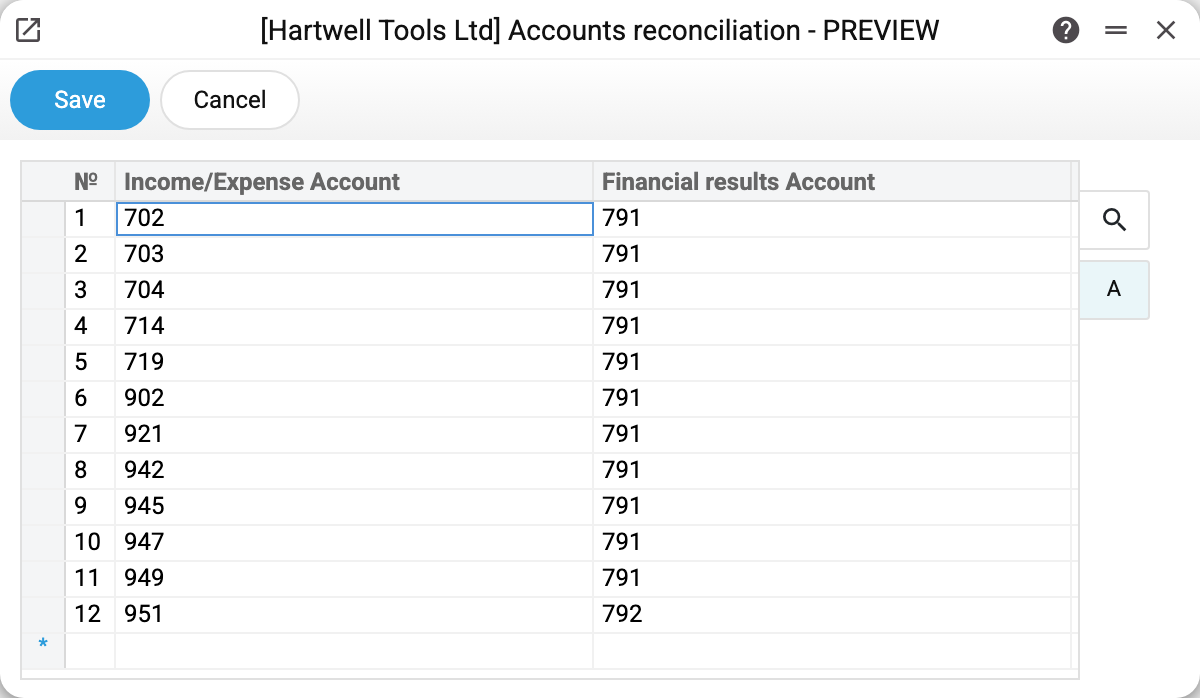
One row is one pair, a single account in each column:
- Income/Expense Account — what gets closed: 702 "Revenue from sales of goods", 902 "Cost of goods sold", 921 "Administrative expenses", 947 "Shortages and losses from damage to valuables", 949 "Other operating expenses" and so on.
- Financial results Account — where the balance goes. In the demo almost every row leads to 791 "Result of operating activities", and only 951 "Interest on loans" goes to 792 "Result of financial operations".
This split across 791–794 is what makes the financial result readable: operating activities on their own, financial operations on their own, other and extraordinary ones with their own accounts. Each of them is then closed to profit or loss.
Worth knowing
- The list is the definition of what gets closed. An account missing from the table has its balance left where it is — nothing is carried to the financial result. So whenever a new income or expense account appears in the chart of accounts, give it a row here.
- Exchange difference accounts are closed too. In the demo 714 "Income from operating exchange differences" and 945 "Losses from operating exchange differences" are on the list — otherwise the result of currency revaluation would hang outside the financial result.
- Analytics stay on the side of the account being closed. If an income or expense account carries objects, closing writes its balance off object by object, while the financial result account receives the amount without objects. The object mask also works on the side of the account being closed: object types missing from its row for that account do not get into the closing posting.
- Each income/expense account goes in one row only. A repeat will not save: "This account is already in use". Both columns are required.
- The account must exist in the chart of accounts — otherwise the setting will not save.
Common situations
An expense account still has a balance after closing. It is not in this table — add the pair and repost the closing in the same document: untick and tick "Close income/expenses". If the document also has "Calculate profit/loss (account 44)" ticked, untick it first — otherwise the system will not let you untick the closing; tick it again after reposting. A new closing document in the same month will not help: "Closing accounts transactions exist in the period".
Expenses ended up on the wrong result account. Check where the row points: a mistake in the second column scatters amounts between 791 and 792.
Can several rows point to one result account? Yes — that is the normal case: a dozen income and expense accounts close to a single 791.