NP Warehouses
Nova Poshta's branches, cargo branches and parcel lockers. This is the module's largest reference book — over twenty thousand records in the demo database — and it is where the destination point of a parcel comes from.
Where to find it: Modules → Nova Poshta → Registers → NP Warehouses
It is filled by the data download service. Branches are loaded by a separate routine, page by page, which makes them the longest part of the download.
Menu: Modules → Nova Poshta → Registers → NP Warehouses.
A worked example
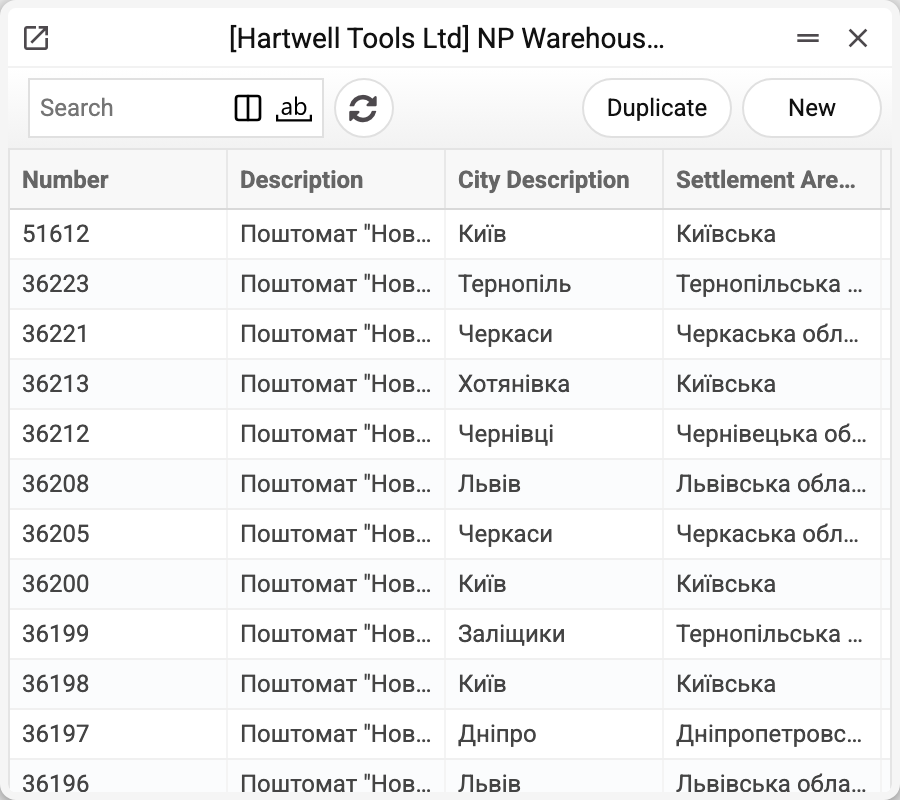
Like the rest of Nova Poshta's books, this one opens as a list: the records have no card, so everything on screen is four columns — number, description, city and region. The description already carries the essentials: the type of point and the weight limit, phrased by Nova Poshta itself — "Поштомат "Нова Пошта" №51612…", "Відділення №1 (до 30 кг на одне місце)".
The record itself holds far more than the list shows. Nova Poshta sends everything it knows about the point:
- the branch phone and its type (ordinary postal, cargo, parcel locker);
- limits — the maximum weight of a single place and of the whole shipment, plus maximum length, width and height separately for receiving and for sending;
- the timetable of receiving and handing out, day by day;
- coordinates for the map and flags such as a POS terminal or international shipping.
That data sits in the database, but no window, report or processing routine of the system shows or reads it. Day-to-day work does not need one: documents take the number and the description, and the rest a manager reads from the branch name itself.
In the cabinet card and in documents a branch is picked by number; when a city is set next to the field, the picker shows only that city's branches. The description is filled in alongside automatically — by city and number; if the city has no branch with that number, the description is cleared.
Where the data comes from
- The book is filled by the "Nova Poshta" service: by a full run or with the "Download Branches only" checkbox.
- Branches arrive in pages, and the book is replaced as a whole (within your company) only once every page has arrived. If the connection drops halfway, the old list stays as it was and the service reports: "Nova Poshta data were not updated, the previously loaded records are kept: …" — the service is then simply run again.
- Every company keeps its own copy of the book — unless it is opened to other companies through "Register sharing": then the service runs only in the company that shares it.
- Names and addresses arrive in both Ukrainian and Russian, but only the Ukrainian branch name goes into documents; the Russian one is stored and used nowhere.
Where it is used
- Nova Poshta — the branch of departure on the cabinet card
- Addresses — the branch in a customer's address
- Sales Orders — the recipient's branch
- Shipments, TTN — the sender's and the recipient's branch; the Nova Poshta waybill also takes the sender branch's code from the book
Fields
The list shows four columns: number, description, city name and region. No window shows the other fields.
| Field | Description |
|---|---|
| Number | The branch number within the city — what you select it by |
| Description, Description Ru | Full name with address and weight limit |
| City, region | The city name (branches are narrowed by it) and its region; the city code from the cities book |
| Short Address | The address without the branch name |
| Phone | The branch phone number |
| Type of Warehouse | The code of the type: postal, cargo, parcel locker; the system does not read it |
| Weight and dimension limits | Maximum per place and per shipment, separately for receiving and sending |
| Daily timetable | Receiving and handing-out hours |
| Coordinates, service flags | Latitude and longitude, POS terminal, international shipping and so on |
Print variables
Values available in this document's printed form templates. How to write a variable in a template — see Print Forms.
Header fields:
| Variable | What it holds |
|---|---|
| NPWar_Desc | Description |
| NPWar_Num | Number |
| NPWar_CtDesc | City Description |
| NPWar_SetArDesc | Region of the settlement |
Common situations
- The branch is not in the list. Either it is new (run the service with "Download Branches only"), or the document names another city — the picker shows only the branches of the document's city. A download that broke off does not damage the book: the previous complete list stays.
- A city has hundreds of branches. Search by number: it is the shortest route, and the description with the address fills itself in.
- The parcel does not fit. Branches differ in their weight-per-place and dimension limits, and bulky cargo needs a cargo branch. The weight limit is visible in the branch name; the separate limit fields are stored in the book, but there is no window that shows them.
- The download takes a long time. That is normal: tens of thousands of records arrive page by page. If you only need cities or cargo types, load them with their own checkboxes.
Nearby
- NP Cities — the cities branches belong to
- NP Warehouse Types — what the types mean
- Nova Poshta data download — the service that fills the book
- Nova Poshta — the cabinet card